










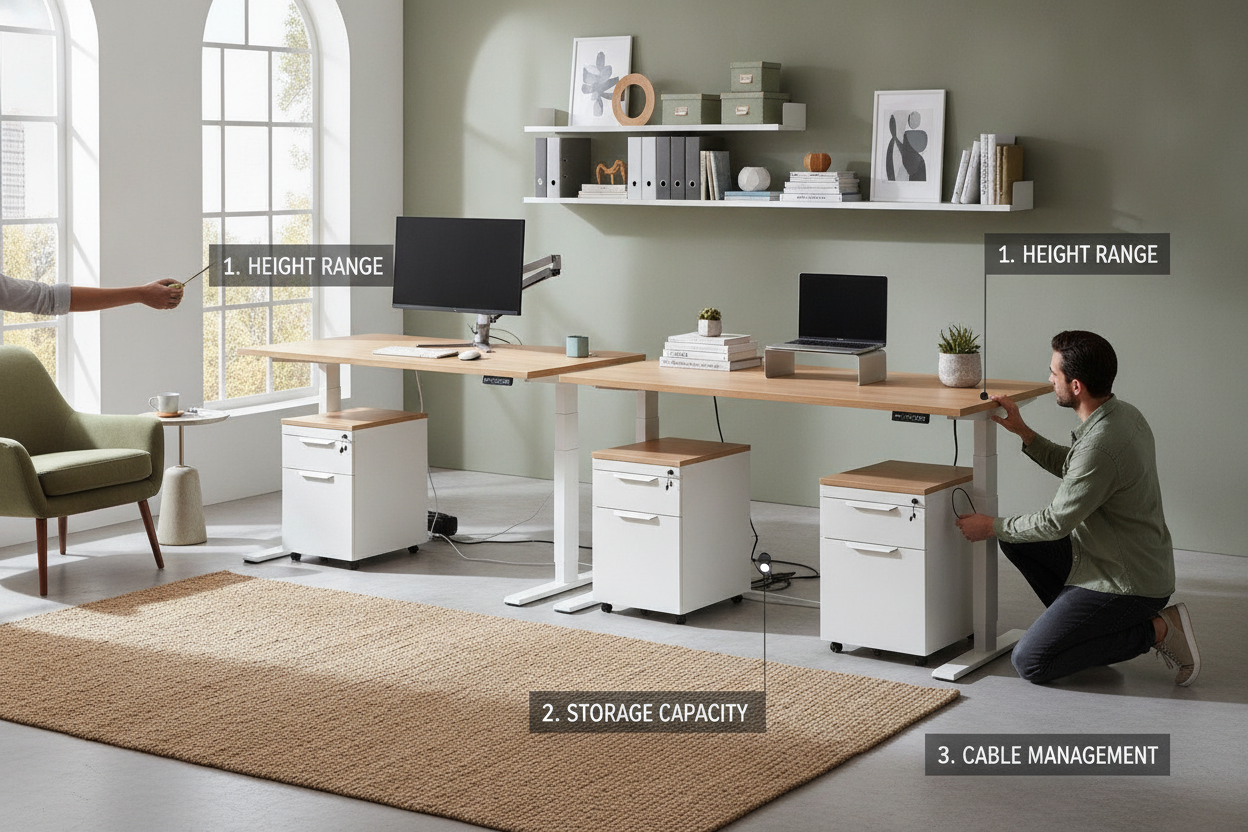
I remember the first time I tried to 'optimize' my WFH setup. I was tired of my printer sitting on the floor and my tax returns living in a literal shoebox. I bought a sleek-looking sit stand desk with file cabinet combo, thinking I had finally achieved peak productivity. Ten minutes after assembly, I realized I could not actually sit down because the cabinet was so tall it hit the bottom of my chair arms before the desk even reached my keyboard height.
It was a total disaster. I ended up returning a 150-pound box of particle board and metal because I forgot that standing desks have moving parts that regular desks do not. If you are looking to add storage to an adjustable frame, you are playing a game of inches where the stakes are your knees and your motor's lifespan.
Quick Takeaways
- Measure your seated 'drop height'—most people need at least 25 inches of clearance for their legs.
- Identify the location of the under-desk crossbar to avoid cabinet collisions.
- Check the weight capacity; a heavy file cabinet eats into your motor's lifting power.
- Opt for mobile cabinets if you want to switch up your legroom throughout the day.
The Adjustable Desk Storage Dilemma
Standard desks are simple: they stay still. You can shove whatever you want under them. But standing desks natively hate storage. When you introduce a motorized frame, you are dealing with a machine that needs a clear path to travel from 28 inches up to 48 inches. Adding a heavy file drawer to this equation creates a functional trade-off that most people ignore until they hear the motor straining.
I have seen plenty of people bolt a cabinet directly to the underside of a cheap single-motor frame. Within six months, the motor burns out because it is lifting an extra 40 pounds of MDF and paper files every time they stand up. You should really stop buying a desk with cabinet until you have checked the lift capacity of your frame. A dual-motor setup with a 350-lb limit is the bare minimum if you want integrated storage.
Getting this combo right requires more math than a stationary desk. You have to account for the thickness of the desktop (usually 1 inch), the height of the cabinet, and the 'dead zone' created by the lifting columns. If you do not plan the layout, you end up with a workspace that feels cramped and cluttered, defeating the whole purpose of an ergonomic upgrade.
Measurement 1: The Dreaded Knee Smash
This is the most common fail in home office design. You find a cabinet that fits under the desk while it is at standing height, but you forget about the 'drop height.' Most people sit with their desk at about 27 to 29 inches. If your file cabinet is 25 inches tall, that leaves you with maybe three inches of space for your thighs. Unless you are a professional cyclist with zero body mass, you are going to smash your knees.
I personally made the mistake of buying a standard 3-drawer pedestal that was 27 inches tall. Every time I lowered my desk to answer an email, the desktop would crunch down onto the top of the cabinet. It actually bent the drawer track. You need to measure from the floor to the top of your thighs while sitting in your favorite chair. Add two inches for 'wiggle room,' and that is your maximum cabinet height.
If you are tight on space, look for 'low-profile' pedestals that sit around 20 or 21 inches high. They usually only have two drawers, but they save your ergonomics. Alternatively, make sure the cabinet is narrow enough (under 15 inches) so you can sit off-center without your legs hitting the side of the unit. Just remember: if your knees are hitting the storage, you will stop using the desk's sit-stand feature entirely.
Measurement 2: Motor and Crossbar Interference
Modern standing desks almost always have a support beam or a 'crossbar' running underneath the center of the desktop. This bar provides stability so the desk doesn't wobble like a leaf at 45 inches high. However, that bar also takes up vertical space. If your cabinet is deep, it will eventually collide with that crossbar or the motor housing as the desk descends.
Before you commit to a large storage filing cabinet, look under your desk. Measure the distance from the front edge of the desk back to the crossbar. Most cabinets are 18 to 22 inches deep. If your crossbar is only 12 inches from the front, that cabinet is going to stick out like a sore thumb or prevent the desk from lowering to a comfortable typing height. It is a physical limitation you cannot 'hack' your way out of.
I once tested a high-end bamboo desk that had a massive central motor housing. I tried to slide a beautiful oak file cabinet under it, and the desk stopped four inches short of my seated height because the motor hit the cabinet. It sounded like a car crash. Check the technical drawings of your desk frame online—most manufacturers list the 'under-desk clearance' specifically for this reason.
Aesthetically Speaking: Avoiding the HR Cubicle Look
There is a fine line between a professional home office and something that looks like it was stolen from a 1990s corporate accounting department. Many sit-stand combos look disjointed because the desk is a modern laminate and the cabinet is a clunky, grey metal box. To avoid the 'HR cubicle' vibe, you need to match your finishes or lean into high-contrast design.
I finally found a standing desk with file cabinet that isn't ugly by focusing on materials. If your desk has black powder-coated legs, get a cabinet with the same matte black finish. If you have a solid wood top, try to find a cabinet that uses the same species—birch with birch, walnut with walnut. Mixed wood grains are the fastest way to make an expensive room look cheap and accidental.
Another pro tip: look for cabinets with casters (wheels). Not only does this make it easier to clean under the desk, but it also allows you to roll the storage out from under the desk when you are in 'sitting mode.' This gives you 100% of your legroom back. When you stand up, you can roll it back under to keep the floor clear. It’s a simple fix that keeps the room looking intentional and residential rather than strictly commercial.
FAQ
Can I use any file cabinet with a standing desk?
Technically yes, but only if it is short enough. Most standard office cabinets are too tall for the 'sit' part of a sit-stand desk. You specifically want 'low-profile' or 'mobile' pedestals that are under 22 inches tall.
Will a heavy cabinet break my desk motor?
If you bolt it to the desk, it might. If it sits on the floor, it won't affect the motor at all. Always check your desk's weight capacity—most are between 200 and 350 lbs—and subtract the weight of your monitors and gear first.
Is it better to have a built-in cabinet or a separate one?
Separate is almost always better. It gives you the flexibility to move the cabinet if it's hitting your knees. Built-in cabinets look cleaner but they lock you into one ergonomic position that might not be comfortable after four hours of work.

Dejar un comentario
Este sitio está protegido por hCaptcha y se aplican la Política de privacidad de hCaptcha y los Términos del servicio.