










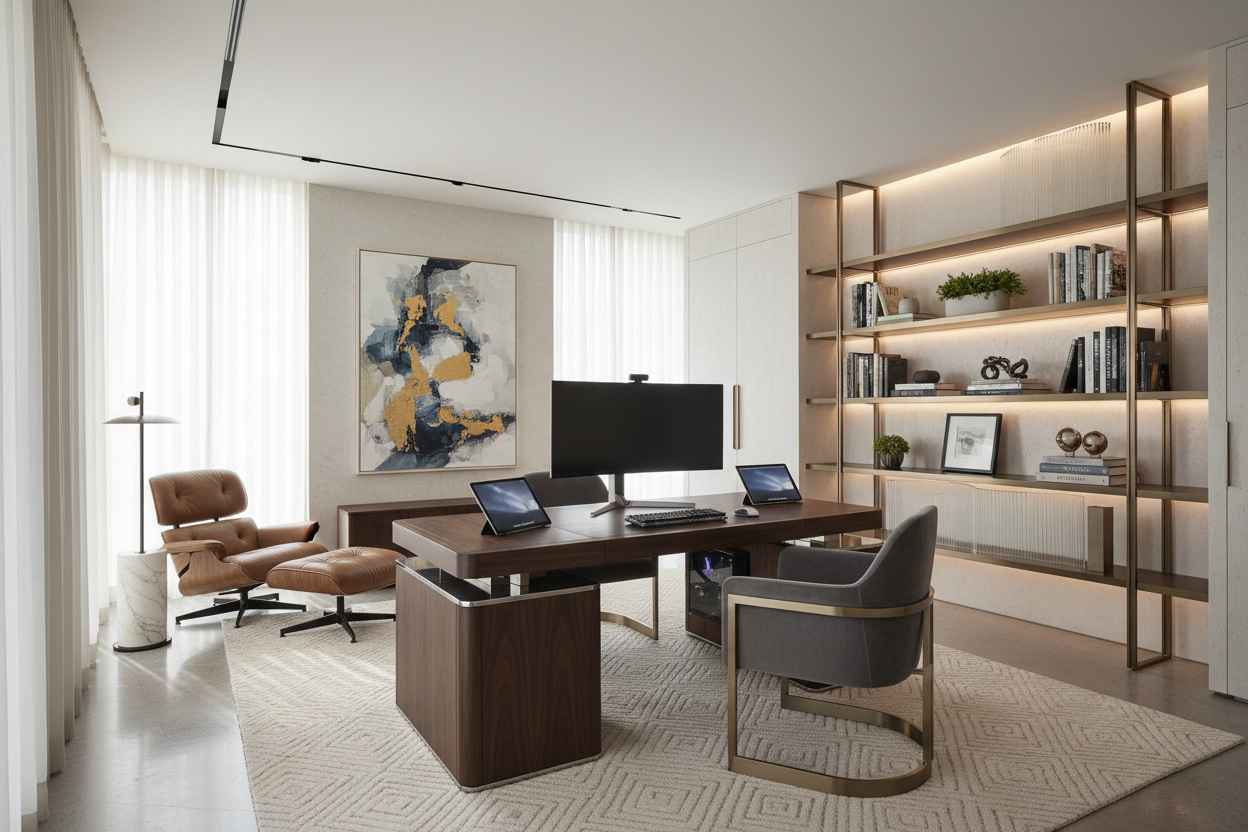
We have all been there: hunching over a dining table, battling glare from a window, and feeling that mid-afternoon fatigue set in due to poor posture. As an interior designer, I see clients struggle to balance professional functionality with residential aesthetics. Creating the **best setup for work from home** requires more than just a sturdy internet connection; it demands a thoughtful fusion of ergonomics, spatial planning, and visual harmony. It is about curating a space that invites focus without disrupting the sanctuary of your home.
Key Elements of a High-Performance Home Office
Before selecting finishes or technology, consider these foundational pillars to ensure your workspace serves you well for years to come:
- Ergonomic Integrity: Prioritize chairs with lumbar support and synchro-tilt mechanisms over purely decorative options.
- Lighting Layers: Combine ambient overhead lighting with focused task lighting to reduce eye strain.
- Spatial Flow: Ensure the desk placement commands the room (the "power position") rather than facing a blank wall.
- Tech Integration: Plan for cable management solutions to maintain a minimalist visual profile.
Defining the Layout: The Workplace Setup at Home
The first step in curating the ultimate wfh setup is zoning. If you do not have a dedicated room, you must create a psychological boundary. A minimalist wfh setup often works best in shared spaces, utilizing a console desk that can be tucked away. However, for a full-time home setup for work, consider the "floating desk" layout. Placing your desk perpendicular to a window allows for natural light without direct glare on your screen, which is crucial for the best computer setup for working from home.
Furniture Selection: Materiality and Comfort
When selecting a desk, look beyond the dimensions. A comfortable work from home setup relies on tactile surfaces. I often recommend solid wood or high-grade veneer over melamine; the warmth of walnut or oak grounds the space and ages beautifully. For the chair, avoid the temptation of a dining chair. A proper task chair can be upholstered in high-performance velvet or leather to soften the "corporate" look while providing the support needed for a wfh pc setup.
Tech Integration: The Laptop and Monitor Dilemma
One of the most common challenges is managing the work and personal computer setup. A cluttered desk kills productivity. To achieve a perfect work from home setup, elevate your screen. A work from home setup with laptop usually requires a riser or, better yet, a VESA-mounted monitor arm.
Optimizing the Laptop Work From Home Setup
If you prefer a simple laptop work from home setup, use a docking station hidden beneath the desk surface. This allows for a single-cable connection, instantly transforming a portable device into a powerhouse. For a work from home laptop and monitor setup, ensure the top of the monitor aligns with your eye level to maintain cervical neutrality.
Aesthetics: Curating Cool and Cute Work From Home Setups
Functionality does not require sacrificing style. Cool work from home setups often feature mood lighting, such as LED strips behind the monitor to reduce contrast strain. For those seeking a cute work from home desk setup, texture is your best friend. Incorporate a bouclé throw on your chair, a wool rug underfoot to dampen acoustics, or a sculptural table lamp that acts as a focal point when the laptop is closed. These elements soften the hard lines of the wfh computer setup.
My Personal Take on best setup for work from home
In my years of designing, I have learned that the "clean" look in catalogs is often a lie. My own wfh laptop setup taught me a hard lesson about surface materials. I initially bought a stunning, matte-black laminate desk because it looked sleek and modern. Within three weeks, it was a nightmare of fingerprint smudges and dust that showed up the second I wiped it down. It drove me crazy.
Furthermore, I realized that deep desks (over 30 inches) sound luxurious, but if you are short like me, you end up reaching too far for your webcam or lamp, breaking your ergonomic flow. I eventually swapped it for a textured oak desk with a shallower depth. The wood grain hides dust, feels warmer under my wrists, and the shallower depth keeps my best wfh office setup feeling intimate rather than cavernous. Sometimes, practical usability trumps the initial "wow" factor of a showroom piece.
Conclusion
Building the best laptop setup for working from home is an investment in your well-being. By balancing ergonomic furniture with warm, residential textures and smart cable management, you create a space that fosters productivity without feeling sterile. Whether you are running a complex wfh pc setup or a simple laptop station, the goal is a space that feels uniquely yours.
Frequently Asked Questions
What is the ideal desk depth for a monitor setup?
For a standard monitor setup, a desk depth of 24 to 30 inches is ideal. This allows you to maintain the proper viewing distance (roughly an arm's length away) without crowding your keyboard and mouse area.
How can I hide cables in a desk with open legs?
Use cable sleeves that match the color of the desk legs or route cables down the back of a leg using adhesive clips. A cable management tray mounted to the underside of the desktop is essential for holding power strips and excess cord length.
Is a standing desk worth the investment for a home office?
Yes, a sit-stand desk is highly recommended for long-term health. It encourages movement and reduces the strain on your lower back. Look for models with dual motors for smoother, quieter adjustments.



Dejar un comentario
Este sitio está protegido por hCaptcha y se aplican la Política de privacidad de hCaptcha y los Términos del servicio.