










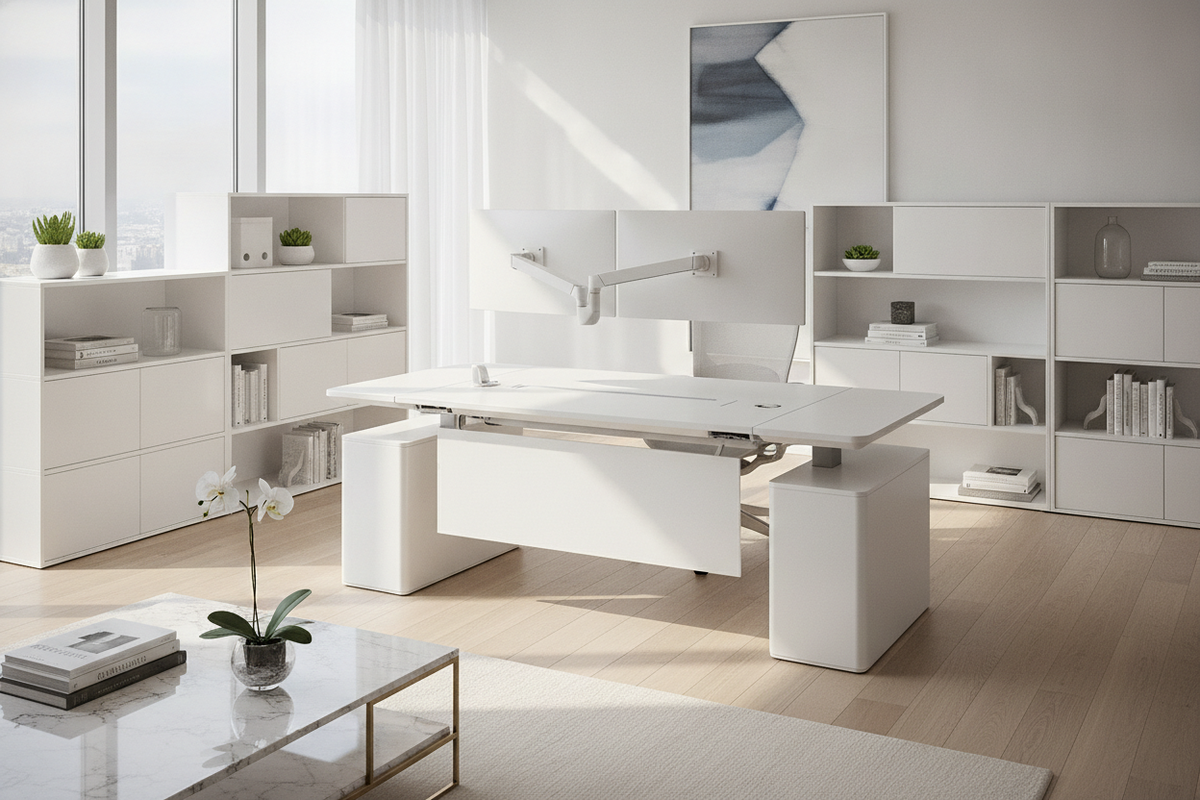
Designing a productive home office requires balancing architectural proportions with functional comfort. An ergonomic white desk serves as the central anchor of a modern office environment, uniting clean visual aesthetics with supportive physical posture. Beyond simple surface area, an ergonomic setup addresses how the body interacts with work tools throughout the day, how lighting influences focus, and how spatial organization prevents physical tension.
Ergonomic Geometry and Postural Clearance Archetypes
The foundation of daily workstation comfort rests on neutral posture principles. A properly arranged desktop allows forearms to rest comfortably near parallel to the floor, reducing shoulder elevation and wrist extension. This neutral plane ensures that common tasks such as typing, writing, and mouse navigation occur without unnatural reaching.
Workspace efficiency is organized into three primary reach zones:
- Primary Reach Zone: The immediate arc swept by the hands with elbows relaxed at the sides, reserved for high-frequency tools like keyboards and pointing devices.
- Secondary Reach Zone: The area reached by extending the arms without leaning the torso forward, ideal for reference documents, notepads, and secondary input surfaces.
- Tertiary Reach Zone: The outer periphery, suitable for display stands, ambient lighting, and decorative elements that require only occasional interaction.
Under-desk geometry is equally important. Adequate knee and leg clearance ensures that seating can roll in close to the work edge without obstruction from thick drawer aprons or misplaced support legs. A wraparound profile, such as a 55-inch white L-shaped workstation, expands both primary and secondary reach zones by bringing peripheral equipment within a simple pivot of the office chair, supporting seamless multi-monitor or task-switching workflows.
Surface Finishes, Light Reflectance, and Visual Ergonomics
Visual comfort is an integral, though often overlooked, dimension of workspace ergonomics. Light-colored desk surfaces introduce diffuse ambient reflection into a room, softening severe contrasts between glowing monitors and the surrounding physical environment. In dimly lit or narrow rooms, an ergonomic desk white finish helps distribute natural light, fostering an airy, open feel.
Surface texture plays a decisive role in light distribution and tactile comfort:
- Satin and Matte White Finishes: These surfaces diffuse overhead task lighting evenly, minimizing specular glare and harsh reflections that can contribute to visual fatigue during long work sessions.
- High-Gloss Coatings: While visually sleek and reflective, high-gloss tops require strategic lamp placement to avoid bright hotspots directly in the user's field of view.
- Protective Laminates: Durable engineered coatings resist everyday moisture, pen marks, and surface scuffs, making routine upkeep straightforward.
Balancing functional surfaces with surrounding textures creates an inviting, balanced atmosphere. Consulting designer insights on white desk configurations provides practical context for material combinations, while exploring techniques for curating a high-end white workspace setup helps integrate subtle warm accents, desk pads, and organizational trays without compromising the minimalist aesthetic.
Spatial Configurations: Sizing Decision Categories and Room Fit
Selecting the right desk configuration depends on room layout, circulation pathways, and functional needs. Workspaces generally fall into three spatial archetypes:
- Linear Alcove Desks: Designed for dedicated wall runs or recessed architectural nooks, linear desks provide clear sightlines and efficient use of narrow footprints.
- L-Shaped Corner Workstations: Ideal for multi-tasking setups, corner configurations optimize dead space while separating computing zones from active paperwork areas. A dedicated minimalist white corner desk with large storage maximizes corner utility by pairing open elbow room with integrated side shelving.
- Freestanding Central Suites: Positioned in larger home offices, floating desks allow complete freedom of movement and access from multiple angles, creating a commanding focal point.
When mapping desk placement, factor in door swings, window glare angles, and walking clearance behind the task chair. Maintaining clear circulation paths preserves both physical ease and visual calm in the room.
Modular Storage Integration and Cable Management Synergy
A cluttered desktop disrupts physical workflow and limits accessible reach zones. Incorporating intelligent storage ensures that essential supplies remain accessible without encroaching on primary work envelopes.
Integrated storage elements should complement, rather than restrict, lower-body clearance. Options range from under-desk utility drawers to vertical hutches and modular side returns. For high-utility workspaces, a modern white versatile storage desk combines deep pedestal storage and display cabinetry to keep daily clutter concealed behind closed doors, protecting clean desktop sightlines.
Wire management is the final step in a streamlined storage plan. Routing power bricks, monitor cables, and charging cords through integrated grommets or rear channels keeps leg zones free of tangles and preserves the pristine aesthetic of a white desk surface.
Assembly Stability, Leveling Checks, and Surface Care Protocols
A stable foundation is critical for any ergonomic workstation. Minor surface wobbles translate directly to monitor vibration during typing, causing subtle distractions. During assembly, ensure all cam-locks, structural bolts, and frame connectors are secured evenly.
Follow these setup and care practices to maintain long-term stability and appearance:
- Leveling Adjustments: Utilize adjustable floor glides on uneven flooring to balance all contact points and eliminate lateral sway.
- Balanced Load Placement: Position heavy monitor arms, desktop towers, and printer units directly over primary vertical supports rather than unsupported spans.
- Gentle Surface Cleaning: Clean white laminated surfaces using a soft microfiber cloth dampened with mild soapy water, avoiding abrasive scouring pads or harsh chemical solvents that can degrade protective topcoats.
- Surface Protection: Use felt-backed desk mats under keyboards and decorative accessories to prevent micro-scratches from daily friction.
By pairing thoughtful geometric layout with light-diffusing white finishes and tailored storage, an ergonomic white desk creates a structured, calm workspace designed for sustained daily productivity.

Dejar un comentario
Este sitio está protegido por hCaptcha y se aplican la Política de privacidad de hCaptcha y los Términos del servicio.