










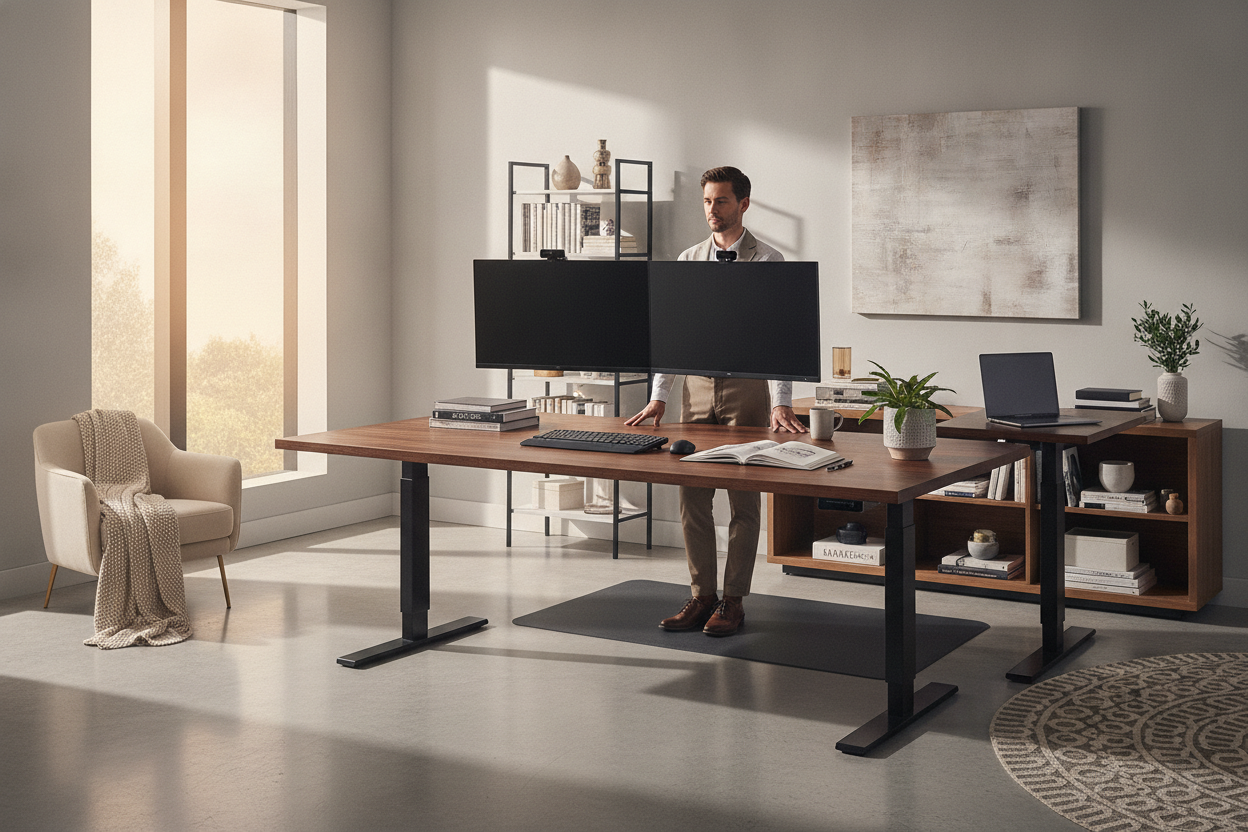
I remember the first time I set up my remote office. I bought this sleek, minimalist desk that looked incredible on Instagram. It was basically a glorified shelf. Two days in, my laptop was hanging off the edge, and I did not have room for a glass of water, let alone a second monitor. If you are shopping for stand up desks, please, learn from my clutter-induced breakdown.
We have been sold this lie that a home office should be 'unobtrusive.' In reality, a tiny desk is just a recipe for a messy floor and a sore neck. You need a surface that actually supports the way you work, not just the way you want your room to look in a thumbnail photo. I have tested dozens of these setups, and the extra square footage is always worth the footprint.
- Depth is king: Aim for at least 30 inches of depth to keep your eyes from straining.
- Dual motors or bust: Single motor desks are slow and prone to burning out under heavy loads.
- Surface area equals sanity: A 60-inch width is the sweet spot for most professional setups.
- Check the weight: A heavy frame means less wobble when the desk is at its highest point.
The 'Café Table' Epidemic in Home Offices
There is a frustrating trend right now of selling 'compact' standing desks for home office use that are barely 40 inches wide. These things are essentially café tables with legs that move. Unless you only ever use a 13-inch laptop and literally nothing else, you are going to hate it within a week. You need space for a mousepad, a notepad, and maybe a stray cat.
I see people making the same home office setup with standing desk avoid these mistakes constantly. They prioritize floor space over work surface. Then they realize they have nowhere to put their tablet or their morning coffee. A cramped rising desk ruins productivity because you are constantly playing Tetris with your gear just to find a place to rest your wrists.
Why You Actually Need a Big Standing Desk
Real work isn't just typing; it is spreading out. If you are a designer, an engineer, or just someone who likes having a physical to-do list next to their keyboard, a standing desk large enough to accommodate your 'spread' is vital. When you are standing, you tend to shift your weight and move your arms more. If you are boxed into a tiny corner, you will find yourself sitting back down just to escape the physical confinement.
A big standing desk gives you the freedom to mount dual 27-inch monitors without them feeling like they are right in your face. It also provides enough 'dead zone' for a charging station or a lamp. I have found that having that extra 10 inches of breathing room on either side of my keyboard drastically reduces my stress levels during 10-hour workdays. It turns a workstation into a cockpit.
My Formula for the Best Height Adjusting Desk Setup
If you want the best height adjusting desk experience, ignore the 'standard' 24-inch depth. That is way too shallow. Your monitors will be too close to your eyes, leading to massive headaches and eye strain. I swear by a 30-inch depth minimum. This allows you to push your screen back and actually use the front of the desk for writing or resting your forearms comfortably.
The best adjustable computer desks also account for the stuff you do not see, like cable trays and monitor arms. If you find that a standing setup just isn't giving you the storage you crave, you might be better off with a home office computer desk corner desk with large storage as a dedicated seated station. But if you are committed to the stand-up life, go wide and go deep. Your future self will thank you for the extra real estate.
Electric Lift Capacity: The Hidden Catch of a Heavy Setup
When you finally upgrade to a standing computer table with a massive wood top, you are adding a lot of weight. Most cheap, entry-level standing desk electric models use a single motor. They struggle, they whine, and they eventually die. Or worse, they wobble so much at standing height that your monitors shake every time you hit the 'backspace' key.
You want a dual-motor system. It is non-negotiable for a large setup. Look for a lift capacity of at least 250 lbs. This ensures that even with three monitors, a heavy desktop tower, and your favorite oversized coffee mug, the transition is smooth and silent. A nice stand up desk should not sound like a dying blender every time you want to stretch your legs.
How to Make a Massive Desk Look Good in a Room
I get it—a giant standing work desk can look like a piece of industrial equipment dropped into your bedroom. But it doesn't have to. The trick is to treat it like a piece of architecture. Use designer ideas for standing desk layouts to tuck the desk into a nook or float it perpendicular to a window to break up the visual bulk of the frame.
You can also soften the 'tech' vibe with intentional home decor. Put a large, leafy plant on one corner and use a high-quality leather desk mat to cover the cold laminate or wood surface. A standing desk nice enough to show off usually has a solid wood top or a matte finish that doesn't scream 'corporate office cubicle.' Style it like a library table, not a server rack.
My Personal Experience: The Jenga Tower
I once bought a 48-inch standing desk because it was on sale for a steal. I thought I was being smart. I put my iMac on it, and every time I typed an email, the screen would oscillate like a bobblehead. It was distracting and, frankly, felt dangerous. I eventually sold it for a fraction of what I paid and bought a 72-inch beast with a heavy steel frame. My productivity doubled because I wasn't afraid of my desk collapsing during a Zoom call.
FAQ
What is the ideal width for a standing desk?
For most people, 60 inches is the sweet spot. It fits two monitors and some peripherals without swallowing the entire room. If you only have one monitor, 48 inches is the absolute bare minimum I would recommend.
Do standing desks wobble at high settings?
Cheap ones absolutely do. To avoid this, look for a desk with a 'wedge' design in the legs or a heavy crossbar. Heavier frames made of steel are much more stable than lightweight aluminum ones found at big-box retailers.
How much should I spend on a good electric desk?
Expect to pay between $500 and $900 for something that will last. Anything under $300 usually cuts corners on the motor quality and the thickness of the desktop material, leading to that dreaded wobble.

Dejar un comentario
Este sitio está protegido por hCaptcha y se aplican la Política de privacidad de hCaptcha y los Términos del servicio.