










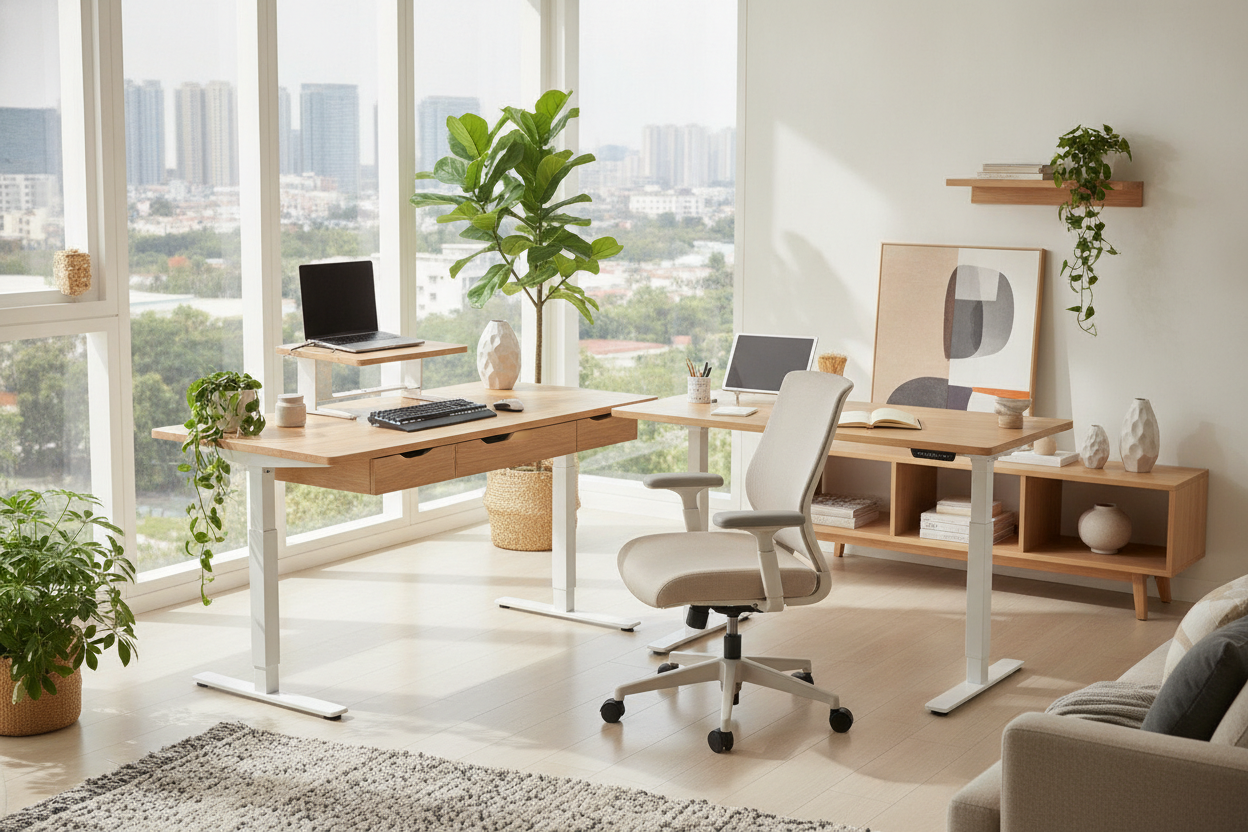
I stared at my desk for twenty minutes yesterday, not actually working, but just moving a pile of sticky notes three inches to the left. It is the minimalist trap: you buy a beautiful slab of wood on motors, and within forty-eight hours, it is buried under lip balm, loose SD cards, and a half-eaten granola bar. I finally caved and bought the flexispot standing desk with drawer to see if it could actually hide my mess without ruining my legroom.
Quick Takeaways
- The drawer is shallow—don't expect to fit a bulky gaming mouse or a thick power brick.
- Assembly is heavy because the desktop arrives with the storage compartment pre-attached.
- Tall users (over 6'0") should measure their chair height to avoid knee-knocking.
- The motor remains quiet and stable even with the asymmetrical weight of a loaded drawer.
The Problem With Trendy, Flat-Top Minimalist Desks
I have spent years trying to make the 'naked desk' look work. It does not. You inevitably need a standing desk with drawer because acrylic bins and mesh pen cups just look like organized garbage. They do not remove the visual noise; they just frame it in plastic.
Working on a flat slab of wood feels great for the first hour. By hour four, your pens have rolled under your monitor, and your desk looks like a junk drawer exploded. I realized I did not need more organizers; I needed a place to sweep the chaos into when the Zoom camera turned on.
First Impressions: Unboxing the Flexispot Sit-Stand Hybrid
The box for this flexispot desk with drawer is a absolute beast. Most standing desks come in two boxes—one for the frame and one for the top. This one arrived as a 100-pound monolithic slab because the storage unit is largely integrated into the desktop structure.
Assembly took me about 40 minutes. The weight is the biggest hurdle; you will definitely want a second person to help you flip it over once the legs are bolted on. The aesthetic is surprisingly clean, though. It does not look like a bulky 'office' desk; it has a slim profile that hides the fact that there is a secret compartment right under your nose.
The Knee Clearance Test (For the Tall Folks)
This is where most people get burned. If you are 6'2" like me, choosing a desk with drawer and shelf requires checking the 'stack height.' The drawer housing eats about 2.5 inches of vertical space that would normally be empty air for your knees.
I found that if I sit with my chair at the highest ergonomic setting, my thighs occasionally brush the bottom of the drawer. It is not a dealbreaker, but if you are a 'leg-crosser' while you work, you are going to feel cramped. Measure your current thigh-to-floor height before you hit buy.
What Can This Drawer Actually Hold?
Let's be real: this is not a filing cabinet. It is about 1.5 inches deep. My 14-inch MacBook Pro fits perfectly, which is great for clearing the desk at the end of the day. A Kindle, a notebook, and a handful of pens fit fine.
However, my Logitech MX Master mouse is too tall. If I try to shove it in there, the scroll wheel catches on the frame. It is designed for flat things. Think of it as a 'tech tray' rather than a storage bin. It is perfect for iPads and cables, but terrible for your bulky headphone case.
The Motor Check: Does the Extra Weight Cause Wobble?
Adding a drawer means adding weight to the front of the desk, which can sometimes mess with the center of gravity. I was worried the frame would shimmy when I raised it to my 45-inch standing height.
Flexispot’s motor handled the off-center load without any high-pitched whining. I noticed a tiny bit of side-to-side wobble when I was aggressively typing at full height, but it is no worse than the standard flat-top models. The steel frame is heavy enough to anchor the whole setup.
The Final Verdict: Who Is This Actually For?
If you are a laptop-only worker who hates seeing a single pen on their desk, this is a win. It forces you to stay organized because you simply cannot fit much in there. It solves the 'visual clutter' problem instantly without requiring extra furniture.
If you need deep storage for camera gear or bulky peripherals, you should skip the integrated drawer and look at more traditional writing computer desk setups paired with a separate rolling pedestal. But for the remote worker who just wants their dining room to stop looking like an office at 5:00 PM, the built-in drawer is worth every penny.
FAQ
Is the drawer removable?
Not really. It is built into the support structure of the desktop. If you took it out, you would be left with a weird gap and potentially compromised stability.
Does the drawer lock?
No, there is no locking mechanism on this model. It is a simple pull-out tray designed for quick access, not security.
Is it loud when it moves?
The motor is a low hum, around 50 decibels. It is quiet enough that I have adjusted the height while on a call and nobody noticed a thing.


Dejar un comentario
Este sitio está protegido por hCaptcha y se aplican la Política de privacidad de hCaptcha y los Términos del servicio.