










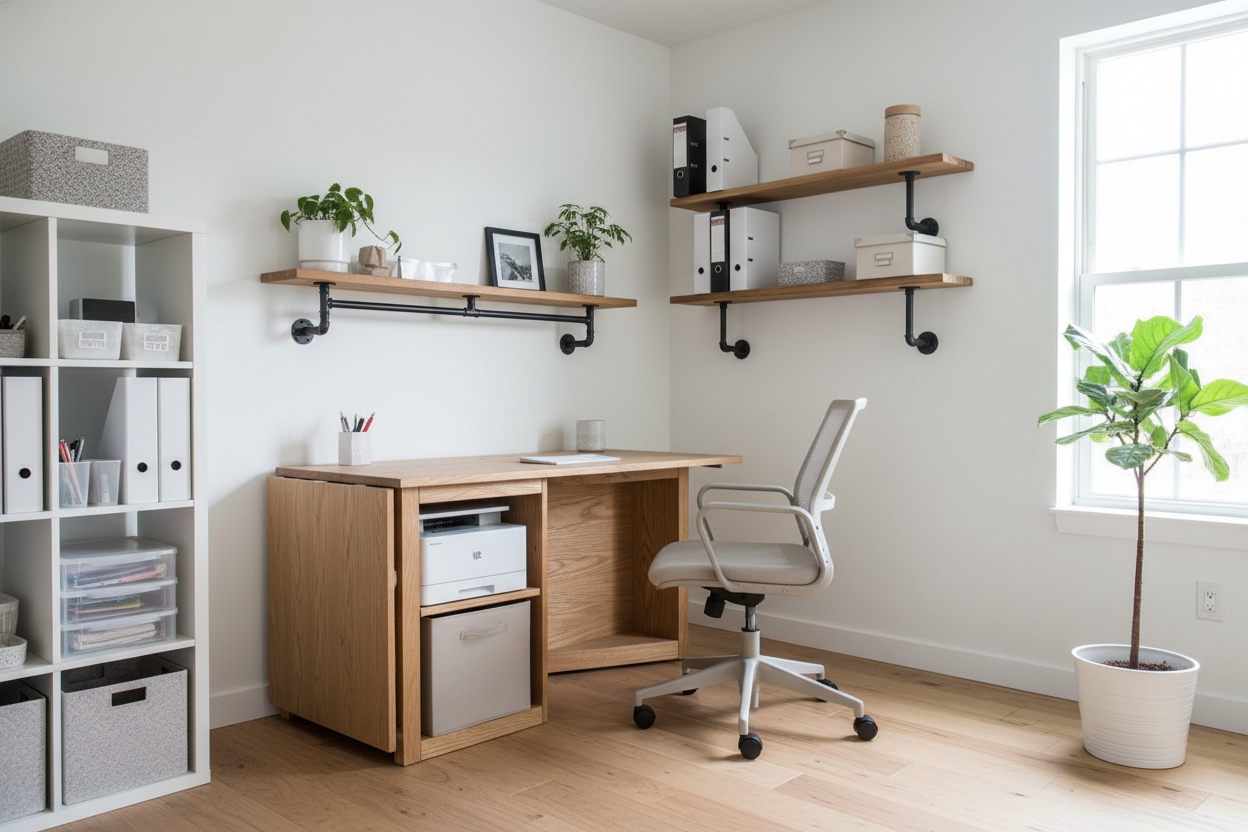
The perennial struggle in residential office design isn't usually selecting the writing surface itself—it is managing the necessary but unsightly peripherals. The printer is often the worst offender; it is bulky, visually heavy, and demanding of cable management. Finding a desk with printer shelf ikea that maintains a sophisticated silhouette without turning your study into a utilitarian cubicle is a nuanced challenge. It requires looking beyond the standard catalog images to understand how modular components interact with your specific floor plan.
Key Features to Look For
- Structural Integrity: Ensure the shelf material (often particleboard or honeycomb structure) is rated for the specific weight of your printer to prevent bowing.
- Depth Requirements: A standard printer requires at least 18-20 inches of depth, plus clearance for rear cable connectors.
- Vibration Dampening: Solid wood or high-density veneer minimizes the oscillation caused by print heads, unlike hollow-core tops.
- Vertical Clearance: If the shelf is below the desk, ensure it allows for proper paper tray access without compromising legroom.
Curating the Right Materials and Finish
When sourcing from mass-market retailers, the distinction between high-end aesthetic and temporary furniture lies entirely in material selection. For a cohesive look, avoid mixing finishes. If you select a bamboo top (like the Anfallare), ensure your shelving supports match in tone or provide a deliberate contrast, such as matte black.
The Solid Wood vs. Honeycomb Debate
Many entry-level tabletops utilize a honeycomb paper filling. While lightweight, these can amplify the noise of a printer. For a more luxurious, quiet experience, I always advise clients to opt for the countertops repurposed as desks (such as the Karlby or Saljan). These provide the density required to absorb the mechanical vibrations of office equipment.
Space Planning: The Modular Approach
Rarely does a single-box solution offer the perfect ergonomics. As a designer, I prefer creating a custom configuration using modular units. This allows us to separate the vibration source from the writing surface while keeping it within arm's reach.
Integrating Printer Table Ideas Ikea
Rather than placing a heavy printer directly on your primary workspace, consider the "L-shape" configuration. By utilizing an Alex drawer unit or a low Kallax unit perpendicular to your main desk, you create a dedicated print station. This is one of the most effective printer table ideas ikea offers. It keeps the bulky machine off your main sightline, reducing visual clutter and allowing you to maintain a clean "executive" feel on your primary desktop.
Flexible Solutions for Compact Spaces
In multi-functional rooms, such as a guest bedroom doubling as an office, permanent footprints are often impossible. Here, we look at the folding computer desk ikea options, specifically the Norden gateleg series. While not marketed strictly as a desk, its solid birch construction handles peripheral weight better than many designated folding desks. When the work day ends, the "wing" holding the printer can drop down, reclaiming the square footage for the room's primary purpose.
My Personal Take on desk with printer shelf ikea
I learned the hard way about "weight distribution" on a project in a pre-war apartment in Brooklyn. I had specified a standard, hollow-core Lagkapten top for a client who was a graphic designer—meaning she had a professional-grade, heavy laser printer.
We placed the printer on a shelf unit that rested directly on the desktop. Within three weeks, the client called me. Every time the printer fired up, the oscillation vibrated her monitor so badly she couldn't work, and the hollow desk acted like a drum, amplifying the sound. We had to dismantle the setup and swap in a solid wood countertop. The lesson? Never underestimate the kinetic energy of a printer. If you are using IKEA components, always place the printer on a grounded unit (like a drawer stack) rather than a shelf attached to a lightweight desktop. It’s a small detail that saves your sanity.
Conclusion
Designing a workspace that accommodates bulky technology doesn't mean sacrificing style. By carefully selecting dense materials and utilizing modular layouts to separate your writing surface from your printing station, you can achieve a studio that feels curated and intentional. It is about making the furniture work for your workflow, not the other way around.
Frequently Asked Questions
How much weight can a typical IKEA desk shelf hold?
This varies significantly by product line. Wall-mounted shelves (like Lack) often have a limit of 5-10 lbs depending on anchors, which is insufficient for printers. However, drawer units like the Alex or shelving units like Kallax can typically support 40-50 lbs, making them the superior choice for equipment.
Can I drill cable management holes into any IKEA desk?
Not always. Desks with a "honeycomb" paper filling (like Lagkapten) are hollow in the center. Drilling into them leaves a jagged hole with no internal support for grommets. Stick to solid wood, particleboard, or veneer tops if you plan to customize your cable routing.
What is the best depth for a desk with a printer?
Aim for a desk depth of at least 24 inches (60 cm). Most printers are 15-18 inches deep. A shallow desk will force the printer to overhang or crowd your keyboard area. The Trotten or Bekant series offer generous depth suitable for this setup.


Dejar un comentario
Este sitio está protegido por hCaptcha y se aplican la Política de privacidad de hCaptcha y los Términos del servicio.