










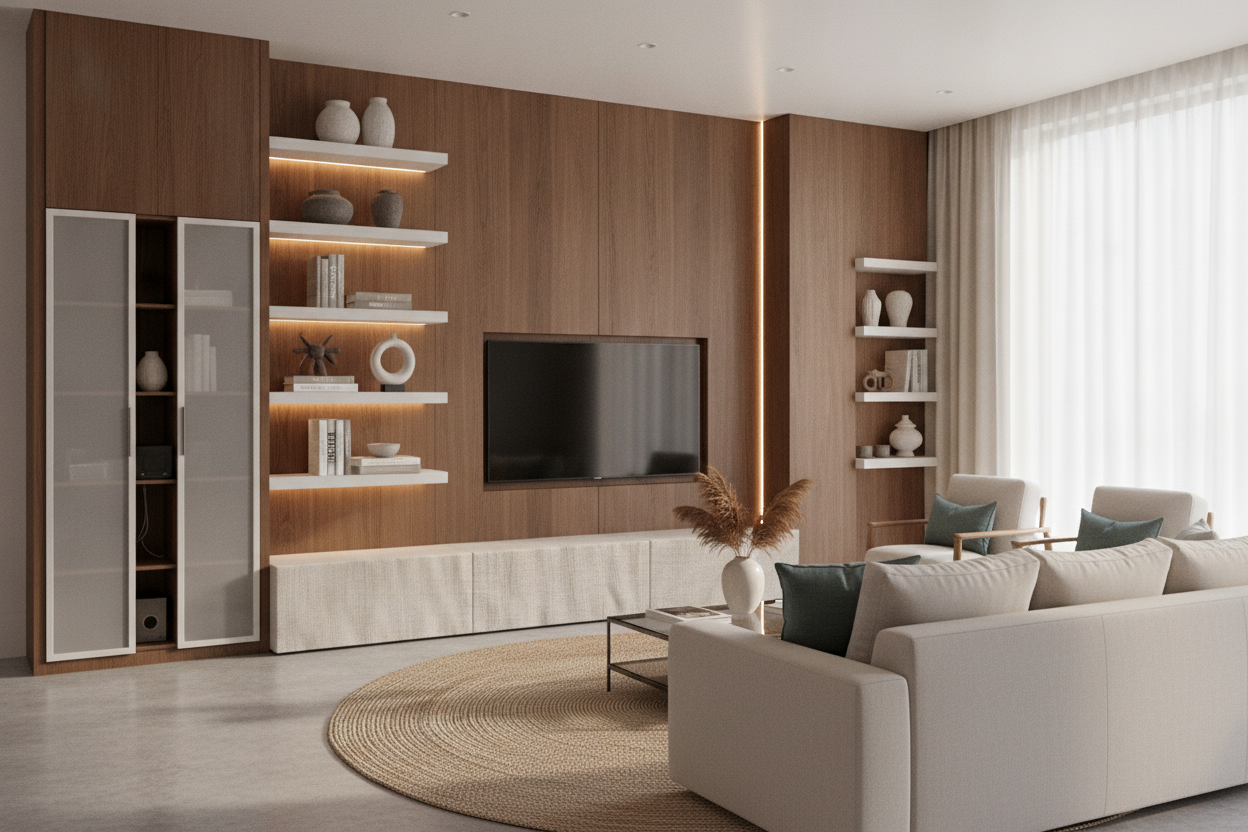
I spent three weeks scrolling through forty-seven tabs of mid-century sideboards before realizing my fundamental mistake. I wanted that sleek, minimalist look I saw in high-end catalogs, but I forgot one crucial detail: I actually own a PlayStation 5 and a router that looks like a robotic spider. When I finally set it up, my minimalist dream was murdered by a rat's nest of black plastic and glowing blue lights. Finding the right television storage ideas isn't actually about the TV; it’s about hiding the junk that makes the TV work.
- Hide the blinking lights: Use fluted or frosted glass to obscure tech while letting remote signals pass through.
- Over-index on width: Your stand should be at least 6 to 10 inches wider than the screen on each side to avoid the 'top-heavy' look.
- Think beyond 'Media': Sideboards and credenzas often offer better storage depth than dedicated TV stands.
- Cable management is non-negotiable: If the piece doesn't have a cord hole, be prepared to drill your own.
The Problem With Minimalist Setups (And Tangled Cords)
Open shelving is a trap. I said it. It looks fantastic when it’s styled with three art books and a single ceramic vase, but the second you plug in a soundbar, the illusion is gone. We’ve all seen those 'floating' consoles that look so airy in photos. What those photos don't show is the vertical plastic cord race hiding the six wires running to the outlet. If you have a cable box, a gaming system, or a mesh router, open shelving is essentially a display case for your clutter.
The issue is that tech is rarely pretty. Most routers are made of cheap, dust-attracting plastic, and gaming consoles are designed to look like futuristic monoliths that clash with literally everything else in a normal living room. When you choose a storage solution that doesn't offer total concealment, you're committing to a lifetime of dusting wires and trying to hide a surge protector behind a potted plant. It doesn't work. You need a piece that acts as a fortress for your electronics, keeping the 'smart' part of your home out of sight until you actually need it.
Hiding the Hardware: My Favorite TV Storage Ideas
The biggest hurdle to hiding electronics is the remote signal. You put your cable box inside a solid wood cabinet, and suddenly, you're standing up and pointing the remote at the floor like a madman just to change the channel. This is where material choice becomes your best friend. I've found that a storage credenza with sliding glass doors is the ultimate workaround. If the glass is fluted or frosted, it obscures the ugly shapes of the hardware while still allowing infrared (IR) signals to pass through effortlessly.
If you prefer solid doors, look for 'slatted' or 'louvred' designs. These are essentially wood shutters for your TV stand. They allow for airflow—which is vital so your Xbox doesn't melt—and they usually let enough of a signal through to keep your remotes working. Another pro tip: check the back of the unit. A high-quality piece will have a recessed back panel or pre-drilled holes for cord management. If it’s just a solid sheet of 1/4-inch plywood, you’re going to be frustrated. I always look for units with adjustable interior shelving, because a standard AV receiver is much taller than a streaming stick, and you don't want to waste six inches of vertical space because the shelves are fixed.
Why You Need to Go Wider Than Your Screen
Proportion is the difference between a room that looks 'designed' and a room that looks like a dorm. A common mistake is buying a stand that is the exact same width as the TV. This creates a vertical block of tech that feels heavy and intrusive. To ground the room, your furniture needs to act as an anchor. A black TV stand entertainment center works incredibly well here because it matches the 'black mirror' effect of the screen when it's off, making the whole setup feel like one cohesive architectural element rather than a screen perched on a box.
Ideally, you want at least 8 inches of breathing room on either side of the screen. This extra surface area gives you space to place a lamp or a few decorative objects, which helps blend the TV into the rest of your decor. It also gives you more interior storage for things that aren't tech-related. I use the extra width in my console to store my massive collection of board games and a few spare throw blankets. By going wider, you turn the 'TV area' into a 'storage area' that just happens to have a screen above it.
Mixing Tech With Everyday Furniture
Stop looking exclusively at the 'Media Centers' category on furniture sites. Some of the best tv storage ideas come from the dining room or the entryway. I’ve used high-end buffets and sideboards for years because they are typically built sturdier and offer more interesting textures than standard particle-board media units. Browsing for versatile storage furniture opens up options like reclaimed wood, intricate bone inlays, or industrial steel that you won't find in the electronics aisle.
When you use a piece of furniture that wasn't specifically made for a TV, you might have to get a little 'handy.' I once bought a gorgeous vintage credenza and had to use a 2-inch hole saw bit to create an entry point for my cords. It took five minutes and saved the aesthetic of my entire living room. The goal is to make the room feel like a place where people live, not just a place where people watch Netflix. If your storage can hold your vinyl collection, your heavy winter candles, and your router, you've won.
The 'Fake Built-In' Trick for Maximum Concealment
If you have a large wall and a small budget, the 'fake built-in' is your best friend. This involves taking a central media console and flanking it with two tall, matching bookshelves. It creates a massive amount of storage and makes the TV feel like it was designed into the architecture of the house. The trick is to keep the colors and heights consistent. If you use black units, they disappear into the background; if you use white, the whole wall feels brighter and more modern.
I personally love this method because it solves the 'floating TV' problem. A TV mounted on a giant blank wall looks like a lonely postage stamp. By surrounding it with shelving, you can fill the space with books, plants, and art. This draws the eye away from the black rectangle of the screen and toward your personal style. Just make sure the central console is deep enough to handle your deepest piece of equipment—usually the receiver or a center-channel speaker. Most standard bookshelves are only 11-12 inches deep, which won't fit a modern gaming console comfortably.
My Personal Lesson in TV Storage
I once bought a stunning, ultra-low profile console that sat only 12 inches off the ground. It looked amazing in the studio photos. In my living room? It was a disaster. Because it was so low, I could see every single cord plugged into the wall behind it. I ended up having to buy cord-hiding boxes that took up more space than the console itself. Now, I never buy anything with less than 4 inches of 'skirt' or base at the bottom to hide the wall outlets. It’s a small detail that saves a massive amount of visual stress.
FAQ
Will my remote work through solid wood doors?
Standard IR remotes need line-of-sight. If your doors are solid wood, they won't work unless you install an IR repeater kit (which is cheap and easy) or keep the doors open while watching. This is why slatted doors or IR-friendly glass are better options.
How do I prevent my electronics from overheating?
Heat is the enemy of tech. Ensure your storage unit has at least 2 inches of clearance around the vents of your console. If the back is solid, consider drilling a few extra 'breathing holes' or leaving the cabinet doors slightly ajar during long gaming sessions.
Can I put a TV on a dresser?
Absolutely, but check the height. A standard dresser is often 30-35 inches tall, which might put the TV at an awkward viewing angle if you're sitting on a low sofa. Your neck will thank you for keeping the center of the screen at eye level.

Dejar un comentario
Este sitio está protegido por hCaptcha y se aplican la Política de privacidad de hCaptcha y los Términos del servicio.