










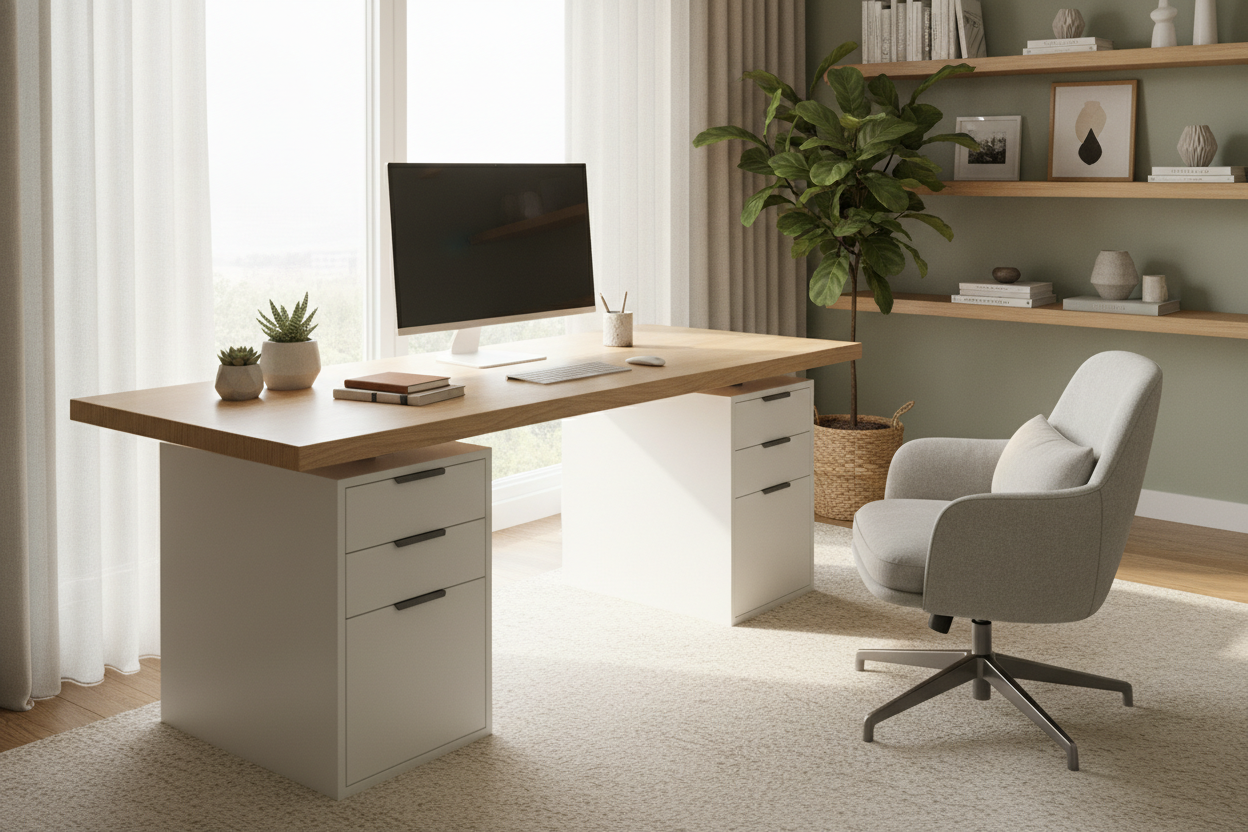
I spent three years fighting a flimsy metal frame that rattled every time I typed. It looked okay on Instagram, but the moment I needed to find a spare charging cable or file a tax document, the whole system collapsed into a pile of 'I will deal with this later.' Most people default to a standard Writing Computer Desk, which is fine if you are a minimalist with three pens and a laptop. But if you are a creative with actual gear, those thin legs offer zero storage and even less stability. I finally realized that a desktop without legs resting on two solid drawer units was the only way to survive the remote work grind.
- Massive storage capacity that hides your mess behind closed drawers.
- Extreme stability compared to cheap, four-legged metal frames.
- Modular design that lets you upgrade the base or top independently.
- Significant cost savings when buying a raw slab versus a finished desk.
Why I Ditched the Frame (And You Should Too)
The 'drawer hack' isn't just for DIY enthusiasts on TikTok; it is a practical solution for anyone who actually works for eight hours a day. By ditching the traditional frame, you reclaim the dead space underneath your desk. Instead of staring at a tangle of cables and dust bunnies, you have ten cubic feet of storage right at your fingertips.
Traditional desks often force you into a specific layout. If the legs are in the way, you can't tuck in your chair or fit a trash can. A slab resting on drawers gives you total control over the width of your legroom. It turns a piece of furniture into a custom workstation without the custom price tag.
The Math Behind the No Legs Desk Hack
Buying a no legs desk—essentially just a solid slab of butcher block or high-density fiberboard—is a financial win. You aren't paying for the engineering of a steel frame or the markup of a 'complete' piece of furniture. You are paying for the surface area. I found that a 74-inch solid wood countertop often costs half as much as a high-end desk of the same size.
You also save on the 'replacement tax.' When a cheap desk frame starts to wobble after a year, you usually have to toss the whole thing. With this setup, if the drawers get dinged up, you replace the drawers. If you want a longer surface, you just buy a new slab. The math favors the modular approach every single time.
Choosing the Right Base for Your Slab
Not all drawers are created equal. You need a base that sits around 28 to 29 inches tall to keep your elbows at a 90-degree angle. If you don't want to deal with the DIY logistics, you could just buy an L Shaped Desk With 3 Drawers And Wood Legs and call it a day. But for the true slab-and-drawer setup, look for heavy-duty metal filing cabinets or high-density fiberboard units.
Make sure the depth of your drawer unit matches the depth of your top. A 25-inch deep slab resting on 14-inch deep drawers is a recipe for a tipped-over monitor. I prefer units with at least one deep drawer for vertical file storage and two shallow drawers for the 'junk' we all accumulate—pens, hard drives, and snacks.
How to Keep the Top From Sliding Around
The biggest fear with a loose desktop is it sliding off and crushing your knees. You don't need to drill holes and ruin your furniture. I use clear silicone bumper pads—the kind you put on kitchen cabinet doors. They create enough friction that the slab won't budge unless you are literally tackling it. They also protect the finish on top of your drawers.
If you are working in a cramped corner, I Saved My Tiny Bedroom With a Desk No Legs Attached covers how to use wall brackets for a floating look. But for drawer-dwellers, simple grip tape or heavy-duty Velcro is your best friend. It is renter-friendly and takes thirty seconds to install.
When You Eventually Need to Upgrade
Eventually, your lower back might demand a change. The beauty of the slab-on-drawers setup is its modularity. When you are ready to stand, you don't throw away the whole desk. You keep that beautiful wood top and simply swap the drawers for a motorized base. It is the ultimate future-proof furniture strategy.
If you decide to skip the middle step and want a massive, professional-grade standing option immediately, a Super Sized Standing Desk With Electric Lift 63X31 5Pc Desktop is the logical evolution. It gives you the same massive surface area but with the benefit of movement. Either way, starting with a solid slab ensures you have a quality piece of wood that will last a decade, regardless of what's holding it up.
Personal Experience: The 'Plastic Bin' Disaster
I once tried to save $50 by using two cheap plastic bins as my 'drawers' for a heavy oak slab. Bad move. The plastic buckled under the weight of my 27-inch monitor within forty-eight hours, and I spent a week working on a literal slope. Don't cheap out on the base. If the base isn't solid wood or heavy steel, your 'desk' is just a liability waiting to happen.
FAQ
Is a desk without legs stable?
Surprisingly, yes. Because the weight of the slab is distributed across the entire top surface of the drawer units rather than four tiny points, it often feels more solid than a cheap bolted frame.
Can I use a kitchen countertop?
Absolutely. IKEA's Karlby is the gold standard for this hack, but any butcher block from a hardware store works. Just make sure it is finished or sealed so you don't get splinters while typing.
Do I need to screw the top down?
Only if you have kids or large pets who might bump into it with force. For most adults, high-friction rubber pads are more than enough to keep everything in place.


Dejar un comentario
Este sitio está protegido por hCaptcha y se aplican la Política de privacidad de hCaptcha y los Términos del servicio.