










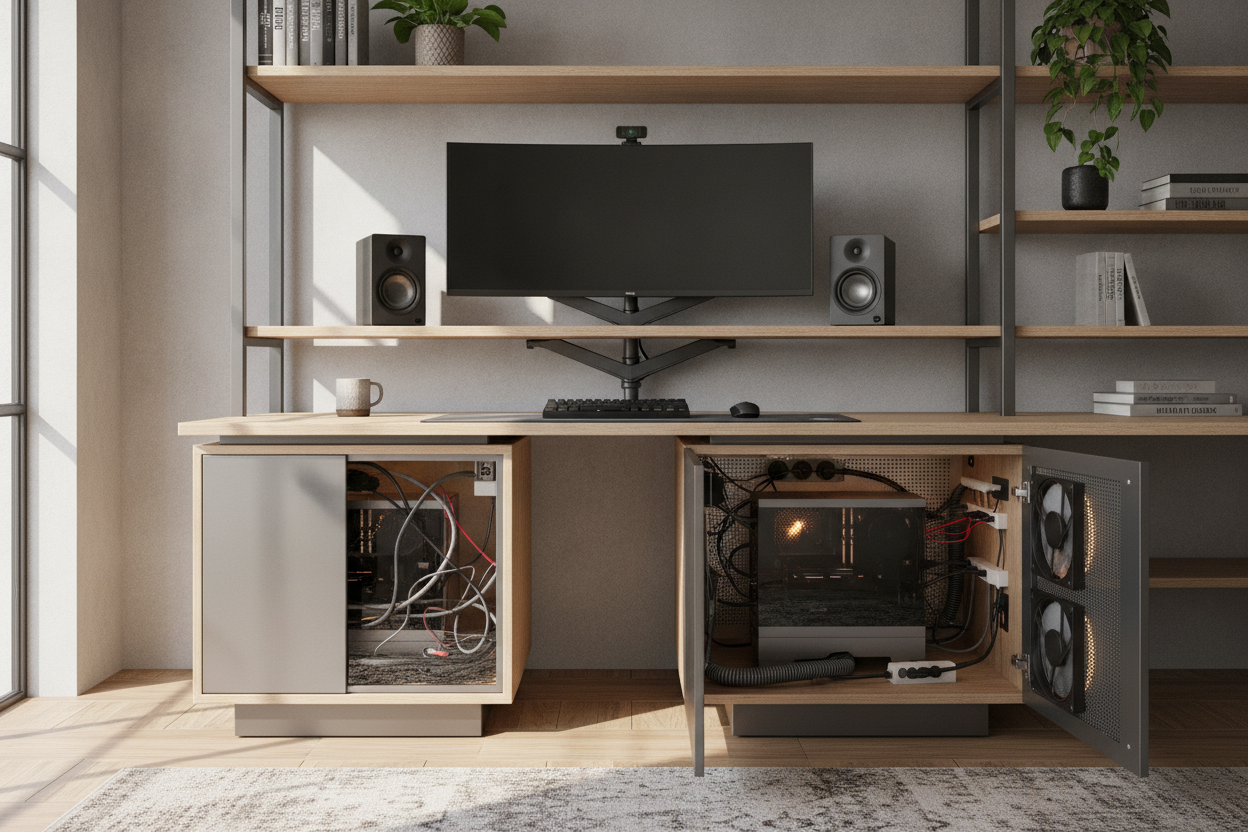
I spent three weeks scouring every computer desk shop in the city trying to find a piece of furniture that didn't look like a dorm room relic. When I finally found a sleek cabinet to house my rig, I thought I’d won. Then I smelled something like melting plastic. I had tucked my high-end computer in desk cabinets without a single thought for thermodynamics.
My expensive GPU was thermal throttling within twenty minutes of a Zoom call. It turns out that shoving a high-performance PC into a wooden box is essentially building a sauna for your motherboard. If you want a clean aesthetic without a dead motherboard, you have to stop thinking about furniture and start thinking about airflow.
Quick Takeaways
- Standard cabinets lack the exhaust capacity for modern PC heat loads.
- Active cooling (USB fans) is mandatory for any covered computer desk.
- Always measure your tower with the cables plugged in—they add 2-3 inches of depth.
- Check for a removable back panel before you buy any computer table workstation.
Why I Refused to Leave My PC Tower on the Floor (or the Table)
Leaving a tower on the floor is a death sentence for your components. Dust bunnies, pet hair, and carpet fibers get sucked into the intake fans like a vacuum cleaner. Within six months, your internal heatsinks look like a dryer lint trap. But putting that same tower on top of the desk? It’s an aesthetic nightmare. I don’t want a glowing RGB box blinking at me while I’m trying to focus.
When I started looking at budget-friendly computer working desk options, I realized most affordable designs are just open tables. If you want something that hides the machine, you usually have to pay a premium. People often ask how much are computer desks that actually look like real furniture, and the answer is usually 'too much' once you factor in the build quality needed to support a heavy tower.
The Heat Problem: The Realities of a Covered Computer Desk
A standard computer desk in office settings usually assumes you’re using a thin laptop. If you have a real PC, putting it in a cabinet creates a heat loop. The computer exhausts hot air out the back, the air hits the solid wood back-panel of the desk, and then gets sucked right back into the front intake. It’s a recipe for a hardware crash.
A desk with computer on it has the benefit of infinite air. Once you move that machine inside, you’re working with a limited volume of oxygen. I’ve seen internal cabinet temperatures hit 110 degrees Fahrenheit in less than an hour. That’s not just bad for the computer; it can actually warp the wood or peel the veneer on your computer office desk for home use.
How I Modified My Cabinet for Active Airflow
I realized I couldn't just leave the door cracked. I had to get aggressive. I took a 4-inch hole saw to the back panel of my cabinet and installed two 120mm quiet fans. One pulls fresh air in from the bottom, and the other pushes hot air out the top. This is the secret to hiding your office without killing your hardware.
Most computer study desks aren't built for this, so you have to be comfortable with a little DIY. If you're using a computer desk 4 feet wide or smaller, space is at a premium. I used USB-powered fans that plug directly into the PC, so they only spin up when the computer is actually on. It keeps the noise down and the temperature stable.
What to Look For If You Want to Buy a Desk to Hide Your PC
If you aren't handy with a drill, look for a writing computer desk that offers an open-back pedestal. You want a cabinet that is at least 4 inches wider than your PC tower to allow for side-venting. Many modern computers desk designs now include mesh panels or 'slatted' doors that look like solid wood but allow air to pass through freely.
Before you pull the trigger, ask yourself: how much is a computer desk worth if it fries a $1,500 PC? Don't skimp on the internal dimensions. Ensure the 'floor' of the cabinet is reinforced. A full-sized gaming rig can weigh 30 to 50 pounds, which is enough to make a cheap particle-board shelf sag or snap over time.
Routing the Cords When Your PC is Trapped Inside
The biggest headache of a computer desk office setup is the 'cable octopus.' When the PC is inside a cabinet, you have to route power, multiple monitor cables, and USB peripherals through a single hole. I recommend buying a corner desk with large storage because they usually have more 'dead space' behind the drawers where you can tuck a massive surge protector.
Don't just jam the cables through. Use a 2-inch plastic grommet to protect the wires from the sharp edges of the wood. If your desks pc setup involves dual monitors, make sure your DisplayPort cables are long enough—at least 6 or 10 feet—because they have to travel a much longer path when they're threaded through the back of a desk cabinet.
FAQ
Is it safe to keep a PC in a closed cabinet?
Only if you have active ventilation. A closed cabinet with no fans will eventually overheat any modern computer, leading to crashes or permanent hardware damage.
How many fans do I need for a desk cabinet?
At a minimum, you need one intake fan at the bottom and one exhaust fan at the top. This creates a natural 'chimney effect' that moves hot air out effectively.
Will hiding my PC in a desk make it quieter?
Surprisingly, no. If the cabinet isn't ventilated, the PC fans will have to spin at 100% speed to stay cool, which often makes more noise than if the PC were just sitting on the table.


Dejar un comentario
Este sitio está protegido por hCaptcha y se aplican la Política de privacidad de hCaptcha y los Términos del servicio.