










Introduction: Why Monitor Elevation Shapes the Modern Workstation
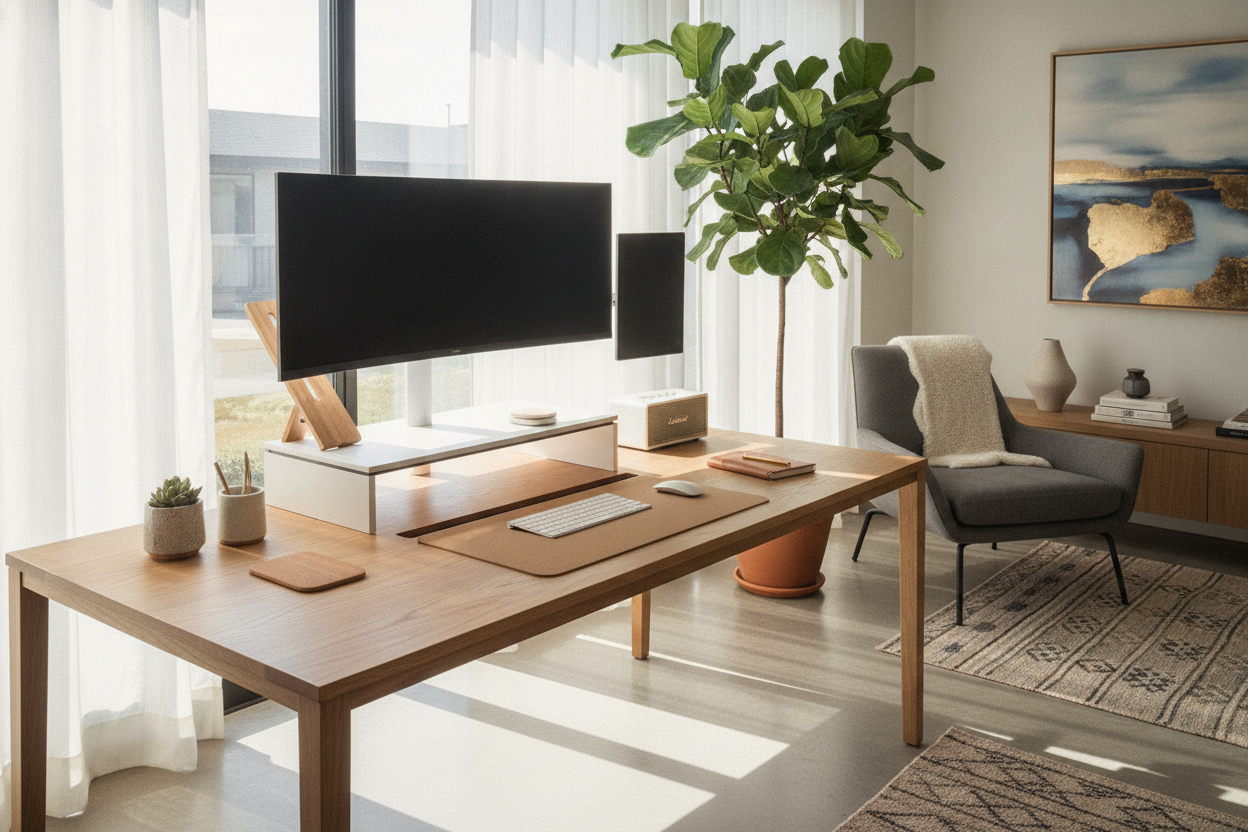
Choosing a dedicated desk with monitor stand configuration addresses one of the most common challenges in home office planning: balancing usable surface area against comfortable visual alignment. Placing displays directly on a flat desktop often forces screen bases into the primary reach zone, crowding keyboards, writing pads, and peripherals. By elevating screens onto a structured riser or integrated platform, a home office desk with monitor stand establishes distinct vertical levels that keep primary active zones free while positioning screens naturally within line of sight.
Beyond freeing up space, this vertical separation prevents the physical and visual clutter that often accumulates during long work sessions. Elevating the display establishes a deliberate boundary between permanent technological gear and dynamic desktop activities, creating a more organized and intentional workstation layout.
Structural Formats: Built-In Riser Shelves vs. Integrated Mount Backdrops
Integrated monitor elevation typically falls into several structural styles, each offering distinct advantages depending on workflow complexity and hardware needs:
- Full-Width Continuous Risers: A solid shelf spanning the entire rear perimeter of the desk surface. This format provides maximum horizontal staging area for dual screens, studio monitors, or supplemental desktop accessories while creating continuous horizontal clearance underneath.
- Tiered and Multi-Level Platforms: Segmented or multi-tiered structures that offer staggered heights. A computer desk with monitor stand and built-in charging features frequently employs this tiered format, pairing raised platforms with dedicated utility trays, power hubs, or storage drawers.
- Integrated Mount Frameworks: Desks engineered with dedicated rear channels, reinforced backplates, or pre-drilled grommet points. A computer table with monitor mount or a computer desk with monitor mount framework provides secure anchor points for articulating display arms without stressing desktop edges.
- Modular Desktop Risers: Free-floating or semi-fixed riser blocks that can be repositioned along the rear desk plane, offering flexibility if equipment arrangements change frequently.
When selecting between a computer desk with monitor riser and a desk with built in monitor mount backing, consider whether your displays rely on manufacturer desktop bases or mechanical VESA brackets. Built-in shelf surfaces provide universal support for any standard screen base, whereas mounting channels provide full floating clearance above the desktop plane.
Surface Zoning: Managing Depth, Reach Envelopes, and Display Focal Distances
A well-planned workstation divides horizontal space into functional zones based on reach and visual focus. An office desk with monitor stand creates a two-tier spatial layout:
- Primary Active Zone (Desktop Level): The immediate front area reserved for keyboard entry, mouse travel, active document review, and resting forearms comfortably without obstruction.
- Secondary Visual Zone (Riser Platform): The elevated rear level where screens, webcams, and task lighting reside at an upright viewing angle.
- Transitional Utility Zone (Under-Riser Void): The open clearance beneath the raised shelf, ideal for sliding keyboards out of the way, docking laptops, or tucking away small desktop tools.
Proper surface depth planning ensures that raised monitors sit at a comfortable focal distance without feeling uncomfortably close. When coordinating your setup, selecting the best computer monitor for home office setups helps establish appropriate screen proportions relative to your chosen desk depth. If your daily tasks shift between digital work and analog drafting or paperwork, browsing versatile writing and computer desk collections provides perspective on how different desk profiles balance writing surfaces with technology tiers.
Accommodating Multi-Screen Workflows: Dual Display Layouts and Span Planning
Setting up multiple displays requires careful measurement of desk width and overall weight distribution. A computer desk with dual monitor mount or a broad riser platform must accommodate the combined lateral width of your displays, especially when pairing angled secondary monitors alongside an ultra-wide or curved screen.
For rooms where linear wall space is limited, an L-shaped corner layout offers an expansive surface envelope. Selecting a 55-inch home office computer corner desk allows one wing to host an elevated multi-monitor array while keeping the adjacent wing open for writing, project materials, or auxiliary computing gear. In our editorial experience, planning display angles before assembling rear risers ensures smooth cable drops and prevents screens from overhanging desk edges.
Under-Riser Storage, Cable Management, and Room Layout Integration
One of the most practical benefits of an elevated shelf is the functional clearance created below the display platform. This horizontal recess serves as an ideal staging zone for low-profile hardware, including:
- Audio interfaces, compact DACs, and external hard drives.
- Compact charging stations for phones, smartwatches, and wireless peripherals.
- Notebooks, planners, and low-profile supply organizers.
- Tuck-away clearance for full-sized keyboards when freeing up the desktop for analog tasks.
To preserve clean sightlines across open-concept living spaces or hybrid bedrooms, pairing an organized riser with compact computer desk office storage strategies ensures that desktop clutter stays out of sight when the workday ends. Running cables along rear modesty panels or utilizing built-in shelf cable channels keeps power cords and display connections secure and visually discreet.
Material Selection, Frame Stability, and Assembly Best Practices
Because monitor platforms elevate weight above the main worktop, workstation structural rigidity is essential. Look for designs featuring robust metal under-frames, triangular corner gussets, or reinforced vertical risers that distribute downforce evenly across the desk surface.
During assembly, ensure all cam locks, shelf brackets, and frame fasteners are tightened uniformly on a level floor before placing heavy monitors onto elevated tiers. Using non-marring surface pads under screen bases preserves composite wood finishes, ensuring your elevated workstation remains sturdy, organized, and reliable through daily use.

Dejar un comentario
Este sitio está protegido por hCaptcha y se aplican la Política de privacidad de hCaptcha y los Términos del servicio.