










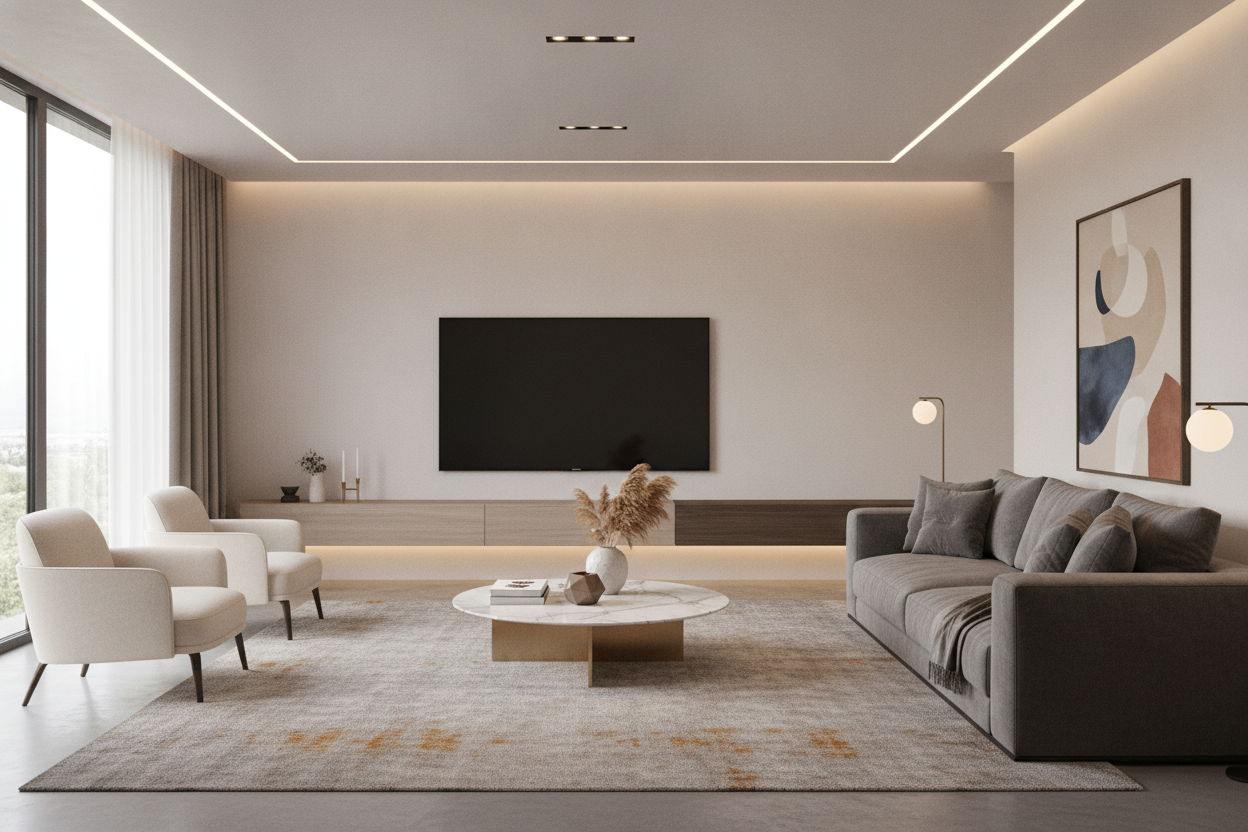
I remember unboxing my first 85-inch screen. It felt like I was installing a drive-in movie theater in my living room. But the second I mounted it, my heart sank. My old console looked like a postage stamp underneath a billboard. Finding a floating tv stand for 85 inch tv isn't just about finding a shelf that fits; it's a battle against visual physics.
If you don't get the proportions right, your massive new investment won't look like a high-end home theater. It will look like a mistake. I've spent years testing wall-mounted units, and the biggest error people make is underestimating the sheer 'gravity' of a screen this size.
Quick Takeaways
- Your stand should be at least 20% wider than the TV itself.
- Aim for a total width of 90 to 100 inches for an 85-inch screen.
- Depth is vital; anything under 12 inches deep will look flimsy.
- Modular units are usually better than trying to find one single 100-inch piece.
The 'Floating Black Hole' Effect (And How to Avoid It)
An 85-inch TV is a beast. It’s not just a screen; it’s a dominant architectural feature. When you pair a massive 85 inch tv floating stand with a unit that is too narrow, you create what I call the 'Black Hole' effect. The TV looks so heavy that it appears to be physically crushing the furniture beneath it.
A floating entertainment center 85 inch tv setup needs to provide a visual 'landing pad.' If the stand ends exactly where the TV ends, the whole wall feels cramped and top-heavy. You want the eye to travel past the edges of the screen, creating a sense of breathability and luxury rather than a cluttered tech corner.
The Visual Math Behind the Perfect Setup
Let’s talk real numbers. An 85-inch TV is not actually 85 inches wide; that’s the diagonal measurement. In reality, most 85-inch screens are roughly 74 to 75 inches wide. If you buy a 75-inch floating tv stand for 85 inch tv, you are asking for trouble. It will look identical in width, which is a design cardinal sin.
To get that 'designer' look, you need at least 10 inches of clearance on either side. That means you are looking for a floating entertainment center for 85 inch tv that measures between 95 and 100 inches. This creates a 1.25:1 ratio that anchors the wall and makes the screen feel like part of the room's architecture rather than an afterthought.
Why Depth Matters Just as Much as Width
I’ve seen people try to use a floating shelf for 85 inch tv that was only 8 inches deep. It looked ridiculous. When a screen has that much surface area, a shallow shelf disappears. You need a 85 inch floating shelf with enough depth—at least 12 to 15 inches—to balance the 'forward' presence of the TV.
If the console is too thin, it loses its 'furniture' feel and starts looking like a piece of trim. This is Why Tiny Floating Shelves for 85 Inch TV Setups Look Ridiculous in large-scale setups. You need the shadow line created by a deeper unit to give the floating wall unit for 85 inch tv the weight it needs to hold its own against the glass.
Grounding the Setup with Lighting and Texture
One trick I always use to make a 85 floating tv stand feel more substantial is integrated lighting. Adding an LED strip to the bottom of the unit creates a pool of light on the floor, which 'grounds' the floating piece. It gives the illusion of volume without taking up actual floor space.
I’m a huge fan of using a 110 Floating High Gloss Tv Stand With Led Light because the reflection of the light off the floor makes the unit feel twice as large as it actually is. Texture also helps. A floating media console for 85 inch tv in a dark oak or a fluted wood finish adds a tactile element that draws the eye away from the giant black rectangle of the TV when it’s turned off.
Where to Actually Find Extra-Wide Consoles
Finding a single 100-inch 85 inch floating tv stand is surprisingly hard. Most shipping companies won't even touch a box that long without charging a fortune. The pro move? Buy two 50-inch or 60-inch units and mount them perfectly flush, side-by-side. It gives you a seamless, custom-built look for a fraction of the price.
When you browse Tv Stands, look for modular designs that lack bulky end-caps. This allows you to chain them together. I once spent three hours leveling two separate units to make them look like one giant 120-inch piece, and it remains the best DIY decision I’ve ever made for my living room.
My Personal Lesson Learned
I once tried to save money by mounting a 70-inch shelf under my 85-inch Sony. I thought, 'It’s only a few inches short, nobody will notice.' I was wrong. Every time I sat on my sofa, I felt like the TV was a giant boulder perched on a tiny twig. I eventually ripped it out, patched the drywall, and bought a 100-inch modular unit. Don't be like me. Measure twice, buy wide once.
FAQ
Can I use a regular shelf as a TV stand?
Only if it's rated for the weight. Most 85-inch TVs weigh between 90 and 110 pounds. A standard decorative shelf will sag or pull out of the studs within a week. Use a dedicated media console.
How high should I mount my floating stand?
Aim for 8 to 12 inches off the floor. If you go too high, you lose the 'floating' effect and it just looks like a wall cabinet. If you go too low, you can't get a vacuum under it.
Do I need to hit studs?
Absolutely. Do not trust drywall anchors with a massive console and expensive gear. You need to hit at least three studs to ensure the unit stays level and secure over time.

Dejar un comentario
Este sitio está protegido por hCaptcha y se aplican la Política de privacidad de hCaptcha y los Términos del servicio.