










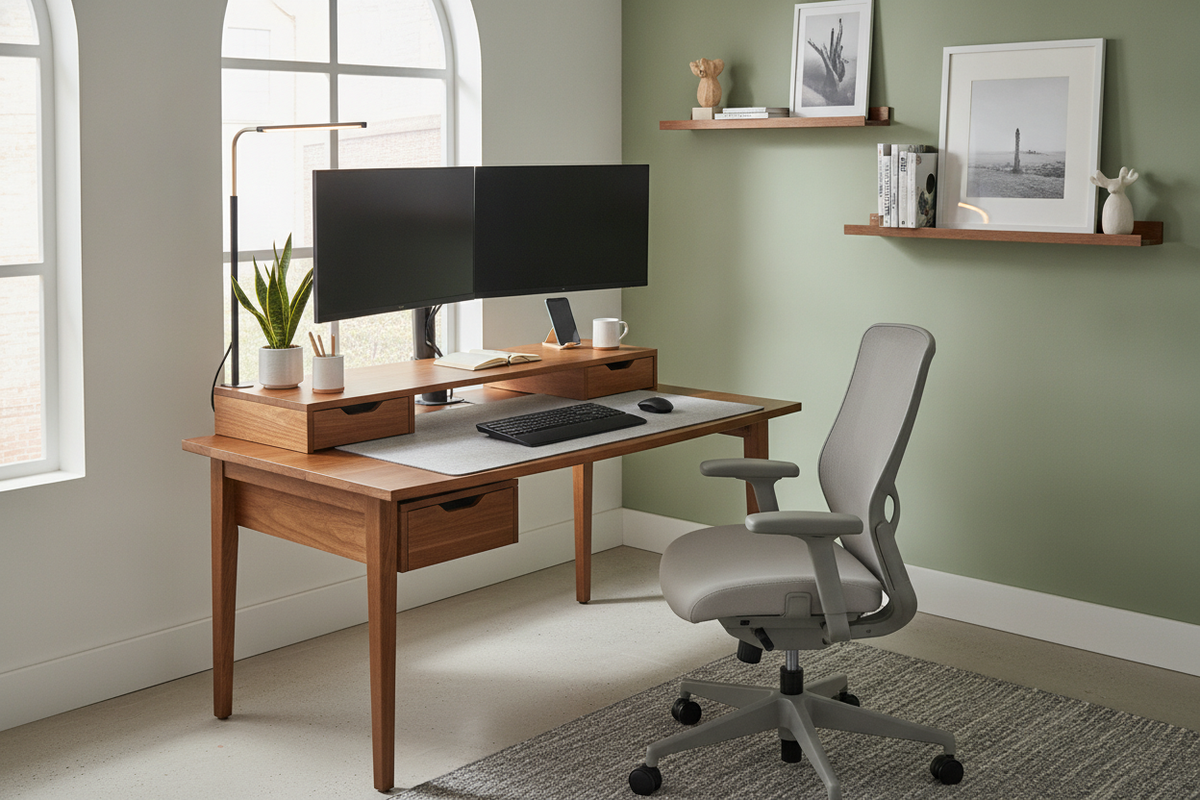
I remember the exact moment I realized my workspace was killing me. I was rubbing my neck for the tenth time before noon, staring at a laptop screen that was roughly six inches too low. I looked like a question mark. I did not want a massive renovation or a trip to the chiropractor; I just needed desk risers to bring my screen up to eye level.
- Neck pain vanishes when your monitor is at eye level.
- They create a 'basement' for your desk clutter like notebooks and hard drives.
- Significantly cheaper than buying a whole new standing desk.
- Matte black or wood finishes look intentional, not corporate.
The Day I Finally Admitted My Setup Was Broken
I tried the 'laptop on a stack of Harry Potter books' move for a week. It looked terrible, and every time I typed, the screen wobbled like a leaf in the wind. It was a temporary fix that felt, well, temporary. I finally admitted that a dedicated desk height riser was the only way to save my posture without my office looking like a college dorm room.
The physical toll of hunching is real. After just three days of having my monitor at the correct height, that dull ache between my shoulder blades started to lift. It is amazing how much energy you claw back when you are not fighting gravity just to read an email.
Why I Did Not Just Buy a Standing Desk
I looked at those fancy electric standing desks, but my apartment is the size of a postage stamp. I did not have the floor space—or the $600—to swap out my furniture. Using desk lifters on my current table felt like a much smarter, less committal move. If you love the desk you already have, you should look at an adjustable riser desk instead of starting from scratch.
I have seen people toss perfectly good solid wood tables for cheap particle-board standing desks just for the height. Do not be that person. A sturdy riser gives you the ergonomic benefit without the wobbly legs of a budget-tier motorized desk.
The Secret Perk: Accidental Vertical Storage
Space is a premium for me. I found a desk riser small enough to fit my 30-inch workspace, and it was a revelation for my organization. Suddenly, my keyboard had a home when I was not using it. My external hard drives and sticky notes lived underneath the platform instead of scattered across the surface.
A standard writing computer desk is usually just a flat, boring slab. By adding that second level, I basically doubled my usable surface area. It is like adding a loft to a studio apartment—you are not increasing the square footage, but you are finally using the air that was just sitting there.
Making It Look Good (Avoiding the Cubicle Vibe)
Let’s be real: some of these look like they were stolen from a 1990s cubicle. I went with a matte black desk riser because it disappeared into my setup. I have seen some cheap, hollow plastic versions that crack if you set a heavy monitor on them, so I suggest sticking to powder-coated steel or solid wood.
The goal is to make the riser look like an architectural choice, not a medical device. If you have a dark wood desk, a black metal riser looks sleek and modern. If you are on a white desk, go with glass or light oak to keep the 'airy' feel alive.
When Is It Time to Upgrade Completely?
Eventually, you might outgrow the modular life. If you find yourself constantly moving your riser around or if you have added a second and third monitor, it might be time for a dedicated desk with riser built directly into the frame. It is a more seamless riser office desk experience that feels more 'pro'.
If you finally have the room to spread out, upgrading to a corner desk with large storage is the move. It gives you that built-in height for your screens while offering enough drawer space to hide the rest of your life. But for now? A simple riser is the best $40 you will ever spend on your spine.
How high should my monitor actually be?
The top third of your screen should be at eye level. You want your neck in a neutral position, not tilted up or down. If you find yourself squinting, pull the riser closer rather than leaning your head forward.
Will a riser make my desk wobble?
As long as you buy a riser with a wide base or solid legs, it should be rock solid. Avoid the 'single-post' versions if you are a heavy typer, as those tend to vibrate more than the four-legged or platform styles.
Can I use a riser for my laptop?
Absolutely, but please use an external keyboard and mouse. Typing on a laptop that is six inches in the air will kill your wrists in about twenty minutes. Use the riser for the screen, and keep your hands on the desk surface.


Dejar un comentario
Este sitio está protegido por hCaptcha y se aplican la Política de privacidad de hCaptcha y los Términos del servicio.