










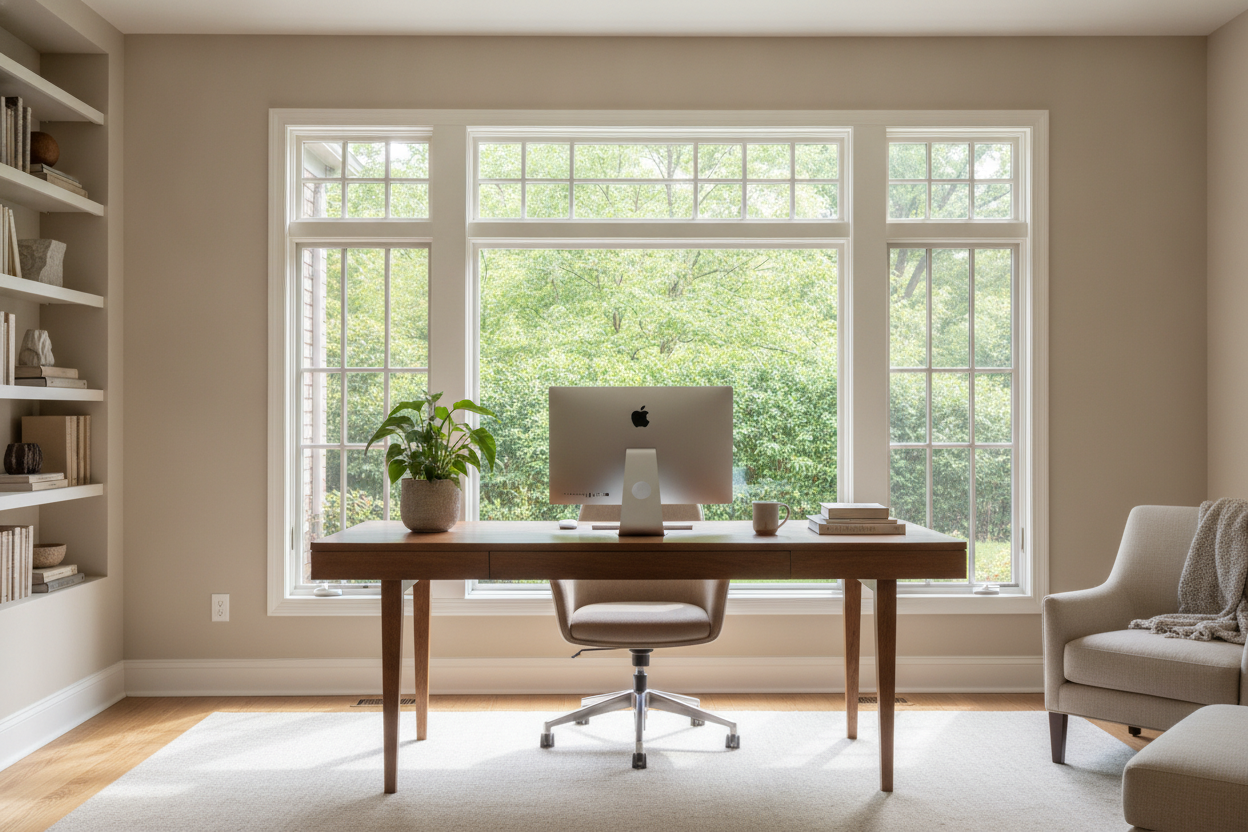
I remember scrolling through Instagram and seeing that perfect desk in front of window setup. It looked like the ultimate productivity hack—natural light, a view of the street, and a vibe that said 'I have my life together.' I spent three hours moving my heavy oak desk to the window, only to realize within twenty minutes that I couldn't see a single thing on my monitor.
The reality of a desk and window setup is often a lot messier than the photos suggest. Between the blinding glare and the weird temperature swings, I’ve had to rethink my entire layout three times just to find a version that didn't leave me with a migraine by 3 PM. Here is the honest truth about making it work.
Quick Takeaways
- Glare is your primary enemy; sheer curtains are non-negotiable.
- Backlighting will ruin your Zoom presence unless you add a ring light.
- Temperature control is harder near glass; watch out for drafts and heat soak.
- Perpendicular placement is often the 'secret' better option.
The Pinterest Dream vs. The Squinting Reality
We all want that window desk for the 'main character' energy it provides. But staring directly into the midday sun while trying to answer emails is a special kind of torture. When you have a computer in front of window, your eyes are constantly trying to adjust between the bright outdoor light and the relatively dark screen. It’s a recipe for immediate eye strain.
I found that desk facing a window ideas only work if you have a North-facing window or a very wide roof overhang. If you’re facing South or West, you're going to spend half your day squinting. I eventually had to buy a monitor hood just to see my spreadsheets, which—let’s be honest—completely killed the aesthetic I was going for.
Why Your Zoom Coworkers Can Only See Your Silhouette
If you put your desk against window, you are essentially setting up a professional-grade silhouette shot. On camera, the light from behind your monitor is so bright that your webcam will underexpose your face to compensate. You end up looking like a witness in a true-crime documentary who is hiding their identity.
If you're wondering why your desk placement is wrong, check your video feed. A window behind desk setup is actually much better for your face—it acts as a giant softbox—but then you're stuck with the glare hitting your screen from behind you. It's a constant trade-off between looking good on camera and actually being able to see your work.
The Temperature Problem Nobody Warns You About
Windows are the thinnest part of your walls. An under window desk means your legs are going to be three degrees colder than the rest of your body all winter. I’ve spent many January mornings with a space heater tucked under my legs because the draft coming off the glass was relentless.
In the summer, it’s the opposite. A built in desk under window can become a heat trap. If your desk is pushed right up against the glass, the surface can actually get hot to the touch. If you’re planning a built-in desk in front of window, make sure you leave a gap for air to circulate, especially if there's a radiator nearby. Blocking a radiator with a desk is a fast way to ruin your heating efficiency and warp your furniture.
How I Finally Fixed My Window Setup
I didn't want to give up the view, so I had to get smart. First, I ditched the heavy blackout shades for a desk in front of window with curtains that are specifically 'light-filtering sheers.' They diffuse the harsh sunlight into a soft glow that doesn't kill my retinas. Second, I swapped my bulky executive desk for a more streamlined writing computer desk. The lower profile means it doesn't block the bottom of the window frame, which makes the whole room feel bigger.
I also realized that placing a desk in front of window requires a matte screen protector. If you have a glossy iMac or a shiny laptop screen, you’re going to see your own reflection all day. A simple $20 matte film changed my life. I also pulled the desk about six inches away from the wall to allow for better airflow and to give the curtains room to hang naturally.
The 'Perpendicular to Window' Compromise
If the front-facing glare is too much, try a desk perpendicular to window. This is my current setup and it’s the gold standard. You get the natural light hitting your face from the side—great for Zoom—and you can just turn your head to see the view. No direct glare on the screen, no frozen knees.
I used a corner desk with large storage to anchor this layout. One side of the 'L' sits against the wall, and the other side acts as a peninsula that faces into the room. It creates a defined workspace that feels private but still lets me enjoy the office with a window vibe without the headaches.
The Verdict: Should My Desk Face the Window?
So, should your desk face a window? If you have the right window treatments and a matte screen, yes. It beats staring at a blank drywall any day of the week. But don't just shove a table against the glass and call it a day. You have to account for the sun's path, the quality of your webcam, and the literal temperature of the room.
If you're in a small room, a small window desk can make the space feel less like a closet. Just be prepared to buy some sheers and maybe a better space heater for your feet. It’s a high-maintenance layout, but when the light hits just right at 4 PM, it’s almost worth the trouble.
FAQ
Is it bad to have a window behind your computer?
It’s not 'bad,' but it’s annoying. You’ll get a reflection of the window on your screen. If you go this route, you’ll need blackout blinds or a very high-nit (bright) monitor to overpower the reflection.
How do I stop glare on my monitor from a window?
Sheer curtains are the best fix. They diffuse the light. You can also try a monitor 'hood' or simply pull your desk further back into the room so the angle of the light changes.
Where should a desk be placed in a room with a window?
Perpendicular is usually best. Put the window to your left or right side. You get the light and the view without the direct glare or the backlighting issues during video calls.

Dejar un comentario
Este sitio está protegido por hCaptcha y se aplican la Política de privacidad de hCaptcha y los Términos del servicio.