










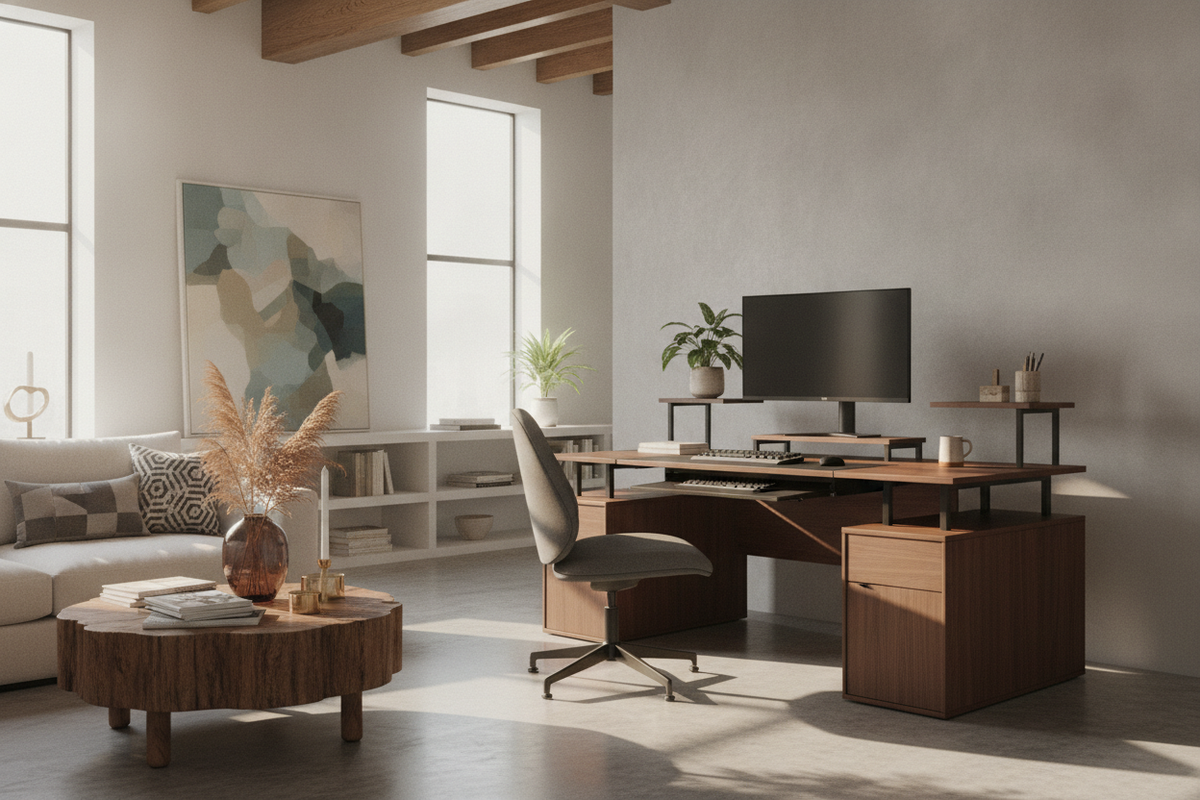
A split level desk approaches workspace organization by dividing daily activity across distinct physical planes. Rather than forcing input hardware, monitors, notebooks, and reference materials onto a single flat board, tiered architecture creates intuitive vertical zones. Understanding how multi-level workstations operate allows homeowners and remote professionals to establish an orderly environment tailored to modern work patterns.
Understanding the Split Level Desk Architecture
The core concept of a split level desk relies on separating primary input tasks from visual display surfaces. A standard single-plane workstation often requires trade-offs between comfortable forearm positioning and proper screen height. By staggering surfaces, a tiered workstation provides an elevated shelf for monitors while preserving a lower tier for keyboards, mice, and active paperwork.
This functional separation helps prevent peripheral clutter from drifting into active writing or typing zones. In static furniture, these levels are permanently joined via rigid risers, brackets, or integrated cabinetry. In more flexible environments, exploring an adjustable standing desk resource introduces dynamic height mechanisms that move both tiers in unison or permit independent elevation changes between zones.
Tiered Dimensions and Ergonomic Geometry
Selecting the proper proportions for a split level workstation requires evaluating the relationship between primary deck depth and upper riser height. The main lower surface requires sufficient depth to accommodate hands, wrist rests, and input peripherals without forcing forearms into awkward contact angles. When the primary deck feels too cramped, users may struggle to keep notebooks or tablets accessible alongside typing tools.
The upper tier, conversely, focuses on line-of-sight positioning. Elevating screens above the main work surface naturally brings monitors closer to horizontal eye alignment. This arrangement reduces the need for bulky aftermarket monitor arms or makeshift display stands. Width is equally significant: compact split-tier desks suit narrow apartment alcoves, whereas wider multi-tier designs accommodate multiple wide screens, studio monitors, or desktop organizing trays without crowding the central visual field.
Dynamic vs. Static Configurations: The Split Level Standing Desk
A static tiered desk offers dependable structural simplicity and traditional joinery, making it a reliable foundation for fixed-height seating. However, a split level standing desk brings active posture variation into daily routines by transitioning between seated and standing elevations.
When planning for a dynamic split level desk, mechanical stability becomes a central consideration. Dual-tier setups shift equipment weight across multiple planes, meaning lifting columns, frame crossbeams, and motor systems must smoothly carry offset loads. Cable management also requires careful routing; cords connecting keyboards on the lower level to monitors on the upper level must retain adequate slack throughout the full range of movement. Reviewing a practical standing desk guide can help avoid common layout pitfalls like pinched cables, uneven weight distributions, or obstructed wall clearances.
Room Spatial Footprints and Workstation Placement
Positioning a split level desk requires attention to spatial volume and visual mass. Because the raised tier adds vertical presence, placing a tiered unit against an uninterrupted wall often creates an anchored, architectural look. When positioned near a window, orienting the desk perpendicular to incoming daylight minimizes screen glare while preserving sightlines across the room.
For rooms with awkward geometries or tight corner clearances, multi-tiered desks can be nestled into perimeter zones to maximize floor efficiency. In open-concept layouts, a floating tiered desk helps delineate an office zone from living spaces, using the raised back shelf as an aesthetic privacy buffer that screens back-panel wiring and equipment ports from view.
Storage Coordination and Under-Desk Architecture
Effective desk organization extends well beyond the upper surfaces. A split level configuration should harmonize with under-desk clearance to maintain comfortable legroom. Positioning low-profile mobile pedestals or lateral filing units beneath the primary desk frame provides essential paper storage without obstructing knees or foot positioning.
Vertical utility can be further expanded by integrating storage-forward furniture. A thoughtfully designed desk level product incorporates elements like multi-tier shelves, integrated utility boards, or power hubs to keep smaller accessories easily accessible while leaving the main work deck completely clear. Utilizing the sheltered space underneath the elevated monitor shelf also creates an ideal nook for docking hubs, audio interfaces, and external hard drives.
Material Selection, Frame Rigidity, and Assembly Readiness
The materials comprising a split level workstation dictate its longevity, rigidity, and overall visual character. Dense engineered wood panels finished with resilient laminates offer dependable resistance against daily surface wear, moisture rings, and minor scuffs. Solid wood surfaces provide distinctive natural grain patterns, though they may require periodic care to maintain their finish.
Frame composition is especially critical for multi-tiered units. Heavy-gauge steel frames, reinforced corner gussets, and sturdy horizontal crossbars ensure that the upper shelf does not wobble during vigorous typing. When unboxing and assembling a tiered desk, organizing hardware packs, confirming joint orientations, and loosely fastening bolts before final tightening ensures that both tiers settle into square, balanced alignment.
Workflow Personas and Use Cases
A split level desk naturally accommodates varied professional workflows by establishing purposeful working zones:
- Digital Analysts and Programmers: Multi-display configurations thrive on elevated platforms, keeping reference dashboards and code editors elevated while leaving keyboard trays clear for focused typing.
- Creative Designers and Illustrators: Designers frequently alternate between digital tablets and physical sketchbooks. A split surface permits drawing equipment to stay on the main deck without disturbing screens or peripheral controllers above.
- Executive and Administrative Managers: Managing meetings, digital communication, and physical paperwork demands versatile surface zoning. An all-in-one standing desk product pairs generous multi-surface utility with dedicated cabinetry, enabling smooth transitions between digital tasks and administrative document review.
By thoughtfully matching tier dimensions, lifting capabilities, and complementary storage systems to personal habits, a split level desk creates an organized, ergonomic workstation tailored for long-term productivity.



Dejar un comentario
Este sitio está protegido por hCaptcha y se aplican la Política de privacidad de hCaptcha y los Términos del servicio.