










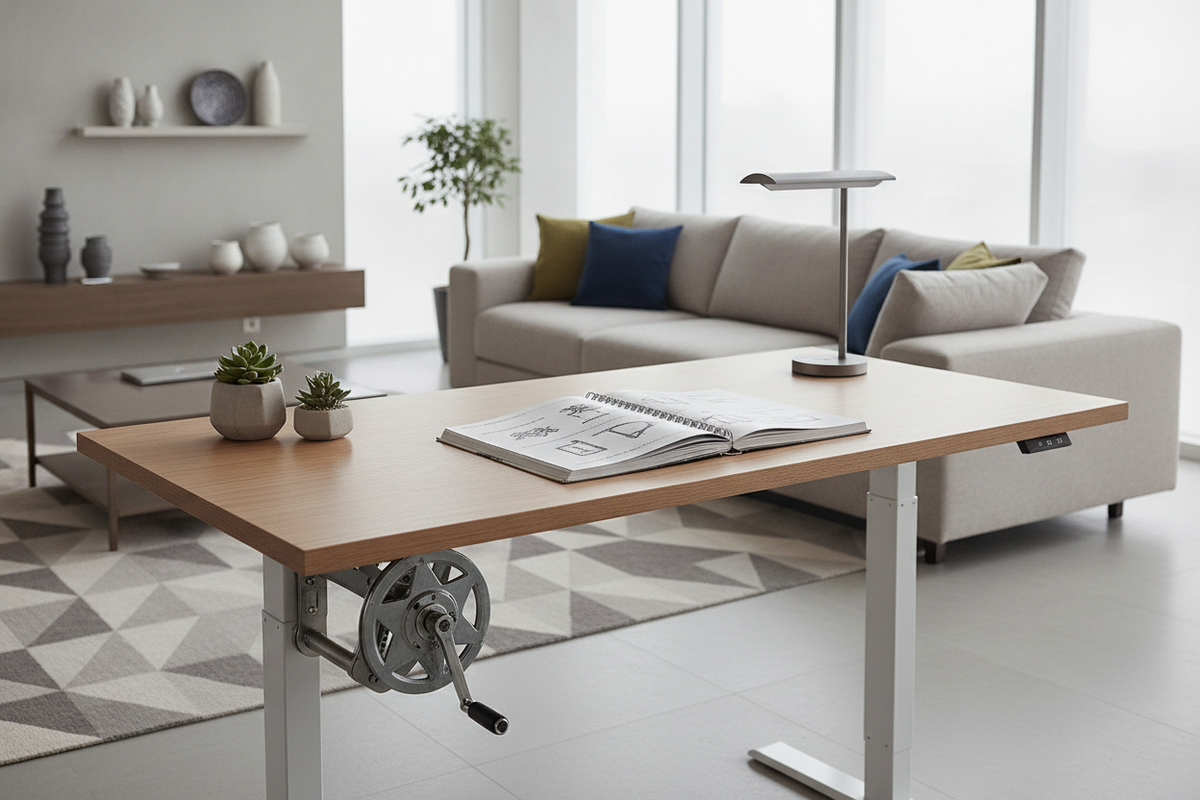
Understanding Manual Height-Adjustment Mechanisms
Selecting an adjustable height desk manual frame introduces quiet independence from wall outlets, electrical transformers, and complex motor control boxes. For many workspaces, manual standing desks offer a straightforward, mechanically tactile approach to daily ergonomics. Whether you are outfitting a dedicated home office, a multi-use loft, or a quiet study area, reviewing our comprehensive standing desk resource can clarify how non-motorized solutions blend mechanical simplicity with dependable posture changes throughout the working day.
Rotary Crank Drives vs. Pneumatic Counterbalance
Manual adjustable desks typically rely on two popular lifting approaches: rotary hand-crank transmissions or pneumatic counterbalance columns. A crank-operated system uses internal lead screws or bevel gears linked to a foldable handle. Turning the crank moves internal gearing that lifts or lowers the desktop gradually. This offers total control over fine elevation steps, though it requires intentional physical rotation for every transition. In contrast, pneumatic designs employ pressurized gas struts combined with a paddle release. Squeezing the release lever allows the desktop to glide upward with minimal lifting input, while pushing down returns the desk to a lower level. While pneumatic units yield faster transitions, hand-crank frames provide steady resistance that prevents unintended shifts when heavier desktop equipment is positioned off-center.
Pin-Slide and Knob-Lock Systems for Fixed Working Heights
Beyond rotary cranks and pneumatic lifts, telescoping pin-lock frames serve users seeking occasional height adjustments rather than multiple daily transitions. These designs feature structural inner columns that slide inside outer frame sleeves, locking into place via detent spring pins, security bolts, or threaded hand knobs. While resetting these frames requires clearing the desktop or enlisting a second person to hold the top steady, they provide an exceptionally rigid setup for dedicated sitting or standing blocks. Pin-lock frames minimize moving mechanical parts, making them well-suited for minimalist studio spaces or shared craft rooms where the working elevation remains stationary for days or weeks at a time.
Workstation Sizing Profiles and Room Clearance Planning
Choosing a manually adjustable standing desk requires balancing your desktop dimensions against the operational space needed to make physical adjustments comfortably. When setting up a home workspace, referencing a practical standing desk guide helps avoid cramped floor plans where moving mechanisms bump against nearby architectural trim or furniture.
Compact Nook Footprints vs. Expansive Multi-Monitor Desktops
Desk dimensions range from space-saving writing consoles designed for laptop workflows to generous spans that comfortably host multiple display monitors, reference books, and task lighting. In compact home study nooks, narrower desktops allow the workstation to sit neatly against a wall without overwhelming room flow. Larger multi-monitor setups require expansive tabletop surfaces alongside sturdy leg spreaders to handle the spread of peripheral gear. When selecting surface area, account for the spatial footprint of desk-mounted monitor arms, keyboard trays, and decorative desktop accents so the surface remains uncluttered during daily tasks.
Accommodating the Crank Swing Radius and Wall Proximity
One distinct layout factor for a crank-driven stand up desk manual station is the physical swing radius of the adjustment handle. Many crank designs mount underneath the front edge or directly to the outer side of the frame column. A side-mounted crank requires adequate side clearance between the desk leg and neighboring walls, filing drawers, or bookcases to permit full 360-degree rotation. Front-facing crank handles typically pivot or fold away flush beneath the tabletop bezel when not in use. Maintaining a slight perimeter buffer behind and around the workstation also shields delicate paint, drywall, and baseboard molding from frictional contact while adjusting the elevation.
Structural Balance: Frame Architecture, Load Distribution, and Materials
Because manual workstations rely on physical leverage rather than automated motorized synchronization, structural frame geometry plays a critical role in preventing monitor wobble and uneven desk tilt.
Telescoping Leg Columns and Lower Crossbar Reinforcement
The stability of any adjustable height desk manual build rests on its leg profiles and bracing system. Dual-stage or multi-stage telescoping steel columns provide a solid structural track, guiding the lifting movement smoothly. To maintain rigidity as the desk reaches taller working points, many manual frames incorporate lower horizontal crossbars or upper under-mount frame stretchers. These crossbars resist lateral swaying forces caused by active typing or hand-crank rotation, ensuring the desktop feels grounded and secure whether set for seated tasks or standing sessions.
Desktop Substrates: Engineered Wood vs. Solid Wood Tops
The choice of desktop material affects both the visual personality of the desk and the mechanical effort required during manual adjustment. Modern engineered wood surfaces, such as high-density fiberboard or durable laminate-faced composites, provide uniform weight distribution, dimensional stability, and resistance to warping. Solid timber slabs bring organic grain texture and artisanal presence, though their heavier density requires greater turning torque on manual crank models or calculated counterweight balance on pneumatic systems. Selecting a balanced, durable top material helps protect the internal gearing from excessive operational strain over long periods of use.
Cordless Freedom: Power Independence and Storage Coordination
The greatest structural benefit of a stand up desk manual model is total electrical independence. Unshackled from wall outlets and extension cords, these workstations can float freely in the center of an open-concept living area, stand perpendicular to scenic window views, or fit snugly into quiet alcoves where electrical wiring is absent.
Cable Routing Without Wall Outlet Constraints
Operating without a primary motor power cable simplifies visual organization around the desk perimeter. Laptop users, tablet writers, and designers working with wireless peripherals can maintain a tidy work zone using surface-mounted wire grommets, under-desk cable baskets, and magnetic cord clips. If external accessories require power, running a single multi-outlet strip inside an under-desk wire raceway keeps equipment cords neatly contained, traveling up and down with the desk surface without tangling around structural crossbars.
Integrating Freestanding Credenzas and Mobile Pedestals
Because manually adjustable frames feature open leg cavities to accommodate crossbars and lifting shafts, storage organization is best handled through independent furniture pairings. Matching a manual workstation alongside an expansive height adjustable standing product or dedicated mobile storage pieces allows you to store paperwork, stationery, and technology out of sight. When positioning mobile pedestals or low filing credenzas underneath or adjacent to the desk, ensure the unit sits clear of the lowest downward travel limit so descending frame rails never pinch against stationary cabinet tops.
Assembly, Synchronization, and Preventative Maintenance
Assembling a manual desk correctly from the initial setup ensures fluid adjustments, balanced lift columns, and dependable long-term operation. Reviewing our layout and aesthetic standing desk guide provides inspiration on finishing touches once the mechanical foundation is complete.
Aligning the Hexagonal Drive Rod and Leveling Glides
Dual-column manual crank desks depend on a central transmission rod—often a hexagonal steel shaft—that transfers rotational energy from the crank gear across to the opposite leg column. During assembly, it is vital to seat both legs at an identical mechanical baseline before locking the shaft set screws. If one leg rests higher than the other when tightening the transmission clamps, the desktop will climb unevenly, introducing friction inside the telescoping channels. Once the frame is assembled and turned upright, adjusting the threaded leveling glides under each foot pad ensures the desk sits flat on uneven floors, eliminating rocking motions before you begin daily work.
Routine Fastener Tightening and Mechanical Upkeep
Over months of daily use, repeated physical turning and shifting between postures can gradually loosen frame connecting bolts. Incorporating a routine maintenance check every few months helps preserve structural stability. Gently inspect the underside hardware, retighten frame-to-top attachment screws, and confirm that the crank mechanism rotates smoothly without unusual grinding or catching. Keeping the exterior leg columns wiped free of household dust prevents grit from migrating into the internal sliding glide pads, ensuring your manual standing workstation remains a dependable center for daily productivity.

Dejar un comentario
Este sitio está protegido por hCaptcha y se aplican la Política de privacidad de hCaptcha y los Términos del servicio.