










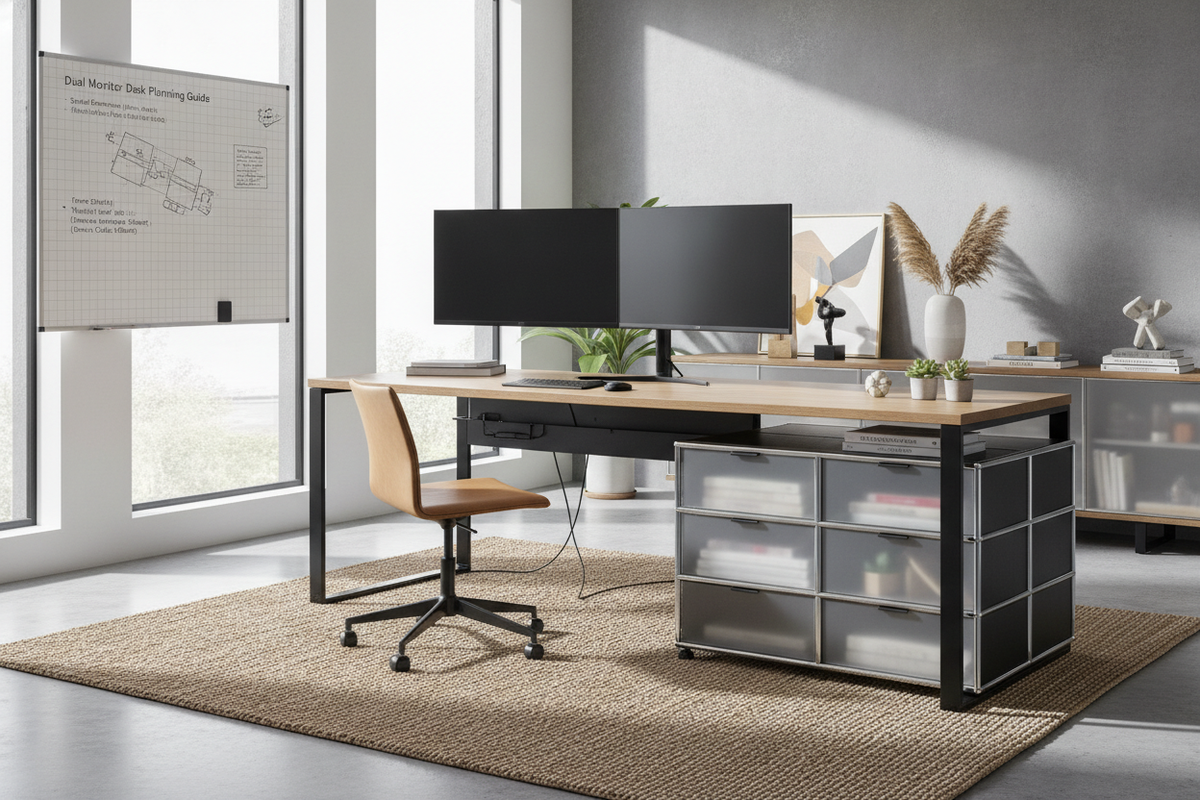
Understanding Spatial Requirements for Multi-Screen Workstations
Selecting appropriate desks for dual monitors begins with calculating the total horizontal footprint of your hardware alongside the clearance needed for peripheral gear. A multi-display setup requires more than just enough width for screen bezels; it demands an intentional balance between viewing comfort, input device placement, and physical tabletop balance. When browsing through a computer desk collection, understanding dimension categories helps narrow down the choices that will keep a workspace comfortable and functional.
Width Tiers: Compact, Standard, and Expansive Spans
Workstation widths generally fall into three structural tiers when accommodating two or more screens:
- Compact Spans: Narrower surfaces accommodate dual screens only when displays are mounted on articulating arms or angled tightly in an inward V-shape. This tier works well in smaller alcoves but leaves minimal desktop space for desktop towers or writing pads.
- Standard Widths: Mid-sized desks offer enough surface area to seat two medium-sized displays side by side on their original stands while leaving practical room for desktop speakers and standard desk accessories.
- Expansive Spans: Wide surfaces allow displays to sit flat or gently curved with abundant perimeter clearance for vertical computer cases, task lighting, and secondary reference documents.
Surface Depth and Focal Distance Considerations
Desktop depth is just as critical as overall width. Shallow desk tops bring displays closer to the user, which can quickly crowd keyboard trays, mouse pads, and personal notebooks. A deeper desk top provides a comfortable focal distance, allowing large screens to sit further back while leaving an open zone in the foreground for typing, drawing, or document review. Adequate depth also creates room behind freestanding monitor pedestals, preventing display bases from encroaching on primary keyboard positioning.
Desk Shapes and Room Configurations for Dual Displays
Room architecture often dictates how a multi-screen workstation integrates into a home or corporate office. Choosing between linear profiles and corner structures depends on room traffic flow, natural light sources, and how tasks are divided across monitors.
Straight Desks vs. Corner and L-Shaped Layouts
Straight desks offer clean lines, simplified cable routing along flat walls, and straightforward alignment within rectangular rooms. However, placing two wide displays side by side across a straight desk requires substantial horizontal wall span. Conversely, an L-shaped surface or corner desk naturally divides tasks into primary and secondary zones. For dedicated corner setups, an office computer desk product engineered for corner placement allows one display to face directly forward while the secondary screen rests along the return wing.
Maximizing Perimeter and Corner Wall Real Estate
Corner placements utilize underused floor space while wrapping screens gently around the user's natural field of view. Selecting an office computer desk product featuring built-in side cabinetry creates a unified command station that supports wide hardware spans without projecting far into central walkways. This configuration also naturally shields screen glare from nearby windows by utilizing angled corner orientations.
Structural Integrity, Weight Distribution, and Mounting Options
Multiple display panels, mounting hardware, sound peripherals, and computer cases combine to place substantial loads on furniture frameworks. Assessing structural engineering ensures the desk remains wobble-free during intense typing sessions or height adjustments.
Desktop Load Capacity and Core Materials
Solid core composite boards, engineered wood with reinforced crossbars, and heavy-gauge steel legs provide the foundation needed for multi-screen setups. Desks with thin or hollow-core surfaces can flex under concentrated weight, especially when monitors are clustered near the center span. Look for desks featuring underlying support stretchers, thick top panels, and reinforced corner brackets to maintain a flat, level surface over long periods of use.
Freestanding Bases vs. Dual Monitor Arm Clamping Dynamics
Dual monitor arms free up valuable desktop surface area, but they shift the distributed weight of two stands into a single concentrated clamp point on the desk edge. When using edge clamps or grommet mounts, ensure the desk top is composed of dense, solid material capable of resisting localized pressure. If using standard desktop stands, ensure the desk depth accommodates their broad footprint without pushing the keyboard forward to the front edge.
Balancing Multi-Monitor Real Estate with Workspace Storage
A multi-screen layout introduces extra cables, power bricks, video hubs, and input devices. Integrating smart storage prevents the workstation from degenerating into visual clutter.
Under-Desk Drawers and Vertical Hutch Cabinets
To keep the primary desktop clear for monitors and input surfaces, incorporate integrated lower pedestals, file drawers, and vertical shelving. Implementing principles from a dedicated multiple computer desk guide helps establish specific functional zones, such as housing tower units in ventilated open bays and storing loose office supplies inside concealed drawers. For multipurpose rooms where technology needs to be concealed when not in use, reviewing a computer desk office guide offers strategies for integrating hardware within fully enclosed cabinetry.
Cable Routing and Peripheral Clutter Control
Dual monitors double the number of power and video cables descending from the display zone. Desks equipped with rear modesty panels, integrated grommets, and underside cable channels allow wires to travel cleanly down toward power outlets. Bundling peripheral cords along rear structural legs preserves clean sightlines and prevents cables from tangling with feet or drawer slides.
Decision Framework: Selecting the Right Desk for Your Workflow
Choosing the best desk requires aligning physical dimensions with daily operational demands.
Evaluating Professional, Creative, and Multi-Tasking Setups
Consider your daily workflow when selecting desk proportions:
- Symmetrical Dual Displays: Equal-sized monitors placed side by side benefit from wide straight desks with centered leg openings to keep the seating position aligned with the inner bezels.
- Primary and Secondary Orientation: A main center display paired with a vertical or smaller secondary screen pairs well with compact straight desks or asymmetric L-desks.
- Hybrid Digital and Physical Tasks: Workflows involving paperwork, drafting, or hardware assembly alongside dual screens require an L-shaped or extended executive desk layout.
Assembly, Placement, and Long-Term Maintenance Checklist
Before purchasing, measure room doorways, wall spans, and nearby electrical outlets. When assembling, verify all frame fasteners and corner brackets are tightened securely to eliminate lateral sway. Periodically check clamp hardware and leg levelers to ensure the entire setup remains stable, safe, and organized through daily use.

Dejar un comentario
Este sitio está protegido por hCaptcha y se aplican la Política de privacidad de hCaptcha y los Términos del servicio.