










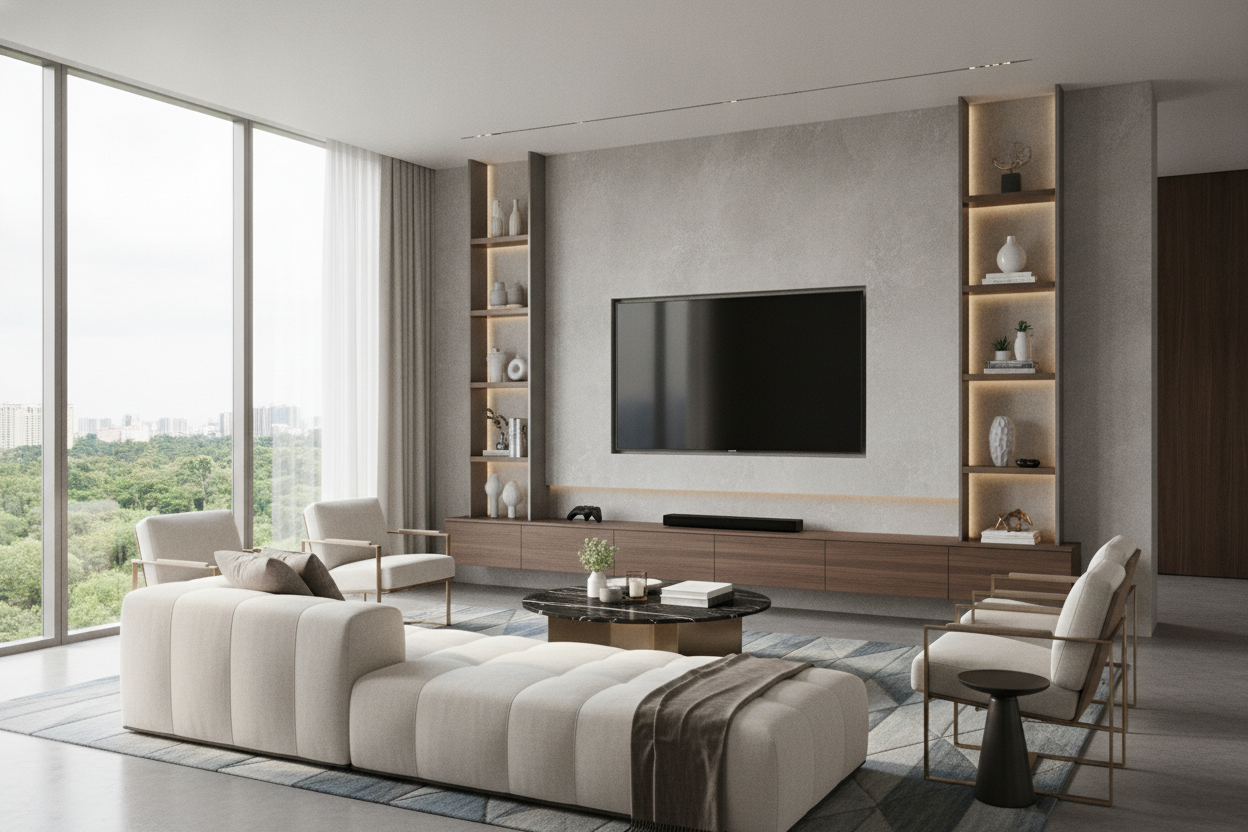
I remember the day my first massive screen arrived. I’d measured the wall, sure, but I hadn’t measured my soul’s ability to handle a 70 inch tv in living room setups that weren't designed for a home cinema. When the delivery guys unboxed it, the thing looked like a black monolith from a sci-fi movie. It didn't just sit in the room; it owned the room. If you’re currently staring at a 47-inch screen and thinking about the upgrade, we need to have a serious chat about logistics before you hit 'buy.'
- Check the Width: A 70-inch TV is actually about 61 inches wide; make sure your wall can handle five linear feet of tech.
- The 25% Rule: Your TV stand should be at least 25% wider than the screen to prevent a top-heavy, precarious look.
- Focal Point Priority: Decide early if the TV or the fireplace is the boss of the room—they rarely share the spotlight well.
- Eye Level Matters: Stop mounting your screens near the ceiling; your neck will thank you for keeping the center of the screen at 42 inches from the floor.
The Elephant in the Room (Literally)
Let’s be honest: a 70 inch tv in room layouts is a physical beast. When we talk about TV sizes, we talk about the diagonal, but the horizontal footprint is what actually ruins your floor plan. A 70-inch screen is roughly 61 inches wide. That is nearly five feet of uninterrupted black glass. You cannot just swap this into the exact spot where your old 50-inch used to live and expect the room to feel the same. I’ve seen people try to squeeze these into alcoves designed for much smaller units, and the result is always a cramped, claustrophobic mess.
The sheer physical presence of a screen this size changes the acoustics and the light flow of the space. It’s not just a piece of tech; it’s a piece of architecture. You have to account for the box it comes in, too—which is usually the size of a small refrigerator. I once spent three hours just trying to figure out how to get the empty box out of my apartment without scratching the paint. Before you commit, take some blue painter's tape and mask out the actual dimensions (61' x 35') on your wall. It’s a sobering reality check that most people skip until the delivery truck is already in the driveway.
Why You Need to Rethink Your Entire Focal Point
In a standard living room 70 inch tv screens become the undisputed dictator. Most older homes were built with a fireplace as the heart of the room, or perhaps a large bay window. When you introduce a five-foot screen, those architectural features suddenly have a massive competitor. If you try to place a giant TV next to a fireplace, the room feels lopsided. If you place it opposite a window, the glare will make the screen unusable for half the day. You have to pick a dedicated media wall and commit to it.
I’ve experimented with 'hiding' these screens behind sliding barn doors or inside massive armoires, but at 70 inches, those solutions become bulky and awkward. Instead of hiding it, you have to integrate it. This might mean rearranging your entire seating chart. I had to move my favorite reading chair because the 70-inch screen made it feel like I was sitting in the front row of an IMAX theater. You need a minimum of 8 to 10 feet of distance to actually enjoy the 4K resolution without getting a headache. If your room is shallow, this screen size might actually be a downgrade for your comfort.
Grounding the Beast: Furniture Proportions
This is where most people fail. They buy a $1,200 TV and try to put it on a $150 MDF stand they bought five years ago. A 70-inch TV weighs anywhere from 55 to 80 pounds, but it’s the visual weight that’s the real killer. A massive screen on a tiny, spindly stand looks like a lollipop—top-heavy and unstable. You need furniture that has the 'visual mass' to anchor the tech. I always look for solid wood or heavy metal frames that can actually support the weight without bowing over time. Cheap 1.5 lb/ft³ density boards will start to sag in the middle within six months.
Color choice is also vital. In a bright, airy room, a giant silver or white TV stand can make the black screen look like a floating void. I prefer using darker tones for media furniture because they absorb the visual weight of the screen when it's powered off. Why Your Bright Living Room Needs a 70 Inch Black TV Stand explains this perfectly—it's about creating a cohesive 'zone' for the tech rather than letting it stick out like a sore thumb. Don't be afraid of a chunky silhouette; a substantial sideboard or a long low-profile console provides the necessary grounding for such a large piece of equipment.
The 25 Percent Rule for TV Consoles
If there is one rule I live by, it’s the 25 percent rule. Your media console should be at least 25% wider than the TV itself. For a 70-inch TV (which is ~61 inches wide), you should be looking at a console that is at least 76 to 80 inches long. This creates a balanced 'buffer' on either side of the screen. Without that extra length, the TV looks like it’s spilling off the edges of the furniture. It’s the difference between a room that looks professionally designed and a room that looks like a dorm. Plus, that extra surface area gives you a place to put a couple of curated decor pieces to soften the tech-heavy vibe.
Lighting Tricks to Soften the 'Black Hole' Effect
When a 70-inch TV is off, it is essentially a giant black mirror. It’s cold, it’s dark, and it can suck the life out of a cozy room. To combat this, I’m a huge advocate for bias lighting. These are simple LED strips that adhere to the back of the TV and project a soft glow onto the wall behind it. It reduces eye strain by narrowing the contrast between the bright screen and the dark room, but more importantly, it makes the TV feel like a deliberate design choice. It 'lifts' the screen off the wall visually.
Don't stop at the LEDs, though. You need layers. I usually place a floor lamp with a warm-toned shade on one side of the TV and a smaller, dimmable table lamp on a nearby shelf. This creates a 'wash' of light that prevents the screen from feeling like a black hole. Avoid overhead lights at all costs—they create a terrible reflection on the glass that will drive you crazy during dark movie scenes. I once spent an entire week moving a floor lamp six inches at a time until I found the 'sweet spot' where it provided ambiance without ruining the picture quality.
To Wall-Mount or Not to Wall-Mount?
This is the ultimate debate. Wall-mounting a 70-inch screen looks incredibly sleek and saves floor space, but it comes with a massive caveat: cable management. There is nothing that ruins a living room faster than 'cable spaghetti' dangling from a beautiful wall-mounted screen. If you aren't prepared to cut into the drywall to hide those wires, stick to a console. Furthermore, ergonomics are non-negotiable. Many people mount their TVs too high—the 'TV Above the Fireplace' syndrome—which leads to literal neck pain. Your eyes should be level with the center of the screen when you're seated.
I personally prefer keeping the TV on a properly sized console. It feels more grounded and 'homey' than a screen floating in mid-air. Plus, it gives you more flexibility if you decide to rearrange the room later. Stop Letting a 70 Inch TV Console Ruin Your Living Room Layout covers the ergonomic benefits of the console approach in detail. If you do go the wall-mount route, invest in a high-quality articulating arm. A screen this size is heavy, and you don't want to trust a $20 mount from a random warehouse site. I once saw a mount fail in a friend's house, and the sound of a 70-inch screen hitting hardwood is something I never want to hear again.
Is a 70-inch TV too big for a small living room?
It’s all about viewing distance. If you can sit at least 8 feet away, it can work. If your sofa is only 5 feet from the wall, you'll be constantly moving your head to see the whole screen, which is exhausting.
How high should a 70-inch TV be?
The sweet spot for the center of the screen is usually about 42 inches from the floor. This aligns with the average eye level of someone sitting on a standard 18-inch high sofa cushion.
What kind of stand do I need for a 70-inch TV?
Look for a stand that is at least 75-80 inches wide and rated for at least 100 pounds. Solid wood or heavy-duty steel is much better than hollow-core particle board for this size.

Dejar un comentario
Este sitio está protegido por hCaptcha y se aplican la Política de privacidad de hCaptcha y los Términos del servicio.