










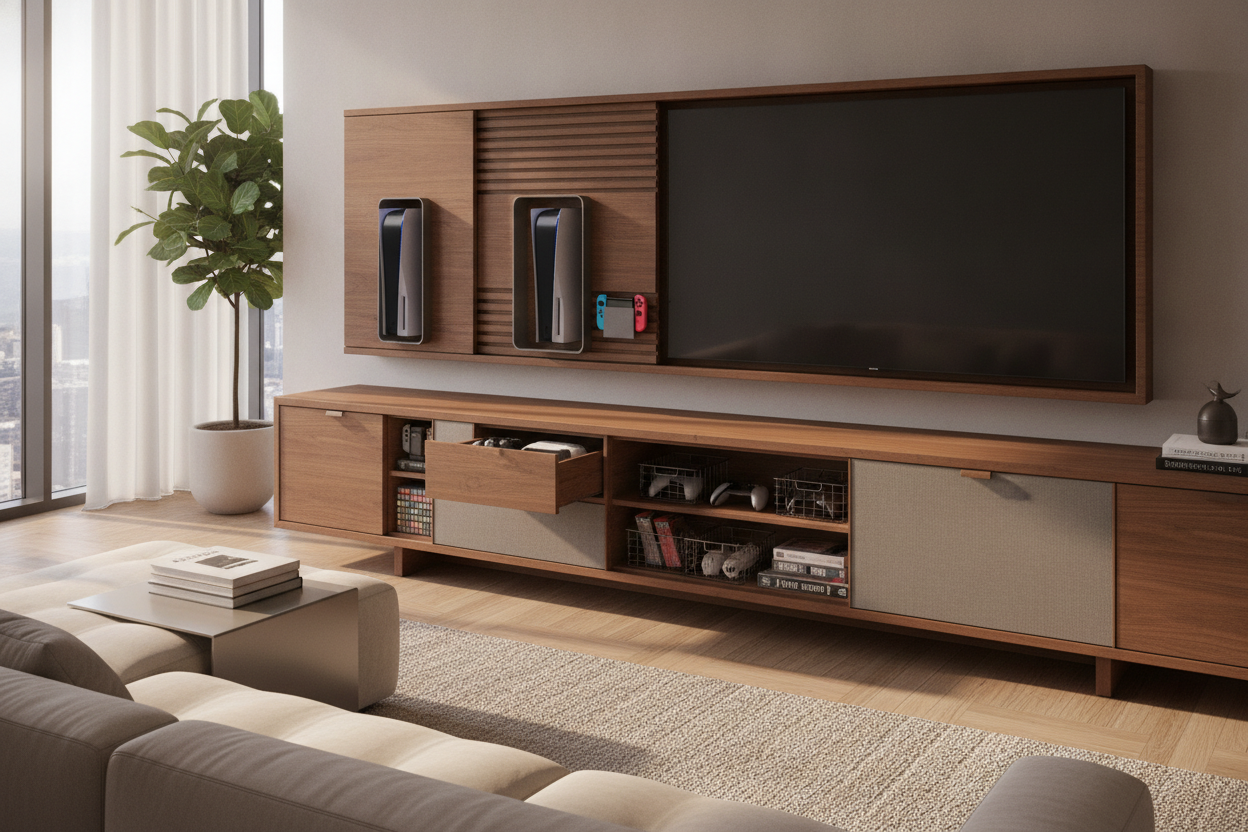
I remember unboxing my PS5 and thinking I’d accidentally ordered a small, futuristic space heater. It didn’t fit on my media shelf, it hung off the edge of my side table, and it looked completely ridiculous next to my ceramic lamps and linen textures. Finding game consoles for tv that actually fit into a grown-up living room has become a genuine design challenge.
Quick Takeaways
- Airflow is non-negotiable; never trap a console in a sealed box.
- Slatted doors are the best compromise between aesthetics and cooling.
- Vertical space is your friend—don't be afraid of wall mounts.
- Velcro ties are superior to zip ties for cable management.
The Elephant (or PS5) in the Living Room
Modern gaming systems for tv are massive. We’ve moved away from the sleek, stackable VCR-style boxes of the early 2000s and entered the era of the 'monolith.' The Xbox Series X is a literal brick, and the PS5 is a curvy giant that refuses to sit flat without a plastic stand. It’s tough to maintain a cohesive aesthetic when your tv game console looks like a piece of lab equipment from a sci-fi movie.
The struggle is real: you want to play 4K games, but you don't want your living room to look like a teenager’s bedroom or a Best Buy showroom. We spend thousands on high-end sofas and rugs, only to have the entire vibe interrupted by a gaming console for tv that dominates the visual field. It’s time to stop letting the hardware dictate the decor.
Why You Can't Just Shove Them in a Drawer
The first instinct for most people is to hide the gaming device for tv inside a cabinet. Close the door, problem solved, right? Wrong. These gaming entertainment systems generate a staggering amount of heat. If you put a high-powered tv gaming console in a closed wooden box, it will eventually throttle its performance or, worse, melt its internal components.
I’ve seen consoles literally warp their own plastic casings because they were starved for air. A video game console tv setup needs at least three to four inches of clearance on all sides for the intake and exhaust vents to work. If you hear your fans screaming like a jet engine, your console is suffocating. You need a solution that hides the bulk without killing the tech.
Features Your Media Cabinet Actually Needs
When you are out shopping for modern tv stands, ignore anything with a solid back panel and no ventilation. You need strategic wire management holes—the bigger, the better. I look for cabinets with slatted doors or metal mesh fronts. These allow for 'passive' airflow, meaning the hot air can escape even when the doors are closed.
Adjustable shelving is another must-have. Because gaming systems for tv come in such awkward heights and widths, fixed shelves are a nightmare. I’m also a fan of using a media console with glass doors if you still use older infrared controllers, though most modern wireless video game console controllers use Bluetooth or proprietary radio waves that pass through wood anyway. Just make sure that glass cabinet isn't airtight.
The 'Open Shelf' Compromise
If you have to leave your game tv console out in the open, treat it like a design element rather than an eyesore. I’ve seen people successfully 'sandwich' a console between heavy art books or place it on a lower shelf surrounded by matte-finish ceramics. The goal is to break up the plastic-heavy look of the gaming devices for tv with natural materials.
In my last apartment, I actually used wall shelves for tv storage to keep the floor space clear. By mounting the console vertically on a sturdy shelf off to the side, it felt less like a piece of tech and more like a deliberate choice. Just keep the trailing Pothos plants away from the fan vents—nobody wants charred leaves inside their tv game systems.
Managing the Ugly Cable Chaos
Nothing ruins a tv game system setup faster than a 'spaghetti' mess of HDMI and power cables. If your media unit doesn't have a built-in channel, use adhesive cable clips to run the cords down the back of the furniture legs. For those who prefer a minimalist look, a tv stand with mount and shelves can be a lifesaver because the mounting spine usually has a hollow center to hide every single wire.
Don't forget the controller charging docks. These are often the messiest part of tv gaming systems. I prefer to keep my charging station inside a drawer with a small hole drilled in the back for the power cable. That way, the controllers are hidden and fully charged when you're ready to play, but out of sight when you're hosting dinner.
My Biggest Mistake
I once shoved a PS4 Pro into a tight cubby in a vintage mid-century sideboard. Within twenty minutes of playing a graphically intense game, the back of the sideboard was hot enough to worry me, and the console was loud enough to drown out the TV audio. I ended up having to take a hole saw to the back of a $600 piece of furniture just to let the heat out. Learn from my stupidity: airflow isn't a suggestion, it's a requirement for any video game consoles for tv.
FAQ
Can I hide my console behind my TV?
Yes, there are 'behind-the-TV' mounts specifically designed for this. Just ensure there is enough space between the TV and the wall so the heat from both devices doesn't build up and cause damage.
Do slatted doors really help with cooling?
Absolutely. Slatted or 'louvred' doors allow for significant air exchange while still obscuring the bulky shape of the game system for tv. It's the gold standard for hidden tech storage.
How much clearance does a console need?
General rule of thumb: give it at least 3-5 inches of open space around any side that has a vent. Never stack other electronics directly on top of your console.

Dejar un comentario
Este sitio está protegido por hCaptcha y se aplican la Política de privacidad de hCaptcha y los Términos del servicio.