










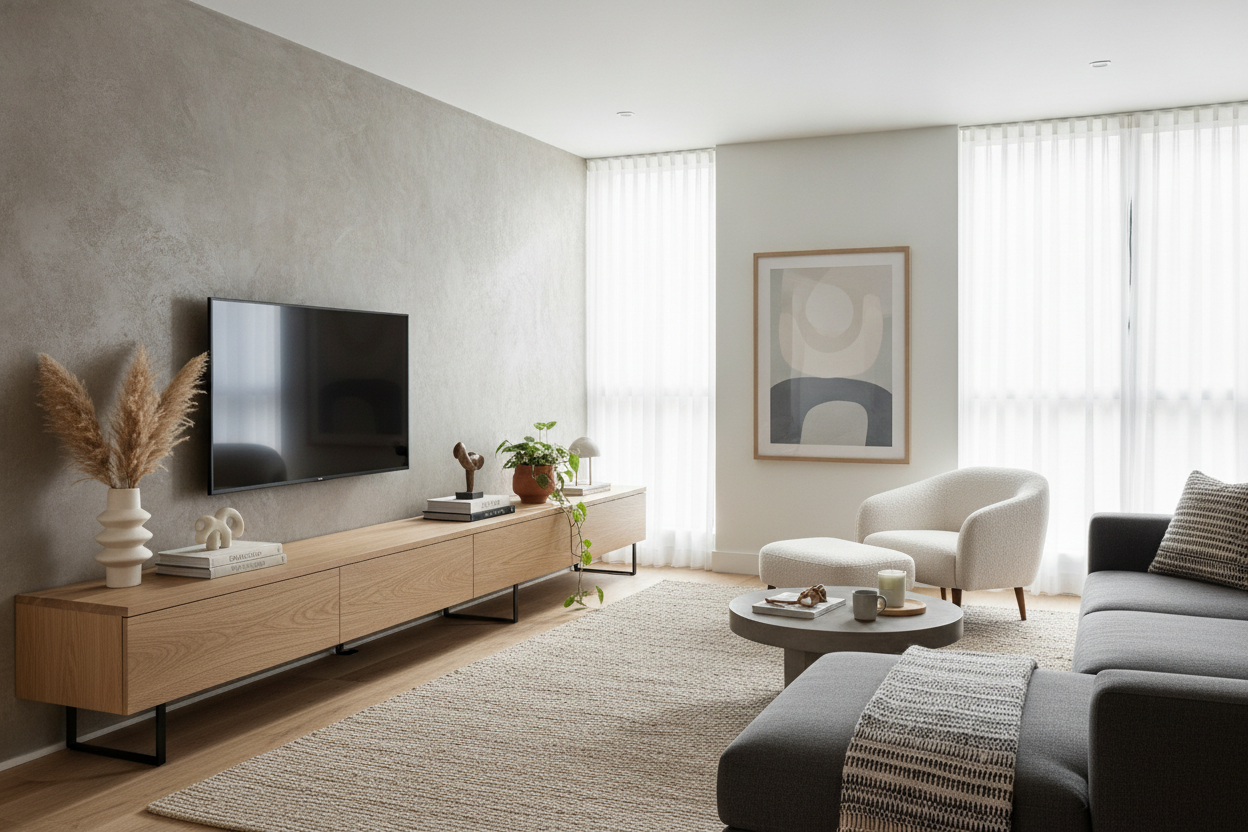
I remember staring at my first 'adult' living room wall with a tape measure in one hand and a level in the other, convinced that if I didn't find the exact mathematical center, the whole room would feel broken. I spent three hours centering a 55 tv entertainment center only to realize it looked like a postage stamp on a giant envelope. It was technically correct, but visually, it was a total snooze.
We have this instinct to treat the TV like an altar, but a 55-inch screen isn't actually that big when it's up against 12 feet of drywall. By forcing it into the middle, you're usually killing the flow of the rest of the room. Here is why I stopped aiming for the bullseye and started embracing the lopsided look.
Quick Takeaways
- Centering a mid-sized TV often creates 'dead zones' of unusable wall space on either side.
- An asymmetrical layout makes room for functional additions like reading nooks or floor plants.
- Your console should always be at least 10-15 inches wider than the TV to avoid the 'lollipop' look.
- Visual balance is achieved through weight, not just mirror-image placement.
The 'Dead Center' Mistake We All Make
When you place a 55-inch screen dead-center on a large wall, you’re essentially highlighting the emptiness around it. It’s a classic proportions trap. A 55-inch TV is about 48 inches wide; on a standard 12-foot wall, that leaves four feet of awkward, blank space on both sides. It makes the TV look smaller than it actually is.
Most people grab standard tv stands that match the width of the TV exactly, shove them into the middle of the room, and then wonder why the space feels cold. It’s because the eye doesn't have a 'path' to follow. You’ve created a focal point that doesn't lead anywhere, leaving the corners of your room to feel like an afterthought.
The Magic of Asymmetrical Styling
The goal is to stop thinking about the wall as one big rectangle and start thinking about it as two distinct zones. By sliding your 55 tv entertainment center to one side—usually about a third of the way in from a corner—you suddenly open up a massive chunk of real estate.
This isn't just about 'vibes'; it’s about utility. Shifting the media unit over creates a natural spot for a tall olive tree, a cozy armchair, or even a small desk. You’re turning a 'TV wall' into a multi-functional living space. It feels intentional, like a curated gallery rather than a showroom floor.
Balancing the Visual Weight
If you move the TV to the left, the right side of the wall is going to feel light. You have to balance that 'weight' without just adding another piece of bulky furniture. I love using a floating wall mounted media console for this because it keeps the floor visible, which makes the room feel much larger.
To balance the offset screen, try a gallery wall that 'steps' down toward the TV, or a single, oversized piece of art on the empty side. A tall floor lamp with a bit of arc can also bridge the gap between the TV and the rest of the room. The key is to make sure the heights vary; you don't want everything sitting at the same 24-inch level.
Scaling Your Off-Center Unit Appropriately
This trick only works if the furniture itself has enough 'heft.' If you push a tiny stand to the corner, it looks like you’re hiding it. I always follow the golden rule for sizing an entertainment center: your console should be roughly 25% wider than the TV. For a 55-inch screen, I’m looking for a unit that is at least 60 to 70 inches long.
This prevents the 'lollipop effect,' where a wide screen sits on a narrow base and looks like it might tip over at any second. A wider base provides a 'grounding' effect that allows the TV to feel like part of the furniture, rather than an appliance just sitting on top of it.
My Go-To Layouts for Tricky Living Rooms
I’ve used off-center layouts to save dozens of awkward rooms. If you have a fireplace that isn't centered, don't try to fight it by centering the TV on the adjacent wall. Instead, align the TV console with the edge of the fireplace hearth to create a continuous line. It tricks the eye into seeing one large, cohesive architectural feature.
In narrow apartments, pushing the TV toward the window allows you to keep the 'traffic lane' clear. If your entertainment center is probably too narrow, it forces people to walk right in front of the screen. By choosing a longer, off-center unit, you can guide the walking path behind the sofa or along the far wall, keeping the 'viewing zone' sacred.
Personal Experience: My 'Small Room' Lesson
I once lived in a studio where I insisted on centering my TV on the only long wall I had. It left me with 18 inches on either side—literally useless space. I couldn't fit a plant, a lamp, or even a trash can there. I eventually wised up, slid the console two feet to the left, and suddenly had room for a full-sized bookshelf. The room felt twice as big overnight. My only regret was the six extra holes I had to patch in the drywall from moving the mount.
FAQ
Does an off-center TV cause neck strain?
Only if you don't angle your seating. The TV doesn't have to be centered on the wall, but it should be centered to your primary viewing spot. Just pivot your sofa or armchair to face the new 'media zone.'
How wide should a tv console 55 inch be?
Aim for at least 60 inches. Anything less than 54 inches will make the TV look top-heavy. If you go up to 72 inches, you have extra room for decor like books or a small lamp on the console itself.
Can I off-center a TV if I have a soundbar?
Yes. Just keep the soundbar centered to the TV screen itself. The whole 'unit' (TV and soundbar) moves together as one visual block on your wall.

Dejar un comentario
Este sitio está protegido por hCaptcha y se aplican la Política de privacidad de hCaptcha y los Términos del servicio.