










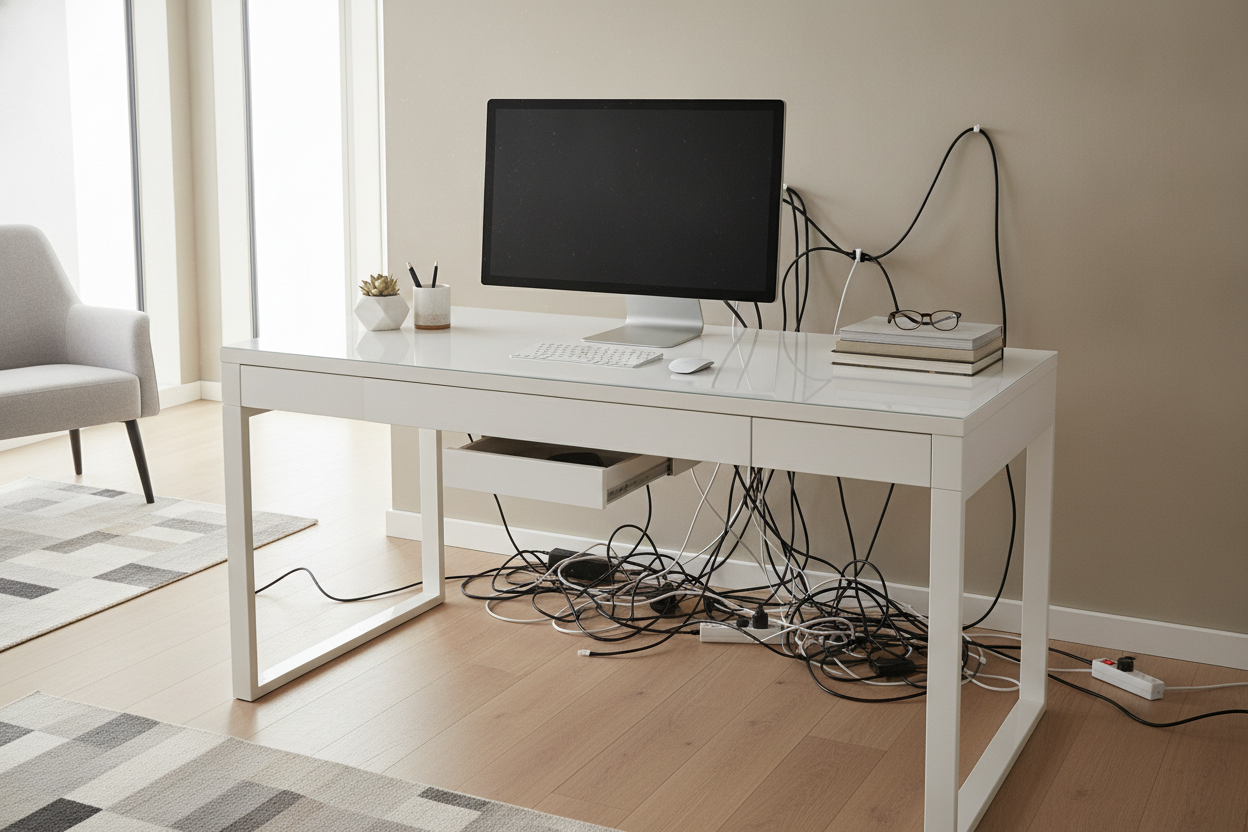
I remember unboxing my first ultra-thin glass desk like it was yesterday. It looked like a floating slab of light in my studio apartment—until I plugged in my MacBook. Suddenly, my minimalist masterpiece looked like it was being strangled by a black rubber octopus. It’s the classic bait-and-switch of modern furniture: the thinner the profile, the more work you have to do to keep it from looking like a disaster zone.
The truth is, sleek desks are designed for people who don't actually own electronics. But since most of us need power for our laptops, phones, and monitors, that 'simple' look requires more planning than the furniture assembly itself. If you aren’t ready to fight the cable war, your workspace will never look like the photos.
- Buy a cable management tray or J-channel before the desk even arrives.
- Wireless peripherals (mouse, keyboard) are non-negotiable for this aesthetic.
- Mount your power strip to the underside of the desktop using industrial Velcro.
- Accept that you will need a separate pedestal or floating shelf for your actual 'stuff.'
The Instagram Lie: Why Minimalist Workspaces Fail
We've all seen the photos on social media: a simple modern desk sitting in a sun-drenched room with nothing on it but a single succulent and a closed laptop. It is a beautiful lie. What you don’t see are the photographers tucking the power bricks under the rug and hiding the mouse in a drawer that probably doesn't even exist in that model. They are selling a feeling, not a functional workstation.
In reality, a sleek desk offers zero forgiveness. There is no chunky frame or thick modesty panel to hide a tangled mess of HDMI cables or that bulky charger for your 2021 Dell laptop. If you have a desktop PC or a dual-monitor setup, that thin silhouette is going to be fighting for its life against a sea of plastic wires. You aren’t just buying furniture; you are committing to a lifestyle of aggressive cable pruning. If you aren't prepared to zip-tie every single cord to a table leg, you’re better off with a traditional executive desk.
Where Does the Clutter Actually Go?
The hardest part about an office desk sleek enough to fit in a hallway is the total lack of storage. Most of these tops are barely an inch thick—usually 0.75-inch MDF or a thin sheet of tempered glass. You can't just sweep your pens, sticky notes, and half-eaten granola bars into a junk drawer because there isn't one. The moment you add a stapler and a stack of mail, the minimalist vibe evaporates.
Transitioning to a modern sleek desk means you have to become a curator. You need to follow a contemporary office desk styling guide to figure out what actually deserves to take up real estate on your desktop. If it isn't beautiful or essential, it has to live somewhere else. I spent three weeks losing my favorite pens before I realized I needed a dedicated felt tray just to keep things from rolling off the edge. You have to be okay with your 'office' being spread across the desk and a nearby bookshelf.
The Dark Art of Aggressive Cable Management
If your modern sleek desk has spindly 16-gauge steel legs, you have nowhere to hide a power strip. My solution? Industrial-strength Velcro. I stick the power strip directly to the underside of the desk near the back edge. It’s a bit of a workout for your lower back to get it installed, but it keeps the 'spaghetti monster' off the floor and out of sight. It’s the only way to keep the floor space clear, which is the whole point of a thin desk.
Use adhesive cable clips to run wires along the back edge or down the least-visible leg. If you can see a cable dangling in mid-air, the 'sleek' effect is dead. I even went as far as buying white cables to match my white walls—it’s a level of obsession you have to embrace. I also recommend using a single-cable USB-C dock. It allows you to plug one wire into your laptop for power, video, and data, hiding the other five cables under the desk surface where they belong.
When to Compromise on the Ultra-Thin Look
Sometimes a desk is just too thin to be functional for a 40-hour work week. There is a massive difference between decorative writing and computer desks. A writing desk might be 18 inches deep, which is great for a diary but miserable for a 27-inch monitor. Your neck will hate you within an hour because your screen is way too close to your face. I’ve found that a 24-inch depth is the absolute minimum for actual work.
If you need the surface area but want to keep the profile thin, pair the desk with a rolling file cabinet that slides underneath. It gives you the storage of a heavy executive desk without the permanent visual bulk. I use a slim 3-drawer unit on casters that I can wheel away when I want the room to feel open again. It’s the 'cheat code' for people who love the minimalist look but actually have papers to file and chargers to store.
How to Keep Your Setup Looking Expensive
Minimalism is high-maintenance. On a heavy oak desk, a little dust or a coffee ring adds 'character.' On sleek home office desks, it just looks like you're messy. I keep a microfiber cloth in my top drawer (well, in my rolling cart) and wipe the surface down every single morning before I log on. Glass and high-gloss white finishes are the worst offenders for fingerprints and dust bunnies.
To really style your modern office desk so it looks intentional rather than just empty, stick to a strict color palette. One high-quality wool desk mat and a single lamp with a hidden cord do more for the room than five cheap accessories. It’s about quality over quantity. If you buy a $500 desk and put a $5 plastic lamp on it, the whole thing looks cheap. Invest in a few solid pieces that match the metal or wood of the desk frame.
Personal Experience: My Glass Desk Disaster
I once bought a 60-inch tempered glass desk with chrome legs. It was gorgeous in the showroom. But I forgot one thing: glass is transparent. You could see every single cable tucked underneath the desk from across the room, even if they were 'managed.' I ended up having to wrap the cables in decorative tech-sleeves just to make them look like part of the design. It was a 10-hour project for a 10-minute 'sleek' look. Learn from my pain: if you go thin, go opaque unless you are a literal wizard with wire ties.
FAQ
Are sleek desks stable enough for dual monitors?
Only if the frame is steel and the top is at least 1-inch thick. If it is just thin particle board with screw-in legs, a heavy dual-monitor arm will eventually crack the surface or cause a terrifying wobble every time you type. Always check the weight capacity before mounting arms.
How do I hide a laptop dock on a thin desk?
Mount it to the underside using a 'laptop under-desk mount' or heavy-duty mounting tape. It keeps the heat away from your hands and clears up about 12 inches of horizontal space. It also makes the desk look much more expensive than it actually is.
Do I really need a desk mat?
Yes. Thin desks are often made of materials like laminate or glass that scratch easily or feel cold to the touch. A wool or vegan leather mat adds 'visual weight' and protects the surface from the constant friction of your mouse and keyboard.


Dejar un comentario
Este sitio está protegido por hCaptcha y se aplican la Política de privacidad de hCaptcha y los Términos del servicio.