










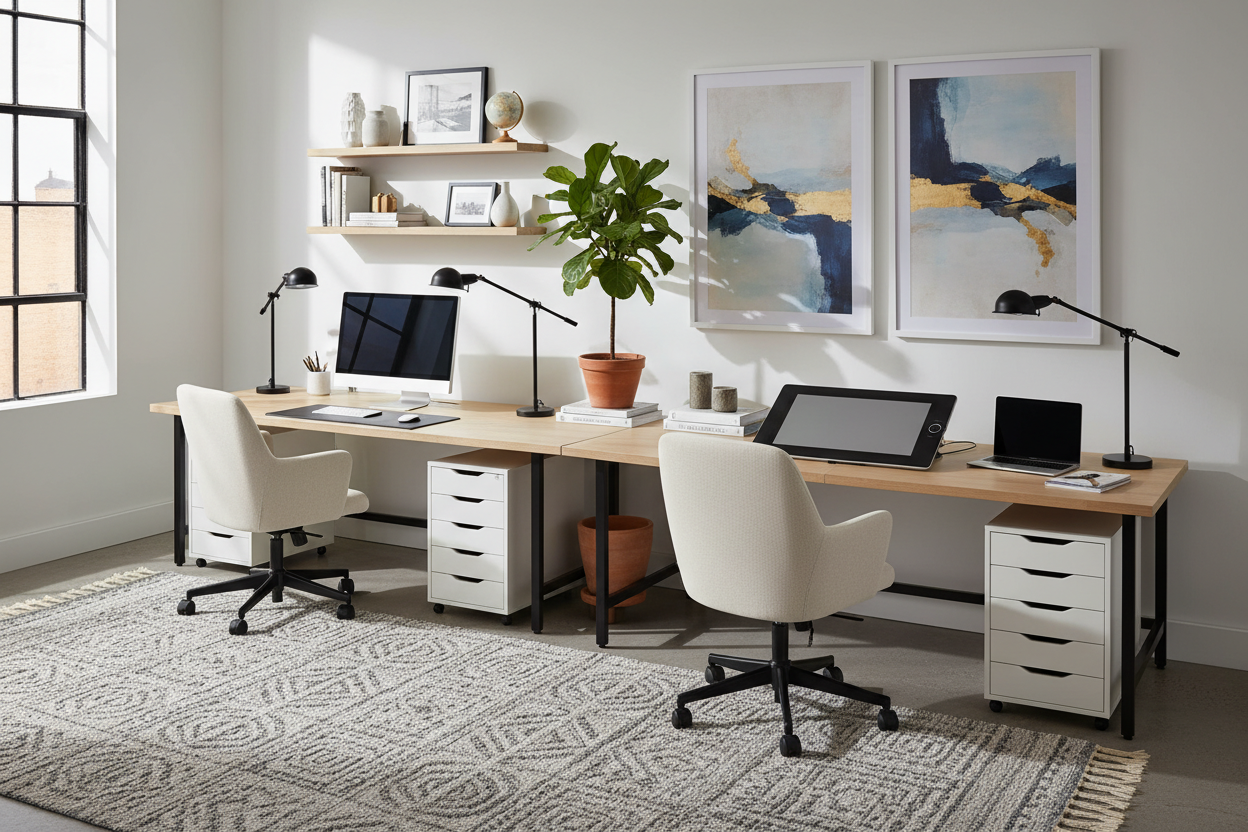
Designing a shared home office often presents a unique spatial challenge: how do you accommodate two workstations without making the room feel like a cramped call center? The default reaction is to buy two separate tables, but this frequently fractures the room's visual flow. The smarter, designer-approved solution is creating a streamlined silhouette using double desks ikea components.
In this guide, we will move beyond the basic catalog setup. I will walk you through how to select the right modular pieces to create a cohesive, architectural workspace that looks custom-built rather than flat-packed.
Key Features to Look For
Before heading to the warehouse, review this checklist to ensure your configuration will actually function for two adults.
- Surface Density: Avoid hollow-core tops if you plan to mount heavy monitor arms; look for solid wood or thick veneer.
- Span Support: Any span over 140cm typically requires a center support leg to prevent sagging.
- Depth Requirements: A depth of at least 60cm is non-negotiable for proper keyboard and monitor ergonomics.
- Modular Compatibility: Ensure your chosen tabletop pairs correctly with base units (like the Alex or Mittback) without requiring custom drilling.
The Anatomy of a Shared Workspace
When creating an ikea desk for 2, you are essentially playing with volume and negative space. The goal is to reduce visual clutter. A single, continuous surface creates a sense of expansiveness that two separate desks cannot achieve.
Choosing the Right Material
The finish of your desktop dictates the longevity of the piece. While the standard white laminate is cost-effective, it lacks the warmth and texture needed for a sophisticated interior.
For a more elevated aesthetic, I often direct clients toward the kitchen countertop section (specifically the Karlby or Saljan series). These provide a robust, ikea long desk with drawers configuration when paired with under-desk storage. The walnut or oak veneer offers a tactile quality that resists fingerprints and creates a focal point in the room, unlike the standard paper-foil finishes which can feel sterile.
Space Planning and Layout
The placement of your storage defines the functionality of the desk for two ikea setups. You have two main layout options:
1. The Anchor Layout: Place a drawer unit in the exact center, with legs on the outer edges. This creates a natural boundary between workstations, giving each user a defined zone. It is excellent for privacy but requires a longer top (200cm+) to ensure ample legroom.
2. The Floating Bridge: Place drawer units on the far left and far right, leaving the center open (supported by a leg). This offers more freedom of movement but requires disciplined cable management, as the space under the desk is entirely visible.
Ergonomics and Visual Balance
A common oversight in DIY double desk setups is the chair height relative to the apron of the desk. If you are using drawer units as legs, the desk height is fixed at roughly 70-73cm. Ensure your task chairs have adjustable armrests; otherwise, they may collide with the desktop, forcing you to sit too far away from your work.
To maintain visual balance, keep the desktop clear of heavy towers or printers. Relegate these to the floor or a separate credenza. The beauty of a long span desk is the horizontal line it creates; breaking this line with clutter diminishes the architectural impact.
My Personal Take on double desks ikea
I have specified IKEA hacks for high-end rentals and starter homes alike, but I learned a hard lesson early on regarding the "Lagkapten" series.
I once designed a dual workspace for a graphic designer couple. To save budget, we used the hollow-core Lagkapten top. It looked pristine on installation day. However, one of the clients used a heavy-duty, clamp-style dual monitor arm. Within three weeks, the pressure of the clamp had crushed the internal honeycomb paper structure, leaving a permanent, ugly indentation and a wobbly monitor.
The lesson? If you use clamp-mount accessories, you must use a solid wood top or the particleboard kitchen countertops. The hollow desks are fantastic for laptops and writing, but they cannot handle the torque of heavy peripherals. Also, a small detail that drives me crazy: the Alex drawers are slightly deeper than some tabletop options. Always measure that overhang; if the drawers stick out past the desktop, it ruins the sleek profile immediately.
Conclusion
Creating a luxury workspace doesn't require a custom joinery budget. By thoughtfully selecting materials and prioritizing structural integrity, you can configure double desks ikea components into a studio-worthy centerpiece. Focus on the long lines, hide the cables, and choose a finish that brings warmth to your workflow.
Frequently Asked Questions
What is the minimum length for a comfortable two-person desk?
Ideally, you want at least 200cm (approx. 78 inches) of total width. This allocates 100cm per person, which is sufficient for a laptop, monitor, and notebook. Anything less than 180cm will result in constant elbow bumping.
Can I cut IKEA countertops to fit a specific alcove?
Yes, but with a caveat. The veneer countertops (like Karlby) or laminate options (like Saljan) can be cut with a circular saw. However, you must use the provided edging strip to seal the raw cut end, otherwise, moisture can enter and swell the particleboard core.
How do I stop the tabletop from sliding on the drawer units?
If you aren't drilling the top into the drawers, use clear silicone bumper pads or anti-slip rug tape between the top of the drawer unit and the underside of the desk. This provides enough friction to keep the top stable without damaging the finish.


Leave a comment
This site is protected by hCaptcha and the hCaptcha Privacy Policy and Terms of Service apply.