










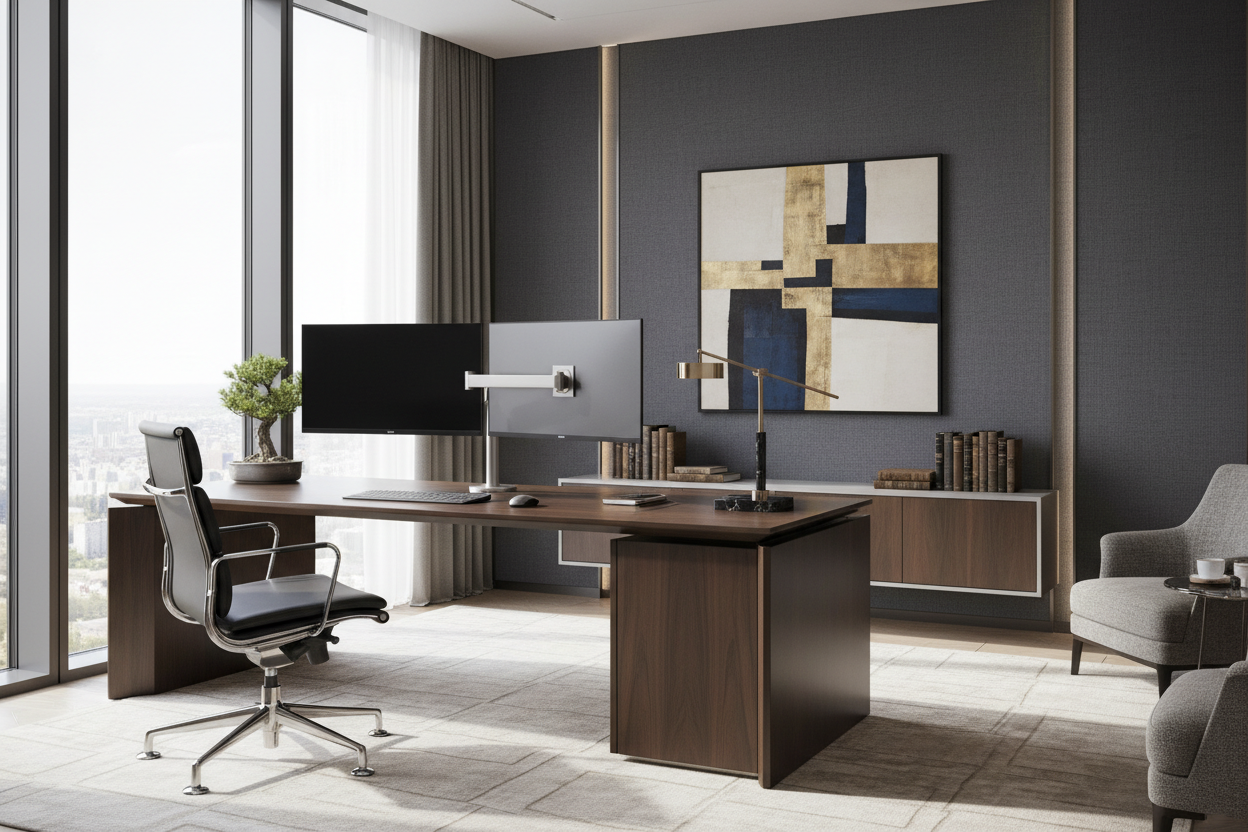
One of the most frequent design dilemmas I encounter with clients is the battle between technology and tranquility. You want a high-performance workspace, but you don't want your home office to look like a server room. The computer setup desk acts as the visual anchor of your study; if it feels cluttered or industrial, the entire room loses its sophistication. This guide moves beyond basic utility to help you select a piece that offers architectural beauty while supporting your workflow.
Key Features to Look For
- Material Integrity: Prioritize solid hardwoods (Walnut, White Oak) or high-grade veneers over particle board for longevity and tactile warmth.
- Depth & Scale: A minimum depth of 30 inches is crucial for best workstation setups to maintain proper focal distance from monitors.
- Cable Architecture: Look for desks with integrated modesty panels or hidden grommets to maintain a clean silhouette.
- Leg Stability: ensure the frame is steel or solid joinery to prevent monitor wobble during intense typing.
Selecting Materials: Texture and Durability
When curating the best computer desk setups, the surface material dictates the room's mood. For a luxury aesthetic, avoid high-gloss finishes that attract dust and fingerprints. Instead, opt for matte-finished solid wood or linoleum-topped surfaces. Linoleum is a favorite in high-end workstation setups because it is soft to the touch, naturally anti-static, and doesn't reflect overhead lighting glare, which reduces eye strain over long hours.
Space Planning and Visual Weight
The footprint of your furniture must respect the room's flow. A heavy, double-pedestal desk demands a large room to breathe. If you are working with limited square footage, a pc setup small desk requires a lighter visual touch. Look for legs with a slender profile or a floating design. This exposes more floor space, tricking the eye into perceiving the room as larger. Even in compact areas, never sacrifice depth for width; a shallow desk forces you too close to the screen, ruining ergonomics.
Integrating the IT Desk Setup
Functional IT desk setup requirements—like multiple monitors and heavy towers—can disrupt a clean design. The solution lies in 'zoning.' Use a desk with a dedicated CPU compartment or mount the tower under the desk surface to keep the top clear. Accessories should be intentional; swap plastic risers for wood or aluminum that matches your desk's hardware.
Creating the "Cool" Factor with Lighting
What makes for cool desk set ups isn't just RGB strips; it is the layering of ambient and task lighting. A high-quality desk lamp with a brass or matte black finish serves as a piece of jewelry for the desk. Position bias lighting behind your monitor to reduce contrast ratios, which softens the harsh digital glow and blends the screen into the surrounding decor.
My Personal Take on Computer Setup Desks
I learned a hard lesson early in my career regarding the best workstation setup choices. I once specified a stunning, reclaimed barn-wood desk for a client who was a graphic designer. Visually, it was a masterpiece of texture. Practically? It was a disaster. The uneven grain made using a mouse erratic, and the soft, aged wood actually compressed when we tried to clamp a heavy dual-monitor arm to the back edge.
Since then, I always perform the "thumbnail test" on wood finishes to check density and ensure the underside of the desk is solid, not hollow, to support heavy clamp-mounts. It is these unpolished, tactile details—how the edge feels against your wrist or whether a monitor arm crushes the veneer—that determine if a desk is truly worth the investment.
Conclusion
Your workspace should be a reflection of your personal style, not just a holding ground for electronics. By investing in quality materials, respecting the scale of your room, and managing your technology with intention, you can create a space that invites creativity rather than stress. Treat your desk as a permanent fixture of the home, and the functionality will follow.
Frequently Asked Questions
What is the ideal height for a computer setup desk?
Standard desk height is between 29 and 30 inches. However, for the most ergonomic posture, your elbows should rest at a 90-degree angle. If you are shorter or taller than average, an adjustable sit-stand mechanism concealed within a premium wood top is the best solution.
How do I manage cables on a desk with open legs?
For open-leg designs, visual clutter is the enemy. Use cable spines that attach to the back of the leg to route wires down to the floor. Additionally, mounting a power strip to the underside of the desktop ensures only one single cord needs to run to the wall outlet.
Can a small desk accommodate a dual monitor setup?
Yes, a pc setup small desk can handle dual screens if you utilize vertical space. Instead of using the factory stands, use a desk-mounted monitor arm. This reclaims valuable surface area for your keyboard and notebook, keeping the setup functional without feeling crowded.

Leave a comment
This site is protected by hCaptcha and the hCaptcha Privacy Policy and Terms of Service apply.