










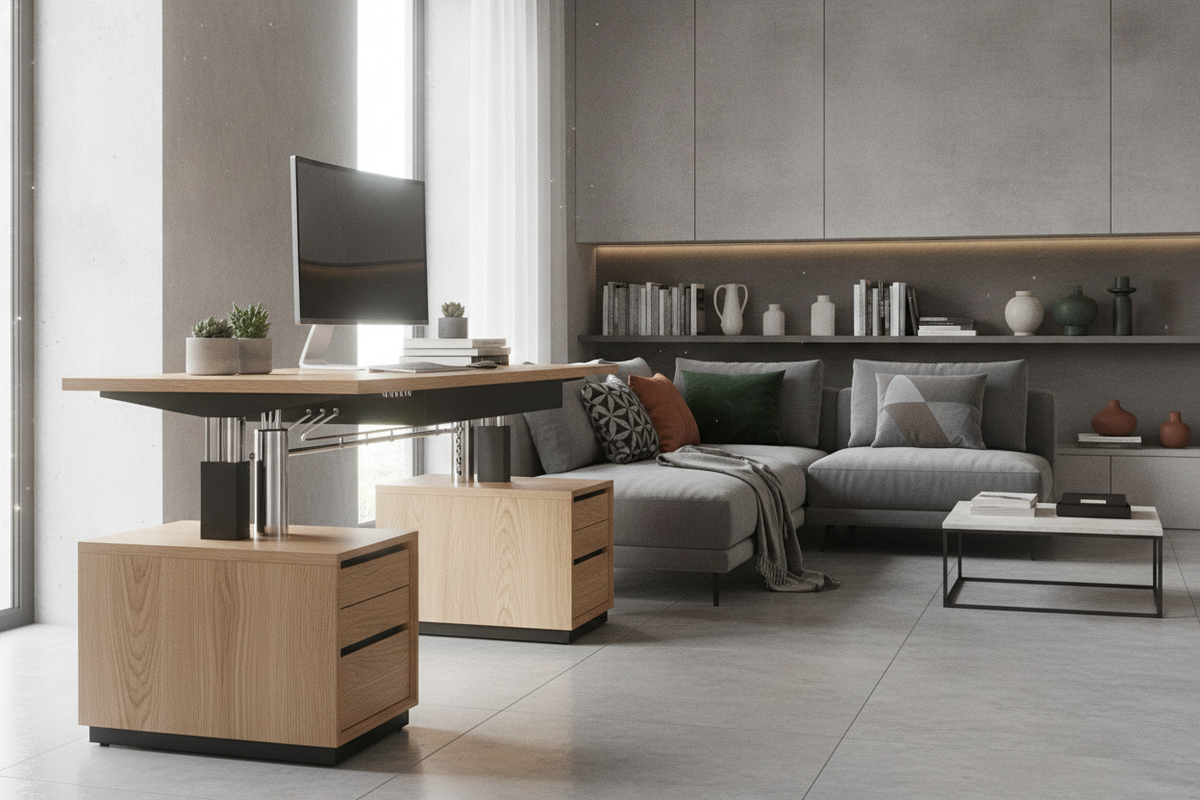
Understanding the Hydraulic Adjustable Desk Mechanism
Creating an adaptable home workspace often comes down to choosing the right kinetic furniture. A hydraulic adjustable desk offers a dynamic foundation for daily tasks by utilizing fluid-assist or gas-strut lift systems rather than electric motors. These mechanisms counterbalance the weight of the desktop and your desktop essentials, allowing smooth elevation changes with the touch of an intuitive release lever.
Because these desks operate using enclosed fluid or gas pressure systems, they bypass the need for power cords, wall plugs, or intricate motor housings. This self-contained engineering yields an exceptionally quiet transition between sitting and standing postures while granting complete freedom over where you position your workstation within a room.
Manual Fluid Lift vs. Electric Actuation
Selecting between manual fluid-assist mechanisms and motorized frames involves distinct aesthetic and practical considerations. Motorized desks require access to electrical outlets, leaving cords running along baseboards or hanging beneath the frame. In contrast, a hydraulic adjustable height desk maintains a clean, cordless silhouette that suits open floor plans, floating layouts, and minimalist interior themes.
Fluid-assist systems also offer immediate manual response without waiting for motor gearboxes to cycle. By depressing a hand paddle or release handle, you can quickly guide the surface to your preferred height. Without circuit boards, gear wear, or power supplies to worry about, fluid systems provide dependable simplicity for long-term home office planning.
Dimensional Frameworks: Selecting the Right Footprint
Choosing the ideal surface size requires balancing your daily project workflow with the physical proportions of the room. When exploring a height adjustable desk product for your layout, evaluate how your computing equipment, task lighting, and writing materials will occupy the surface.
- Compact Nooks: Narrower work surfaces fit neatly into bedroom corners, alcoves, and guest spaces without disrupting surrounding circulation paths.
- Standard Dedicated Offices: Mid-sized surfaces comfortably hold dual displays, a dedicated keyboard tray zone, and peripheral accessories while leaving perimeter room for complementary furniture.
- Executive and Multi-Monitor Workstations: Expansive surfaces accommodate multi-display setups, desktop audio monitors, reference binders, and writing pads for multitasking professionals.
Desktop Depth, Reach Zones, and Vertical Clearance
Spatial planning for an adjustable surface extends beyond horizontal floor area. A dynamic desk travels vertically, meaning you must preserve clearance around wall trim, window sills, art frames, and open wall shelving. Maintain a modest perimeter gap between the back edge of your desk and the wall to prevent scuffs during height adjustments.
Desktop depth also dictates your comfort zones. Primary tools like mice and keyboards belong within comfortable forearm reach, while monitors, desk risers, and task lamps rest in the secondary zone toward the rear edge. Keeping heavy accessories centered over the frame promotes smooth kinetic movement whenever you raise or lower the desktop.
Material Selection and Structural Stability
The longevity and stability of an adjustable workstation depend heavily on the pairing of its top surface and underframe. Quality engineered woods with protective laminate coatings offer strong resistance against daily scuffs, moisture rings, and light impacts. These surfaces come in a variety of woodgrain patterns, clean whites, and deep tones that coordinate seamlessly with existing residential cabinetry.
Underneath the work surface, heavy-gauge steel leg assemblies and wide base feet establish a solid foundation. Crossbars and dual-column telescoping legs minimize kinetic sway when working in elevated positions, providing a secure platform for typing, sketching, and computing.
Integrating Storage with Dynamic Workstations
Because an adjustable desk moves throughout the day, attaching deep drawers directly beneath the surface can add unwanted bulk or impede legroom. A cohesive home office balances dynamic work surfaces with surrounding organization, such as an adjustable collection of shelving units and credenzas.
- Low Side Credenzas: Positioned adjacent to the desk, low credenzas offer flat staging areas for printers and desk supplies without intersecting the descending desktop edge.
- Mobile Under-Desk Pedestals: Compact filing cabinets on casters can tuck beneath the frame during sitting mode or roll aside to create open foot space.
- Perimeter Wall Cabinets: Tall display towers and closed cabinets keep binders, books, and electronics close at hand while leaving the desk completely clear.
Multi-Functional Room Layouts and Companion Accent Furniture
In shared rooms, guest suites, or open living areas, an adjustable workstation often sits near other accent furnishings. Reviewing an adjustable guide helps ensure auxiliary surfaces, accent tables, and lounge seating complement the movement of your main desk rather than cluttering pathways.
Coordinating finishes across desks, shelving, and occasional furniture creates visual unity, allowing a dedicated task zone to feel like an intentional part of the home rather than an utilitarian office intrusion.
Dedicated Grooming and Vanity Transition Workstations
The versatility of fluid-assist lift systems also extends into hybrid daily routines. Multi-purpose designs, such as a specialized desk adjustable height product, show how flexible elevation enhances everything from morning preparation to afternoon laptop sessions in compact residential spaces.
Integrating multi-functional pieces allows smaller apartments and dual-purpose rooms to serve changing personal needs throughout the day without requiring duplicate furniture setups.
Assembly, Cable Routing, and Daily Care
Setting up a fluid-assist desk involves straightforward frame assembly and thoughtful cable management. When routing cords for your monitor, computer, and desk lamps, install a flexible cable spine or underside routing basket. Ensure all wires possess sufficient slack to travel freely from lowest to highest elevations without pulling taut.
For everyday maintenance, wipe down laminate and engineered surfaces with a soft, slightly damp microfiber cloth, avoiding harsh chemical cleaners. Periodic checks on frame hardware ensure fasteners remain snug, preserving smooth lift motion and dependable everyday stability.


Leave a comment
This site is protected by hCaptcha and the hCaptcha Privacy Policy and Terms of Service apply.