










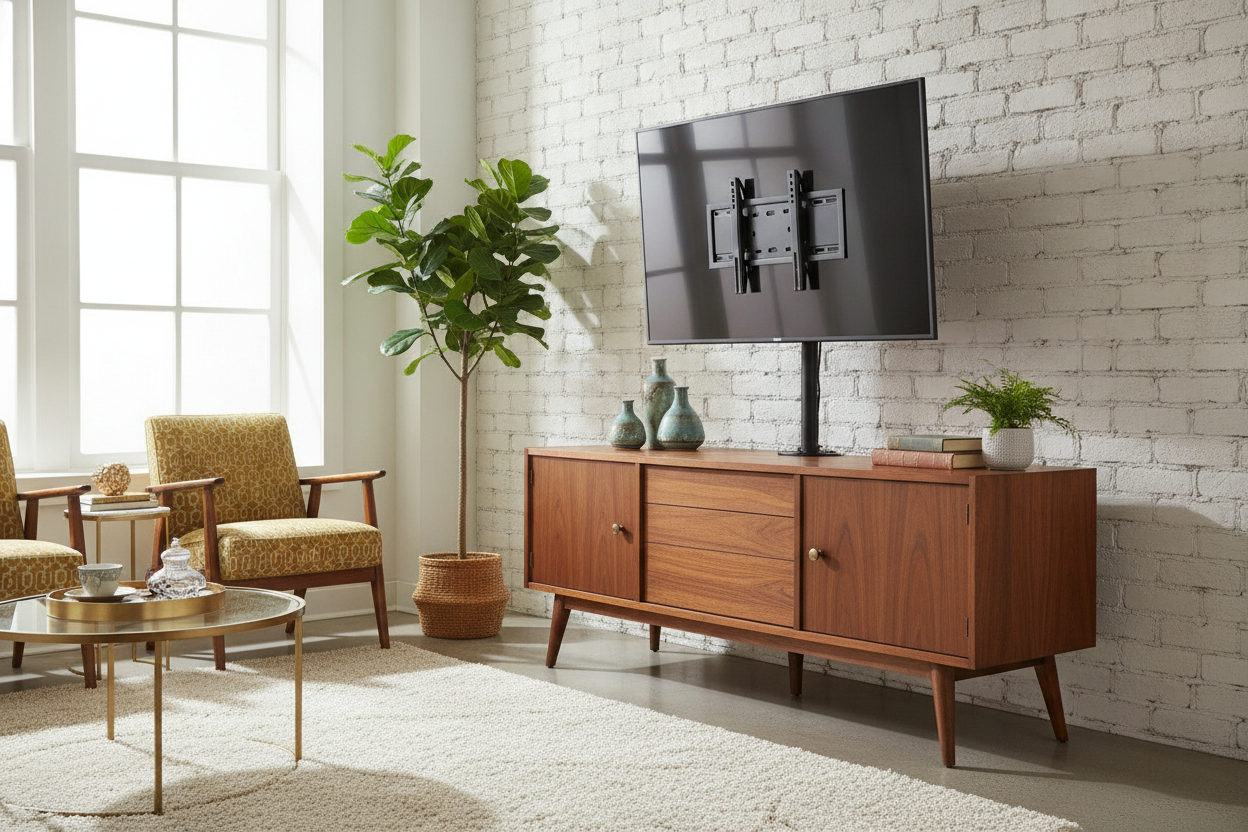
I spent three months scouring estate sales for the perfect 1964 walnut sideboard. When I finally found it, I spent another two weekends stripping old lacquer and hand-rubbing it with Danish oil until it glowed. Then, I bought a new 65-inch OLED. I unboxed the TV, ready for a movie night, only to realize that the 'chicken feet' legs included in the box were spaced 58 inches apart. My beautiful, labor-of-love credenza was only 54 inches wide.
I stood there holding a $1,500 piece of glass while my partner suggested we just 'buy a bigger table.' Absolutely not. I wasn't about to let modern TV design dictate my interior aesthetic. That is when I discovered the universal tv stand 65 inch mount—a heavy-duty pedestal that effectively turns a massive flat screen into a piece of furniture that actually fits where you want it to.
- Center Mount Magic: Replaces wide-set factory legs with a single, sturdy central base.
- Vintage Friendly: Allows you to keep narrow or antique furniture without overhanging edges.
- Swivel Function: Most universal stands allow for 30-45 degrees of rotation—something factory legs never do.
- Cable Management: Integrated clips hide the 'spaghetti' of wires behind the main support pillar.
The Awkward 'Wide Legs' Problem Nobody Warns You About
Modern TV manufacturers have moved toward 'edge-mounted' feet for a few reasons. It is cheaper to produce two small plastic legs than one heavy center base, and it provides a wide footprint for stability on basic surfaces. But for those of us who prefer curated tv stands with character—like vintage sideboards, antique chests, or even just narrower modern consoles—these wide legs are a total dealbreaker.
The overhang isn't just an eyesore; it is a massive safety hazard. If those legs aren't fully supported by the surface beneath them, the slightest bump will send your expensive screen face-planting onto the floor. I briefly considered buying a whole new piece of furniture, but I realized that buying entirely new tv stands just to accommodate a poorly designed pair of plastic feet felt like a defeat. I needed a way to concentrate the weight of the TV into the center of my credenza, and that is exactly what a universal bracket does.
Enter the Center Pedestal Solution
The solution is a VESA-compatible center mount. These are aftermarket stands that bolt directly into the four mounting holes on the back of your TV (the same ones you’d use for a wall mount) and attach to a heavy, weighted base. It completely eliminates the need for those wide-set factory feet. Suddenly, my 65-inch TV had a footprint of only 20 inches wide instead of 58.
I spent a lot of time researching which one to get. A friend of mine recommended a universal tv stand Home Depot sells that he used for his gaming setup. While that one was solid, I ended up looking for something with a slightly lower profile to keep the TV closer to the surface of my wood. The beauty of the universal tv stand 65 category is the variety. You can find bases made of heavy-duty steel or tempered glass, depending on how much of a 'tech' look you want to embrace. I opted for a matte black steel version that blends into the shadows behind my soundbar.
But Is It Actually Going to Tip Over?
This was my biggest fear. You are taking a 60-pound, 65-inch piece of glass and balancing it on a single neck. It feels like it shouldn't work. However, these stands are built with a low center of gravity and massive base plates. I was initially skeptical about whether a budget tv stand with mount actually sturdy enough for a heavy OLED, but the physics are sound as long as the base is heavy enough.
Most high-quality universal stands use 8mm or 10mm tempered glass for the base. This weight acts as an anchor. When I finished the assembly, I gave the TV a 'stress test' (a gentle nudge). Unlike the flimsy factory legs that wobbled, this thing felt like it was bolted to the floor. If you have kids or pets, look for a model that includes a safety cable you can tether to the back of your furniture for extra peace of mind.
The 3 Measurements You Need Before Ordering
Before you hit 'buy,' you have to do a little homework. First, check your TV's VESA pattern. This is the distance (in millimeters) between the four holes on the back of your TV. For most 65-inch models, it is 400x400mm, but some Sony or LG models vary. If your stand doesn't match your VESA pattern, it simply won't bolt on.
Second, check the weight capacity. A 65-inch TV usually weighs between 45 and 75 pounds. Most universal stands are rated for 80-110 pounds, but don't cut it close. Buy a stand that is rated for at least 20% more than your TV's actual weight. Finally, check the height adjustability. You want to make sure the stand can lift the TV high enough to clear your soundbar, but not so high that you're straining your neck looking up at it like you're in the front row of a movie theater.
Why I'm Never Going Back to Factory Legs
Aside from saving my vintage furniture, the universal stand added a feature I didn't know I needed: the swivel. Being able to turn the screen 30 degrees toward the kitchen while I'm cooking or toward the armchair when I'm reading is a luxury factory legs don't offer. It makes the whole living room feel more flexible.
While I'll admit that a high-end hidden tv mechanism with remote control is the ultimate dream for a clean aesthetic, a $50 universal stand is the best 'bang for your buck' upgrade you can make. It solves the wide-leg problem, improves your viewing angle, and—most importantly—means you don't have to get rid of that mid-century credenza you spent weeks refinishing.
FAQ
Will a universal stand scratch my wood furniture?
Most come with rubber or felt pads for the bottom of the base. If yours doesn't, just buy a pack of adhesive felt furniture sliders from the hardware store and stick them on yourself. It protects the finish and actually makes it easier to slide the TV around if you need to access the plugs.
Can I use this for a curved TV?
Yes, but you usually need specific spacers (which are almost always included in the hardware bag of the stand). These spacers sit between the bracket and the TV to account for the curve so the metal plate doesn't put pressure on the screen.
How long does assembly take?
If you're handy, 15 minutes. If you're 'instruction-manual challenged,' maybe 30. It is much easier with two people—one to hold the TV and one to screw in the bolts. Don't try to lift a 65-inch TV onto the stand by yourself; that is how screens get cracked.


Leave a comment
This site is protected by hCaptcha and the hCaptcha Privacy Policy and Terms of Service apply.