










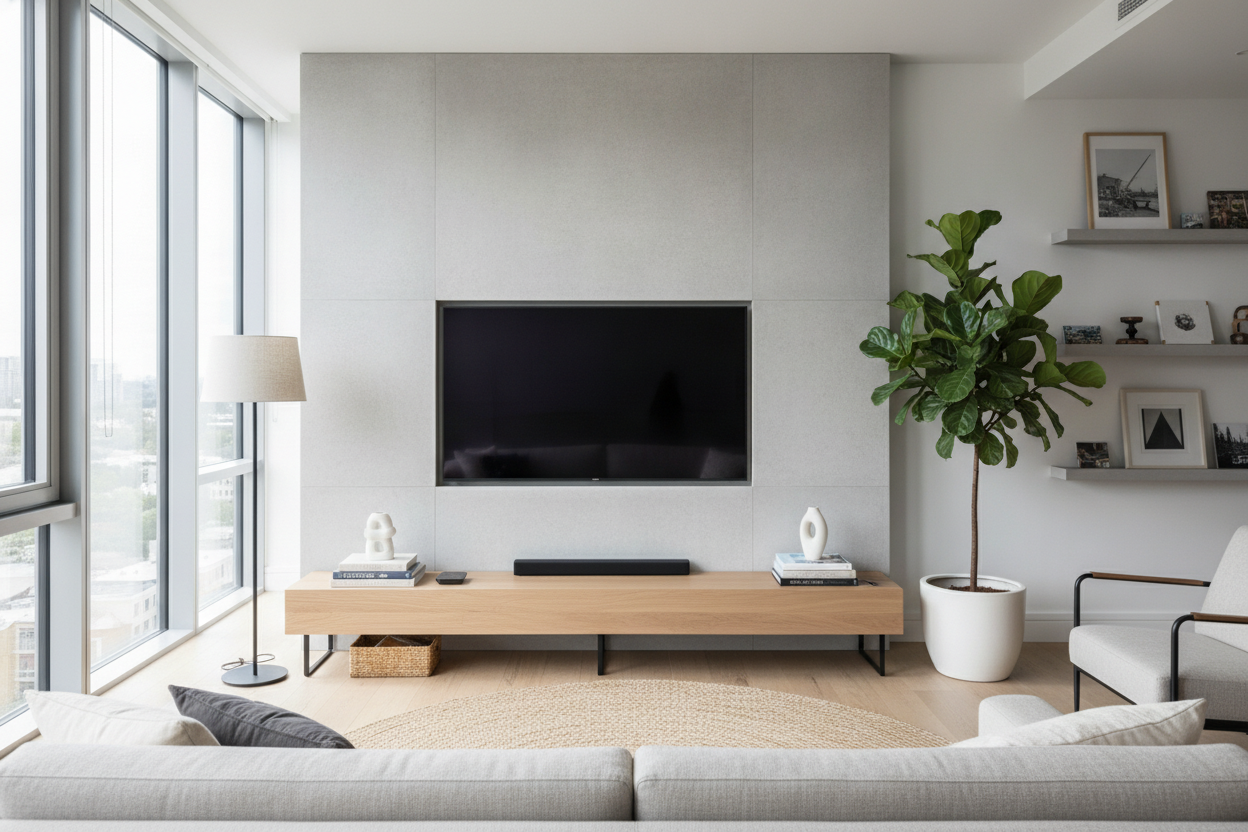
I remember spending three hours sweating over a stud finder to get my 65-inch OLED perfectly centered on the wall. It looked like a piece of art—until I pushed my old 20-inch deep sideboard underneath it. Suddenly, the 'floating' effect vanished, and my living room felt like a crowded storage unit. If you've gone through the effort of mounting your screen, don't ruin the look with a chunky cabinet. A thin tv console is the only way to keep the room feeling open while giving your gear a place to live.
- Standard media consoles are 18-20 inches deep; slim versions are 10-14 inches.
- Wall-mounted TVs look better when the furniture below doesn't protrude further than necessary.
- A long narrow media console can make a small room feel significantly wider.
- Solid wood or stone tops prevent a narrow entertainment center from looking like cheap flat-pack furniture.
The 'Floating TV, Heavy Cabinet' Mistake
Most of us mount our TVs to reclaim floor space. It’s a classic small-apartment move. But the second you slide a massive, 18-inch deep media stand under that sleek screen, you've killed the vibe. It creates this weird visual disconnect where the top half of the wall is airy and the bottom half is a heavy block of wood jutting into the walkway. It’s like wearing a slim-fit suit with clunky hiking boots.
When the furniture is too deep, it draws the eye downward and makes the room feel cramped. A narrow media console table stays out of the way, allowing your eyes to travel across the floor without hitting a massive obstacle. You want your furniture to support the TV, not compete with it for dominance in the room.
What Actually Qualifies as 'Thin' in Furniture?
In the world of furniture retail, 'standard' is usually synonymous with 'bulky.' If you’re searching for a slim media console, you need to ignore anything over 15 inches deep. The sweet spot is usually between 10 and 12 inches. That’s just wide enough to hold a soundbar or a few decorative books without encroaching on your living room’s 'flow.'
A narrow entertainment center should feel like a ledge rather than a box. I’ve found that 12 inches is the magic number—it’s deep enough to feel sturdy but shallow enough that you won’t bang your shins on it every time you walk to the kitchen. Keeping the profile slim ensures that even a large piece of furniture doesn't overwhelm the space.
But Where Do I Put the Messy Cables?
The biggest fear with going slim is the cable disaster. We all have that one 'spaghetti' pile of HDMI cords and power bricks. However, a narrow tv console with storage doesn't have to be a giant box. Look for designs with flip-down fronts or shallow drawers specifically designed for tech. These are perfect for hiding an Apple TV, a remote, or a slim gaming console.
If you have more than just a few wires—maybe a full sound system or a record collection—you might need to rethink the whole setup. I actually swapped my console table for a narrow storage cabinet recently because I needed the vertical height for my router and extra controllers. It kept the slim 12-inch profile but gave me much more usable hidden space than a traditional open-shelf narrow media stand.
The Trick to Styling Long, Awkward Walls
If you have a long, blank wall, a tiny 40-inch stand looks like a postage stamp. It makes the wall look unfinished. Instead, go for a long narrow tv console. Stretching the furniture horizontally across the wall creates a sense of scale that makes the ceiling feel higher and the room feel more expensive.
A narrow table under tv that spans 70 or 80 inches provides a great surface for a few lamps or plants without taking up actual square footage. It’s a visual anchor. By using a narrow media table that matches the scale of the wall rather than just the width of the TV, you turn a functional piece of furniture into a design feature.
Avoiding the 'Dorm Room' Look
The danger of slim furniture is that it can sometimes feel flimsy. To avoid that 'first apartment' aesthetic, stay away from cheap particle board. A narrow wood tv stand made of solid walnut or oak has a weight and texture that feels intentional. If you prefer a modern look, a narrow tv console cabinet with a stone or metal top adds a level of sophistication that balances out the thin profile.
One word of caution: if you aren't wall-mounting and plan to sit the TV directly on the console, measure the legs of your TV first. Many modern 65-inch sets have wide-set feet that might be deeper than 12 inches. If you find yourself in that spot, you should try a tabletop TV stand. These center-mounted pedestals allow a huge TV to sit safely on a very narrow tv console table with storage without hanging off the edges.
How deep should a thin tv console be?
Ideally, look for something between 10 and 14 inches. This is deep enough for most modern electronics but narrow enough to keep your walkways clear.
Can I put a 65-inch TV on a narrow console?
Only if the TV is wall-mounted or if you use a pedestal stand. Most factory TV legs are too wide for a truly narrow tv console table.
How do I hide cables on a console with no back?
Use adhesive cable clips along the back legs of the console or a cable management box on the floor. You can also use 'snakes' that match your wall color to group the cords together.

Leave a comment
This site is protected by hCaptcha and the hCaptcha Privacy Policy and Terms of Service apply.