










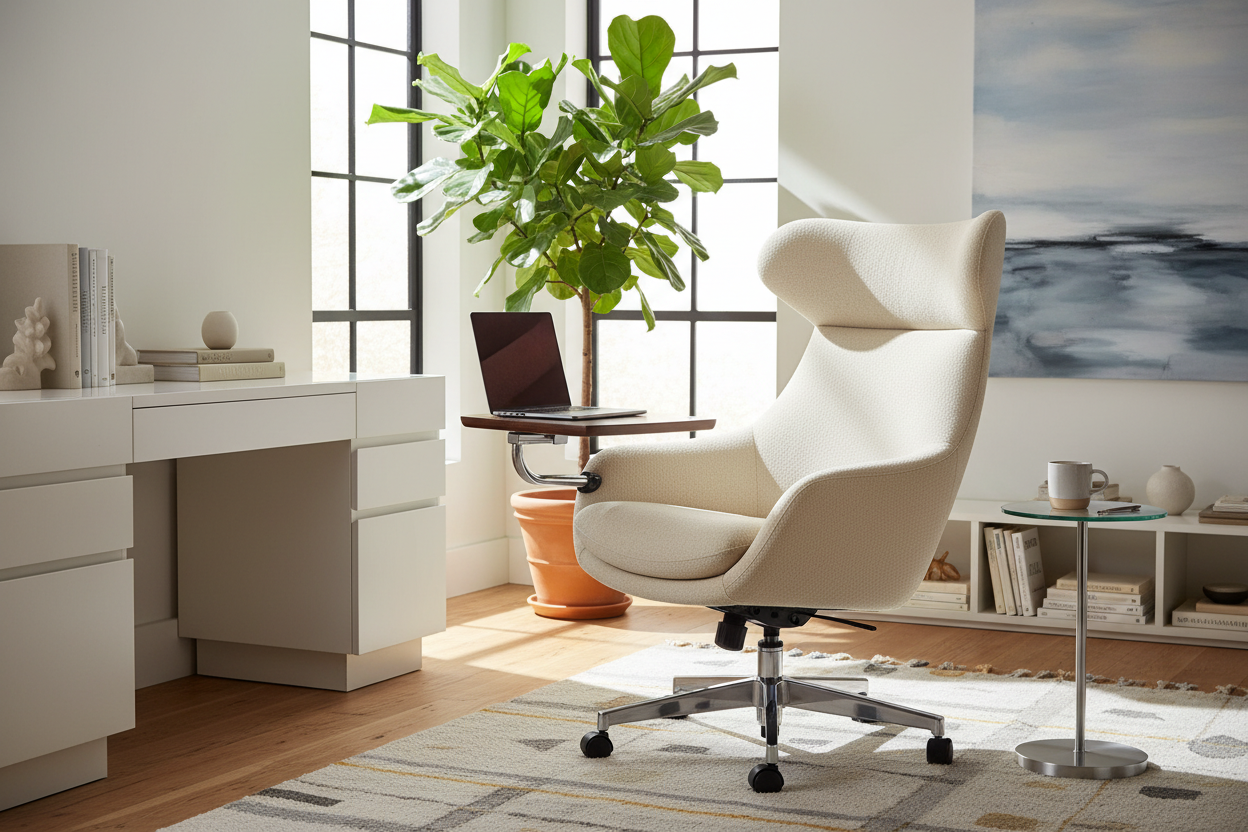
We have all encountered the makeshift home office dilemma: balancing a hot device on your knees while sinking into a sofa that offers zero lumbar support, or hunching over a dining table that ruins your posture. As our living spaces increasingly double as workspaces, the traditional desk setup often feels too rigid for casual tasks or creative brainstorming. Enter the **chair with laptop arm**—a hybrid furniture piece that bridges the gap between commercial functionality and residential comfort.
This isn't just about attaching a tray to a seat; it is about curating a micro-environment where productivity meets relaxation. Whether you are outfitting a reading nook or a dedicated study, selecting the right piece requires navigating ergonomics, mechanism durability, and visual weight.
Key Features to Look For
- Tablet Articulation: Look for a 360-degree swivel mechanism. An office chair with laptop arm must allow you to push the surface away easily for ingress and egress.
- Weight Capacity: A standard chair with pad for laptop should support at least 20lbs on the arm itself to handle heavy laptops and the pressure of your wrists.
- Base Stability: Avoid lightweight pedestal bases. A chair with built in laptop desk requires a wide, weighted footprint to prevent tipping when the arm is extended fully outward.
- Material Tactility: Ensure the laptop surface has a non-slip texture or a slight lip to prevent devices from sliding off during adjustments.
Analyzing Ergonomics and Mechanics
The primary failure point in many of these designs is the connection between the seat and the surface. An ergonomic chair for laptop use must prioritize the height relationship between your elbow and the tray. Ideally, the laptop platform should be adjustable vertically.
If the tray is fixed, test the sitting height. Your shoulders should remain relaxed, not shrugged up toward your ears. For extended sessions, look for an ergonomic chair with laptop stand that includes a dedicated lumbar curve. The goal is to maintain the neutral spine position of a task chair while enjoying the softer silhouette of a lounge piece.
The Aesthetic: Integrating Function into Decor
One common hesitation clients have is that an office chair with integrated laptop desk looks too "institutional"—reminiscent of a university lecture hall. To avoid this, focus on upholstery and finish.
Material Selection
For a sophisticated library look, opt for a leather lounge chair laptop setup with a walnut or matte black metal tablet. Avoid chrome finishes if you want a warmer, residential feel. If you are aiming for a lighter, Scandinavian vibe, a wool-blend fabric in grey or oatmeal paired with a birch plywood tablet creates a softer visual anchor.
Spatial Flow
Unlike a standard armchair, a chair with laptop table attached has a larger dynamic footprint. You need to account for the "swing radius" of the arm. Ensure you have at least 30 inches of clearance on the active side of the chair so the table doesn't collide with walls or side tables when you stand up.
Specialized Use Cases: Gaming and Compact Living
In smaller urban apartments, a dedicated desk might not be feasible. Here, a work from home chair with laptop stand acts as a standalone workstation. For the tech-focused user, a gaming chair with laptop tray offers a different set of advantages, typically featuring higher backrests and aggressive bolstering, though they can sometimes dominate a room visually.
If you already own a high-quality seat, you might consider a desk that attaches to chair arms via clamps, but be wary: these retrofits rarely offer the stability of an integrated design. An office chair and laptop table fused at the frame level will always provide superior rigidity.
My Personal Take on the Chair With Laptop Arm
In a recent project for a tech consultant's loft, I specified a high-end ergonomic laptop chair with a tablet arm. On paper, it was perfect. However, once installed, I noticed a detail that specifications sheets don't tell you: the "typing bounce."
Even with high-quality aluminum mechanisms, there is a slight reverberation when typing aggressively on a cantilevered arm. I learned that for clients who are heavy typists, a chair where the arm connects to the base (rather than the armrest) is crucial for stability. Another nuance? The finish on the laptop tray matters immensely. We initially chose a high-gloss lacquer, but within two weeks, it was a mess of fingerprints and micro-scratches from a metal watch band. We swapped it for a textured laminate, which held up beautifully. It is these tactile interactions that define the longevity of your furniture.
Conclusion
Investing in a chair with integrated laptop desk is a commitment to flexible living. It acknowledges that work happens everywhere, not just at a desk. By prioritizing a sturdy pivot mechanism and selecting materials that complement your existing palette, you can create a spot that is as functional as it is inviting.
Frequently Asked Questions
Can left-handed users use these chairs?
It depends on the model. Many "tablet arm" chairs are right-hand biased. However, high-end manufacturers often offer a reversible tablet or a central mounting point that swings either way. Always check the specification sheet for ambidextrous capability.
Is a chair with a laptop arm suitable for an 8-hour workday?
Generally, no. While an ergonomic chair for laptop use is better than a sofa, it lacks the full adjustability of a dedicated task chair and desk setup. These are best used for 1-3 hour "sprint" sessions, reading, or video calls.
How do I clean the mechanism?
Dust and debris can accumulate in the swivel joint of the arm, causing squeaking. Use compressed air to clear the joint and a silicone-based lubricant spray once a year to keep the movement fluid and silent.



Leave a comment
This site is protected by hCaptcha and the hCaptcha Privacy Policy and Terms of Service apply.