










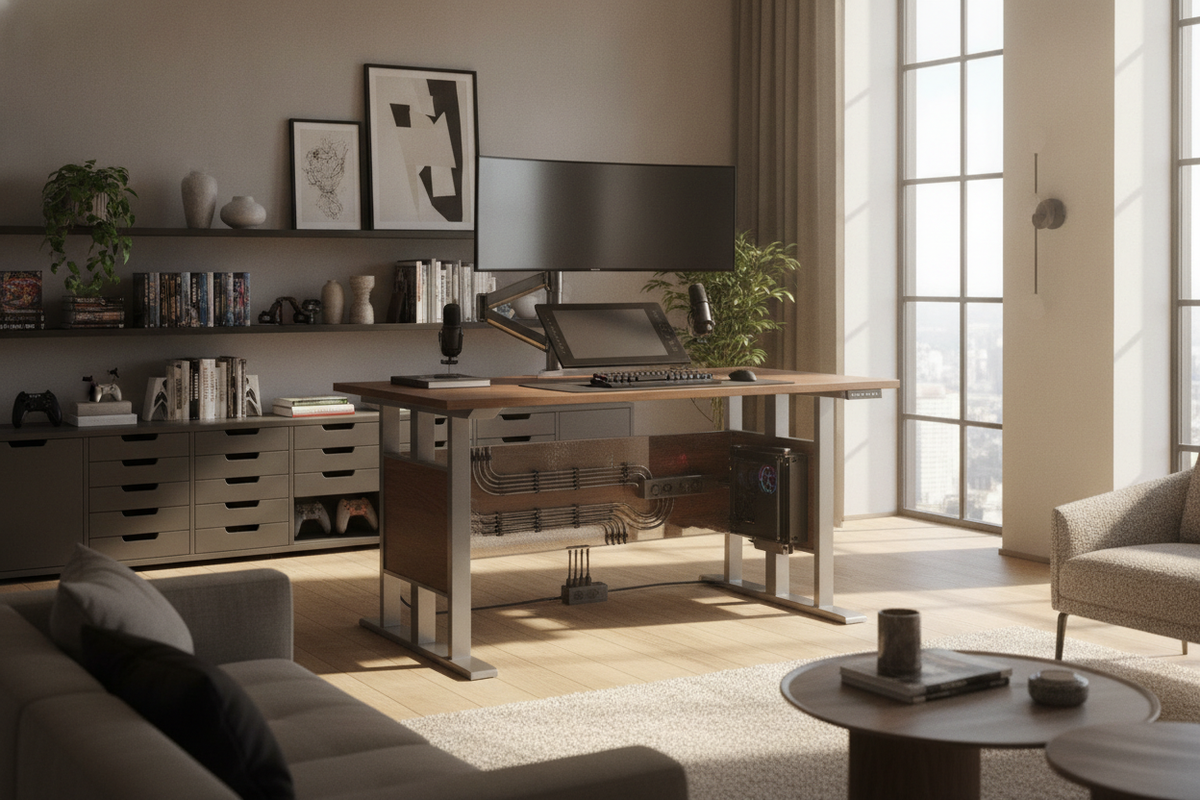
The Evolution of the Modern Battlestation: Why Gaming Standing Desks Matter
Traditional gaming setups historically relied on static computer tables, often forcing players into fixed postures across extended sessions. As modern entertainment and remote work blend together, the gaming stand desk has emerged as a versatile centerpiece. Integrating a sit-to-stand dynamic allows players to vary their physical stance, maintain alert posture during competitive play, and reduce the fatigue associated with uninterrupted sitting.
Transitioning between seated focus and standing gameplay requires deliberate planning. Unlike a conventional office environment where typing produces minimal lateral force, gaming introduces rapid mouse sweeps, mechanical keyboard actuation, and complex peripheral arrangements. Selecting the right frame and surface architecture ensures that height adjustments remain fluid while supporting heavy multi-monitor arrays. For aesthetic guidance on balancing functional hardware with room decor, exploring a standing desk setup guide can help harmonize modern technology with thoughtful interior styling.
Frame Architecture and Rigidity: Minimizing Screen Shake Under Intense Input
The primary engineering challenge of any height adjustable gaming desk is lateral stability at full extension. When a desk rises, its center of gravity shifts upward, which can amplify mechanical vibrations caused by quick mouse movements or aggressive keystrokes. Eliminating perceptible monitor wobble requires evaluating frame design, column stages, and foundation engineering.
Dual-Motor Systems and Lift Smoothness
An electric gaming desk utilizing synchronized dual motors provides smooth, balanced elevation across both lifting columns. By dedicating an independent motor to each leg, the system distributes weight uniformly across the desktop. This mechanical balance protects against uneven motor strain when asymmetric payloads—such as an off-center PC chassis or asymmetrical monitor arms—are mounted to the surface. A quality motorized gaming desk also integrates anti-collision detection to safeguard mounted peripherals, low-hanging storage, and surrounding furniture during height adjustments.
Telescoping Frame Width and Foot Base Geometry
Structural rigidity in a standing gaming desk relies heavily on the physical dimensions of its steel base and telescoping crossbars. Wider, elongated feet provide a stable ground footprint that resists front-to-back tilting. Multi-stage lifting columns with tight joint tolerances minimize play between nested steel tubes. When paired with reinforced cross-support brackets beneath the desktop, a robust electric height adjustable gaming desk delivers reliable stability for both sitting and standing sessions.
Desktop Dimensional Tiers: Surface Zoning for Peripherals and Multi-Monitor Displays
Selecting the correct desktop dimensions involves balancing room footprint, monitor count, and peripheral space. A well-proportioned pc standing desk provides sufficient depth to maintain comfortable viewing distances without crowding oversized mousepads, streaming microphones, or audio interfaces.
- Compact Nooks: For tight bedrooms or multi-purpose spaces, compact desks accommodate a single ultrawide or dual-screen setup while maintaining a minimal room footprint. Practical strategies outlined in a desk setup that guide demonstrate how to keep smaller spaces functional and refined.
- Mid-Sized Workstations: Mid-range widths offer balanced real estate for dual monitors and desktop speakers. Models like this adjustable height standing product provide reliable surface depth and programmable memory presets for quick transitions between tasks.
- Expansive Battlestations: High-demand setups featuring triple displays, studio monitors, and on-desk desktop towers require generous proportions. A broad surface, such as this height adjustable standing product, creates dedicated zones for input peripherals, audio gear, and visual displays without spatial compromise.
Dynamic Cable Management and Travel Geometry
Operating a sit to stand gaming desk introduces dynamic movement that static desks never encounter. Without adequate planning, rising desks can stretch cables, disconnect hardware, or dislodge mounted power supplies. Achieving a clean, tangle-free setup requires managing cable travel geometry.
The most effective strategy involves anchoring an under-desk power strip directly to the underside of the desktop frame. When power hubs, display inputs, and lighting controllers move in unison with the surface, peripheral cords maintain a constant length. Only a single master power cable and network line need to traverse the vertical gap to the floor. Housing this vertical run inside an articulated cable spine or flexible braided sleeve ensures smooth flexion during height adjustments while preventing cord snags against adjacent furniture.
Storage Architecture: Organizing Battlestation Gear and Tower Placement
Maintaining clear surface space is essential for unrestricted mouse movement and a clean visual presentation. Because height-adjustable frames move continuously, auxiliary storage must be carefully integrated to prevent physical interference.
Under-desk accessories like headphone hooks, controller mounts, and suspended power trays keep everyday items within reach without consuming tabletop space. For PC towers, users can choose between an under-desk mounting cradle or placing the chassis on a dedicated adjacent cabinet. Pairing your desk with an adjustable collection provides modular shelving for collectibles, physical media, network equipment, and auxiliary gaming hardware without cluttering the main lifting platform.
Ergonomic Workflow: Transitioning Between Competitive Sitting and Active Standing
Maximizing the benefits of a standing desk gaming setup depends on establishing sustainable sit-to-stand routines. Rather than standing continuously for long stretches, an alternating cadence supports physical comfort while preserving input precision.
High-precision competitive gaming often benefits from a seated position where forearm anchoring and elbow stabilization are easiest to maintain. Conversely, casual gaming, strategy sessions, content consumption, and streaming often lend themselves well to a standing posture. Utilizing memory presets on your adjustable gaming table allows you to return instantly to tailored heights for typing, sitting play, and active standing without interrupting your flow.
Material Selection, Assembly Rigidity, and Long-Term Care
The durability of a gaming stand desk relies on sound materials and careful assembly. High-density engineered wood tops with scratch-resistant, water-repellent laminates withstand repeated mouse friction, spilled drinks, and clamped monitor mounts. When assembling the frame, tightening all hardware evenly and periodically checking bolt torque maintains frame rigidity over months of daily movement. By balancing solid structural foundations, dynamic cable routing, and thoughtful storage, you can build a versatile sit-stand battlestation tailored to long-term gaming and productivity.

Dejar un comentario
Este sitio está protegido por hCaptcha y se aplican la Política de privacidad de hCaptcha y los Términos del servicio.