










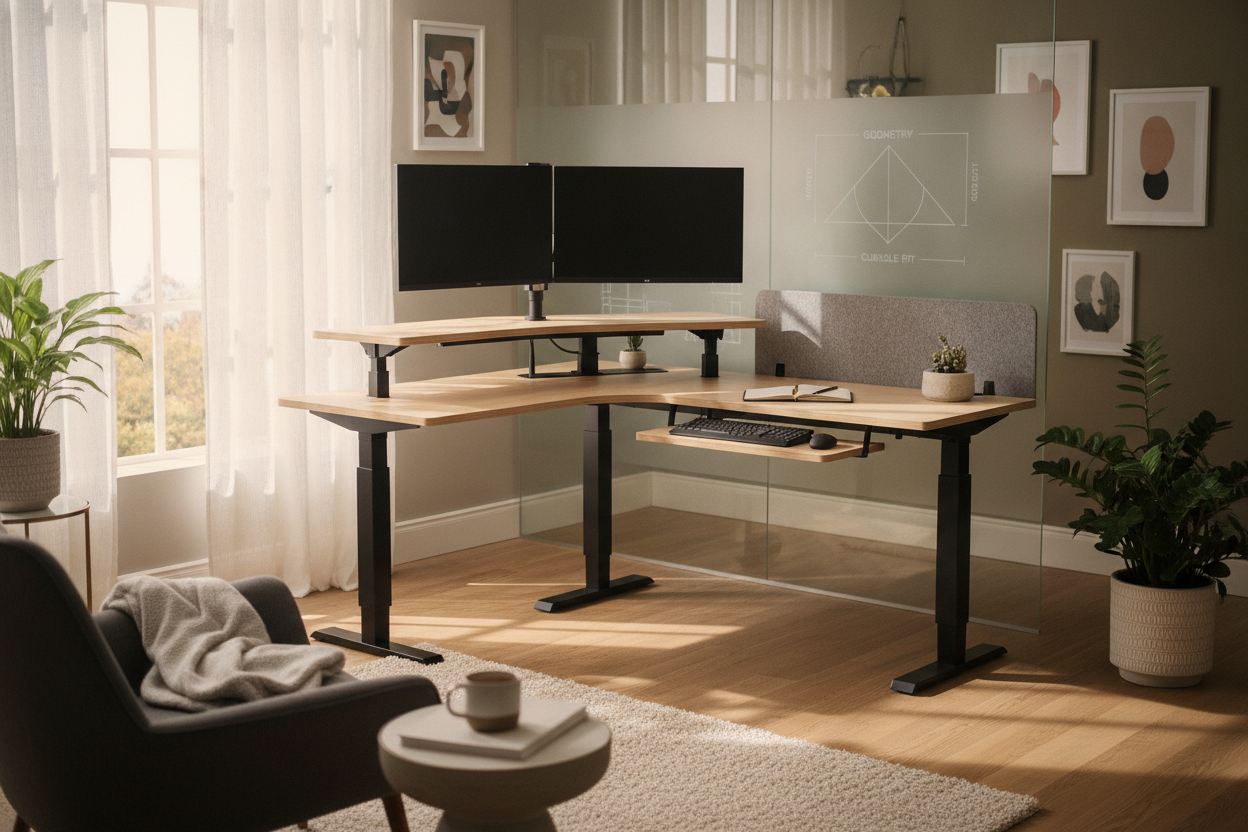
Optimizing an L-shaped workstation or commercial cubicle requires a clear understanding of spatial geometry. When standard rectangular desktop risers are placed into a 90-degree corner, they leave large triangular dead zones along the rear walls while protruding awkwardly past the front edge of the work surface. Finding the best corner standing desk converter involves evaluating unique desktop profiles, vertical travel trajectories, and clearance requirements specific to nested corner workspaces.
When planning aesthetic and spatial continuity across sit-stand accessories, reviewing our standing desk converter guide helps streamline your equipment selection. This guide examines the architectural principles required to select, position, and support a corner standing desk riser within home offices and corporate cubicles alike.
Evaluating Corner Geometry: Why Standard Converters Fail on L-Shaped Desks
Traditional sit-stand risers feature wide, rectangular base profiles engineered for linear surfaces. When installed in the inner vertex of an L-shaped desk or cubicle junction, the rectangular corners collide with partition walls or backsplashes long before the base sits securely back. This leaves unusable space behind the riser and forces the keyboard tier directly into the operator's primary seating threshold.
Specialized units resolve this geometric challenge through distinct design profiles:
- Trapezoidal Upper Surfaces: The rear edge is tapered inward, allowing the unit to slide deep into the 90-degree corner apex without colliding with surrounding paneling.
- Notched and Chamfered Back Corners: 45-degree angle cuts along the back corners accommodate cable drop-downs and structural cubicle posts.
- Curved Front Baselines: A subtle concave front edge aligns with the user's natural reach radius across the dual desktop returns.
By opting for a dedicated standing desk converter for corner desk layouts, you reclaim valuable side-wing workspace on both sides of the junction for document storage, desk lamps, and desktop organizers.
Dimensional Sizing and Cubicle Fit Considerations
Selecting a cubicle standing desk converter demands rigorous three-dimensional measurement. Cubicle layouts present strict vertical and lateral constraints, including overhead storage cabinets, privacy fabric panels, and integrated power raceways.
Before introducing a riser into a modular cubicle, map out these primary clearance zones:
- Diagonal Depth: Measure from the deepest inside corner out to the front edge of the main desk junction. A properly sized corner converter should sit entirely on the main tabletop without cantilevering dangerously over the edge.
- Overhead Storage Clearance: Measure the distance between the primary desktop and the underside of upper cubicle bins, shelves, or task lights. Ensure the top tier—plus the height of your mounted display panels—can reach full standing extension without striking upper furniture.
- Partition and Monitor Arc Room: When dual displays are mounted on articulating monitor arms, their outer corners require dynamic clearance when rotating or tilting. Ensure the displays do not collide with flanking cubicle fabric walls.
For setups requiring expansive surface returns alongside riser mechanisms, pairing the converter with a dedicated corner desk product ensures ample perimeter storage.
Mechanical Lift Typologies: Comparing X-Lift and Vertical Z-Lift Frames
The mechanical frame governing elevation movement determines whether a stand up desk for corner cubicle use remains functional across all height adjustments. Riser frames primarily fall into two mechanical designs:
Straight-Vertical Lift Mechanisms
Vertical lift frames utilize scissor tracks or single-pillar telescoping columns that raise the working tier straight upward on a fixed vertical axis. This design is optimal for corner cubicles because the footprint does not shift forward or backward during transit. Operators can maintain a consistent distance from the back corner wall, preventing accidental collisions with rear privacy dividers.
Forward-Arced Z-Lift Frames
Z-shaped counterbalance systems pivot on bottom-hinged linkages, extending forward toward the user as the unit ascends. While these frames often provide smooth gas-spring assistance, the forward projection pushes the operator back into the aisle or chair clearance zone. In compact cubicles, this forward shift can compromise ergonomics and restrict chair movement.
Surface Zoning: Keyboard Tier Layout, Dual-Monitor Placement, and Cable Routing
A functional standing desk converter for cubicle integration balances operational equipment across distinct tiers. Because the top tier of a corner unit is wide at the front wings and narrow at the back apex, component placement requires deliberate layout planning:
- Monitor Balance: Place dual screens symmetrically along the wider forward section or secure them with a central grommet-mounted monitor arm anchored over the converter's structural center of gravity.
- Keyboard and Mouse Tier: Look for dropped keyboard platforms with sufficient lateral width to accommodate full-sized keyboards alongside mouse tracking pads on the same horizontal plane.
- Dynamic Cable Slack: Route display, power, and peripheral cables along integrated management channels with sufficient slack to accommodate full vertical travel without snagging on corner brackets.
Base Stability and Desk Surface Material Compatibility
The underlying foundation must handle both static mass and dynamic operational forces. A fully equipped corner converter exerts downward and torsional forces, especially when users lean against the keyboard platform.
Evaluating structural stability on an L-shaped foundation is easier when configured atop a reinforced corner desk product with integrated lower shelving.
Consider these structural elements when preparing the underlying desk:
- Substrate Strength: Ensure the desktop material—whether engineered wood, laminated core, or solid composite—can sustain concentrated corner load points.
- Footing Protection: Use high-density silicone or rubber buffer pads beneath the converter base to prevent surface scratching and eliminate base slippage during elevation adjustments.
- Weight Distribution: Keep high-density items centered over the riser's primary support chassis rather than on cantilevered perimeter wings.
Integrating Companion Storage and Surrounding Office Layouts
Transitioning an L-shaped workspace to sit-stand capability alters how surrounding storage elements are accessed. Because the primary work zone moves vertically, standard desk drawers and horizontal surfaces should be organized into functional zones:
- Under-Desk Mobile Pedestals: Position rolling file pedestals along the outer returns of the desk rather than directly beneath the corner vertex, maintaining unimpeded leg clearance in both seated and standing postures.
- Side Return Lateral Cabinets: Use the lateral surface area of L-shaped desk wings for printer stands, document sorters, and high-frequency reference materials that remain accessible without leaning over the converter frame.
- Vertical Wall Storage: Utilize modular wall hooks, tack boards, and magnetic rails mounted on adjacent cubicle walls to keep personal tools off the converter surface.
By harmonizing desktop geometry, lift mechanics, and surrounding storage architecture, a corner standing desk converter creates an ergonomic, versatile, and clutter-free sit-stand workstation tailored to complex office layouts.


Dejar un comentario
Este sitio está protegido por hCaptcha y se aplican la Política de privacidad de hCaptcha y los Términos del servicio.