











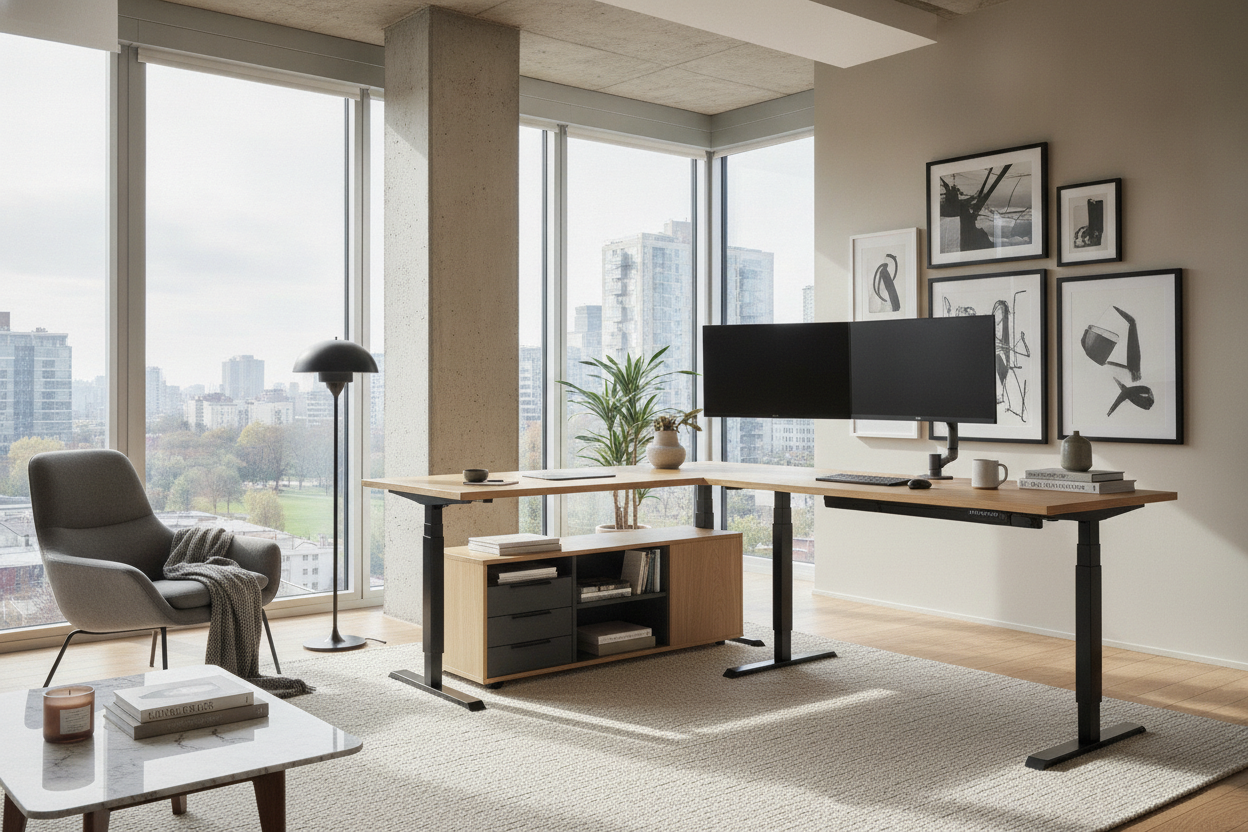
Finding the best l shaped standing desk requires more than simply choosing an expansive corner tabletop. Sit-stand workstations with a ninety-degree configuration introduce unique spatial, mechanical, and ergonomic factors that standard rectangular desks do not share. Whether you manage multiple monitors, balance analog paperwork alongside digital tasks, or need to define an open-concept room, evaluating the best standing l shaped desk involves understanding geometry, lifting stability, and practical layout planning.
Understanding L-Shaped Standing Desk Architecture and Workflow Zones
The primary advantage of an L-shaped layout is the creation of dual workflow zones within arm's reach. Rather than stretching peripheral equipment across an overly wide linear surface, a corner profile brings secondary tasks into a comfortable pivot radius. This setup allows you to establish a primary computing zone on the main surface and dedicate the return wing to drafting, tablet input, physical documentation, or conferencing equipment.
By dividing your workspace across two planes, you reduce the continuous neck rotation that often occurs with expansive side-by-side monitors on straight desks. When planning your layout, coordinating visual balance and surface organization is essential; reviewing a comprehensive standing desk guide can help you align functional equipment placement with clean interior aesthetics.
Dimensional Categories: Sizing Your Main Desk and Return Wing
When conducting an l shaped standing desk review for your office, sizing is the most critical starting point. L-shaped height-adjustable desks generally fall into three structural sizing categories:
- Compact Corner Footprints: Designed for tighter home offices or shared room corners, these profiles optimize surface area without overcrowding floor traffic. Options like a shaped desk product provide ample dual-zone versatility while maintaining an efficient boundary in modest rooms.
- Symmetrical Equal-Length Configurations: Featuring identical dimensions on both wings, these designs offer equal priority to both sides, making them ideal for professionals who switch evenly between computing and tactile tasks.
- Extended Executive Returns: These setups combine a deep primary work surface with an elongated side return, accommodating triple-monitor setups, audio gear, or dedicated reference stations.
Consider whether you need a reversible return wing that can assemble to the left or right side, which provides flexibility if you decide to reconfigure your office layout in the future.
Frame Geometry, Multi-Leg Stability, and Motor Configurations
The mechanical foundation of the best standing l desk is its frame architecture. While standard standing desks operate on two telescoping columns, corner desks typically utilize a three-leg frame geometry. A dedicated lifting column on the outer corner and at both wing terminals ensures balanced vertical movement across the entire surface.
Multi-motor synchronization is vital for smooth height adjustments. Quality three-leg systems feature synchronized motors that elevate all columns at an identical rate, preventing tabletop binding or structural stress on the desktop seams. When evaluating the best l standing desk, look for robust steel crossbar structures that reinforce the underside of both wings to eliminate wobble at taller standing elevations.
Room Layout Strategies: Corner Placement vs. Open-Room Peninsulas
Deciding where to anchor your workstation shapes the flow of your entire room. You can choose between two primary spatial configurations:
- Corner-Nested Workstations: Tucking both wings flush against intersecting walls maximizes open floor area. Ensure you account for baseboard thickness, wall power outlets, and window clearance so your desk travels freely during elevation.
- Peninsula and Floating Layouts: Projecting the return wing outward into the room establishes a natural room divider, separating your office zone from living or sleeping areas. Exploring creative ideas from a standing desk guide can help you balance open-concept walkways with dedicated desk boundaries.
Regardless of placement, always plan for cable slack. Because corner setups often house more monitors and peripherals, articulated vertical cable spines are recommended to guide power cords smoothly without snagging during height adjustments.
Desktop Materials, Surface Durability, and Edge Contours
The desktop construction of a best standing desk l shape configuration directly influences daily durability and hardware mounting. Many corner desks utilize multi-piece desktop assemblies joined by internal brackets, while premium models offer solid contiguous tops. Smooth, high-pressure laminate finishes and durable engineered wood surfaces provide reliable resistance against daily friction, writing pressure, and incidental spills.
Pay close attention to edge geometry. Clean, squared borders allow seamless installation of clamp-on monitor arms and microphone mounts. If you prefer distinctive styling, comparing geometric silhouettes with a dedicated desk shaped product can help clarify whether you prefer a minimalist flat edge or specialized contoured accents.
Integrating Storage with L-Shaped Sit-Stand Workstations
Because the desktop moves vertically, storage planning requires an approach that avoids obstructing mechanical movement. Stationary drawers attached directly to the underside of the tabletop can add unnecessary weight and reduce leg clearance, making freestanding or mobile storage the preferred strategy.
Rolling under-desk pedestals fit neatly beneath the secondary wing while maintaining enough vertical clearance for lowest-seated height settings. Alternatively, pairing your sit-stand workstation with dedicated perimeter cabinetry, such as a matching shaped desk product layout, offers stationary filing and display shelving without interfering with motorized lift paths.
Selection Checklist: Choosing the Right Configuration for Your Routine
Before selecting your ideal corner standing desk, review this practical decision checklist:
- Measure Workspace Footprint: Verify wall dimensions, door swing radiuses, and walking pathway clearance before choosing wing lengths.
- Assess Hardware Load: Total the weight and footprint of your monitor mounts, desktop towers, and desktop accessories to ensure balanced weight across all three lifting legs.
- Confirm Motor and Frame Sync: Prioritize synchronized multi-leg lifting frames that provide stable travel at standing height.
- Plan Cable Runways: Map surge protector locations and flexible vertical routing paths before assembling equipment.
- Coordinate Storage Buffers: Ensure mobile file cabinets or side credenzas sit clear of descending frame crossbars.
By evaluating your work patterns, room architecture, and storage needs, you can confidently invest in a corner sit-stand workstation that delivers long-term comfort, structural reliability, and organized productivity.

Dejar un comentario
Este sitio está protegido por hCaptcha y se aplican la Política de privacidad de hCaptcha y los Términos del servicio.