










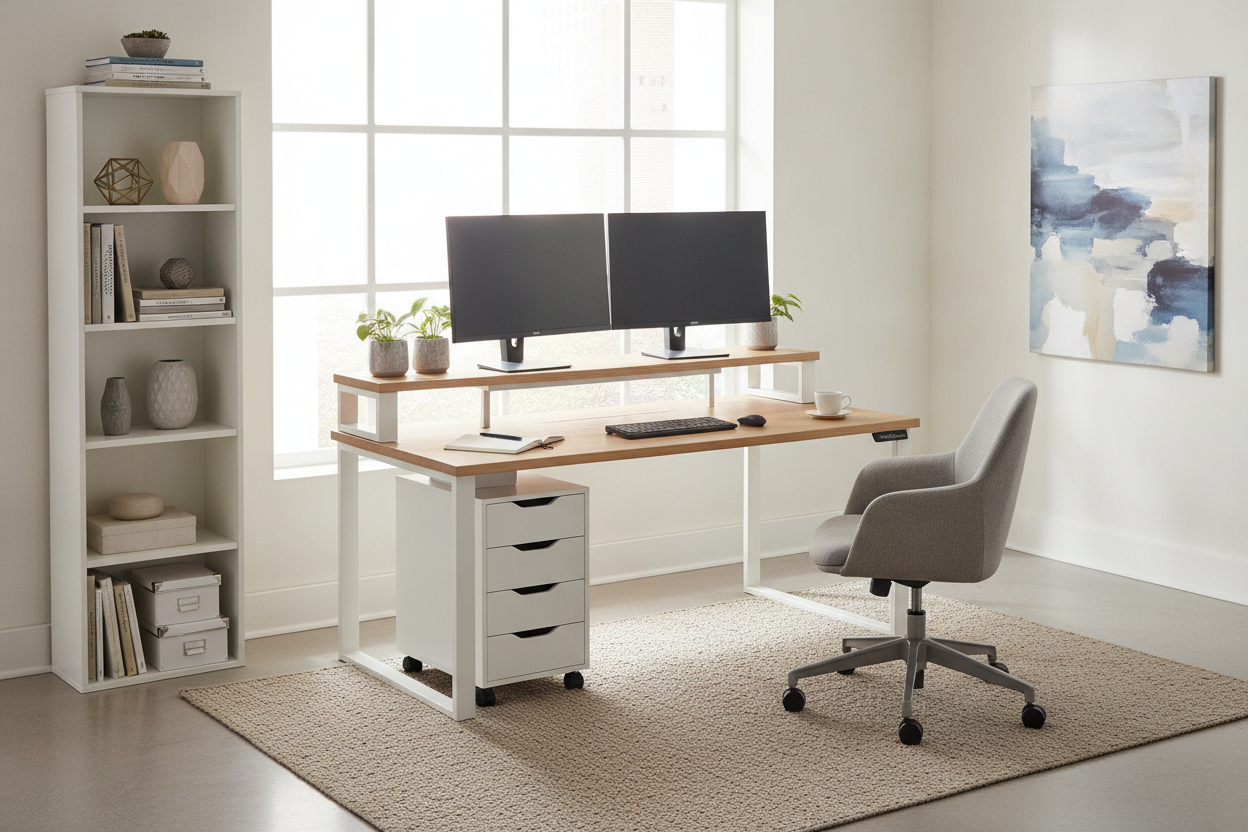
Creating an organized, functional workspace requires intentional layout planning, especially when square footage is at a premium. An ikea two tier desk or a modular multi level desk ikea configuration solves one of the most common workstation challenges: visual clutter competing with active physical tasks. By dividing desktop real estate into horizontal layers, tiered desks allow you to separate computing hardware from daily writing and task areas while keeping essential accessories easily accessible.
Understanding the IKEA Two Tier Desk Concept
A multi-level workstation introduces a vertical step between the primary desktop and an elevated secondary shelf. Rather than relying on a single flat surface where monitors, keyboards, notepads, and desk lamps compete for space, a two-tier configuration organizes functions by height. The lower surface remains open for direct interaction, while the upper shelf holds viewing hardware, ambient lighting, or desktop audio equipment.
Multi-level arrangements generally take one of two forms: integrated structures where tiered shelving is built directly into the frame, or modular configurations where elevated bridge shelves and risers are anchored onto standard flat tabletops. Both approaches provide structured vertical zoning that helps streamline workflow throughout the workday.
Core Benefits of a Multi-Level Workspace Layout
Distributing desk accessories across multiple levels changes how space is utilized across the entire workstation footprint. Instead of expanding outward and consuming floor area, multi-tier setups make better use of vertical room above the desktop.
Zoning Your Worksurface: Primary Tier vs. Elevated Tier
Effective desk organization relies on functional zoning. When configuring a multi-level surface, dividing tasks between tiers helps maintain an uncluttered workspace:
- Primary Lower Tier: Dedicated to tactile, hands-on tasks such as keyboard input, mouse navigation, document review, and handwritten notes. Keeping this zone free from stationary monitor bases leaves generous room for forearm support and comfortable movement.
- Elevated Upper Tier: Serves as the display and presentation platform. Computer monitors, secondary screens, webcams, and reference books rest naturally at a raised position, preventing them from encroaching on everyday writing space.
Under-Tier Clearance and Peripheral Organization
The space created underneath an elevated shelf provides valuable secondary utility. Low-profile gear—such as slim mechanical keyboards, graphic tablets, audio interfaces, or daily planners—can be slid beneath the riser when not actively in use. This horizontal pass-through clearance keeps the primary desk surface clear at the end of the workday without requiring items to be packed away into deep drawers.
Designing Your Multi-Level Setup: Fixed vs. Modular Configurations
Deciding between a fixed tiered desk and a modular workstation depends on your long-term flexibility needs. Dedicated tiered desks provide unified framing and streamlined aesthetics, making them straightforward to assemble and position within dedicated office nooks.
On the other hand, modular setups combine standalone desktops with desktop-mounted shelf units or modular risers. This format allows you to reposition or remove the upper level if your hardware configuration evolves over time. For broader workspace builds, pairing your desk layout with customized storage approaches—such as built-in desk and shelf configurations—creates a cohesive, tailored appearance across the entire room.
Room Fit, Proportions, and Clearance Planning
Because an elevated tier adds visual height, careful spatial planning ensures the desk complements the room without feeling imposing. Consider the following structural and layout factors when positioning a multi-level desk:
- Sightlines and Window Placement: Avoid placing tall tiered units directly in front of low window frames where the upper shelf might obstruct natural daylight. Positioning the desk perpendicular to light sources minimizes screen glare while preserving open sightlines.
- Wall Clearances and Cable Drops: Ensure the back edge of the tiered shelf allows enough clearance for power cords, monitor brackets, and wall trim. A small buffer between the desk and the wall prevents cables from being pinched.
- Compact Nook Utility: In multi-purpose rooms or small apartments, multi-level layouts consolidate equipment within a compact footprint. For spaces requiring full visual concealment when work hours end, exploring enclosed armoire computer desk setups can provide alternative strategies for managing compact office footprints.
Integrating Storage and Supplementary Furniture
While an elevated desktop shelf organizes daily peripherals, pairing your desk with dedicated storage pieces prevents secondary items from cluttering the working tier. Balancing open vertical levels with enclosed lower cabinetry creates a well-rounded office environment.
For high-density storage needs, combining your workspace with a comprehensive office storage cabinet with desk integration allows documents, printers, and office supplies to stay neatly concealed behind solid doors. If you prefer a balance of functional storage and decorative display, positioning a tall multi-tier storage display bookcase alongside your desk framework extends vertical lines upward, creating architectural harmony and abundant shelving across the room.
Cable Routing and Hardware Stability for Tiered Surfaces
Managing cords across a two-tier surface requires thoughtful routing to avoid visible tangles between levels. Because wires run between screens on the top level and computing hardware or power strips below, organizing cables along structural supports maintains a clean visual profile.
Using adhesive cable channels, hook-and-loop ties, or under-desk wire trays helps anchor cords directly along the rear frame or behind vertical shelf supports. Additionally, balance the weight of heavier items evenly across the upper tier to ensure solid contact with the lower surface, maintaining total stability during daily typing and adjustment.
Final Checklist for Building an Efficient Two-Tier Desk Setup
Before completing your multi-level workstation plan, review these practical checkpoints to ensure an ergonomic, organized setup:
- Confirm Tier Depths: Verify that the lower tier provides sufficient depth for your keyboard, mouse pad, and comfortable forearm resting room.
- Check Vertical Clearances: Ensure the height between tiers comfortably accommodates any docking stations, soundbars, or items you plan to store underneath.
- Plan Cable Paths: Map out clean pathways for monitor power and display cords to drop discreetly behind the main tier.
- Coordinate Nearby Storage: Match your desk finish with complementary shelving and drawer units to support long-term organization.
By establishing clear surface zones and integrating practical supplementary storage, a two-tier desk setup creates an efficient, clutter-free environment tailored for productive workdays.

Dejar un comentario
Este sitio está protegido por hCaptcha y se aplican la Política de privacidad de hCaptcha y los Términos del servicio.