










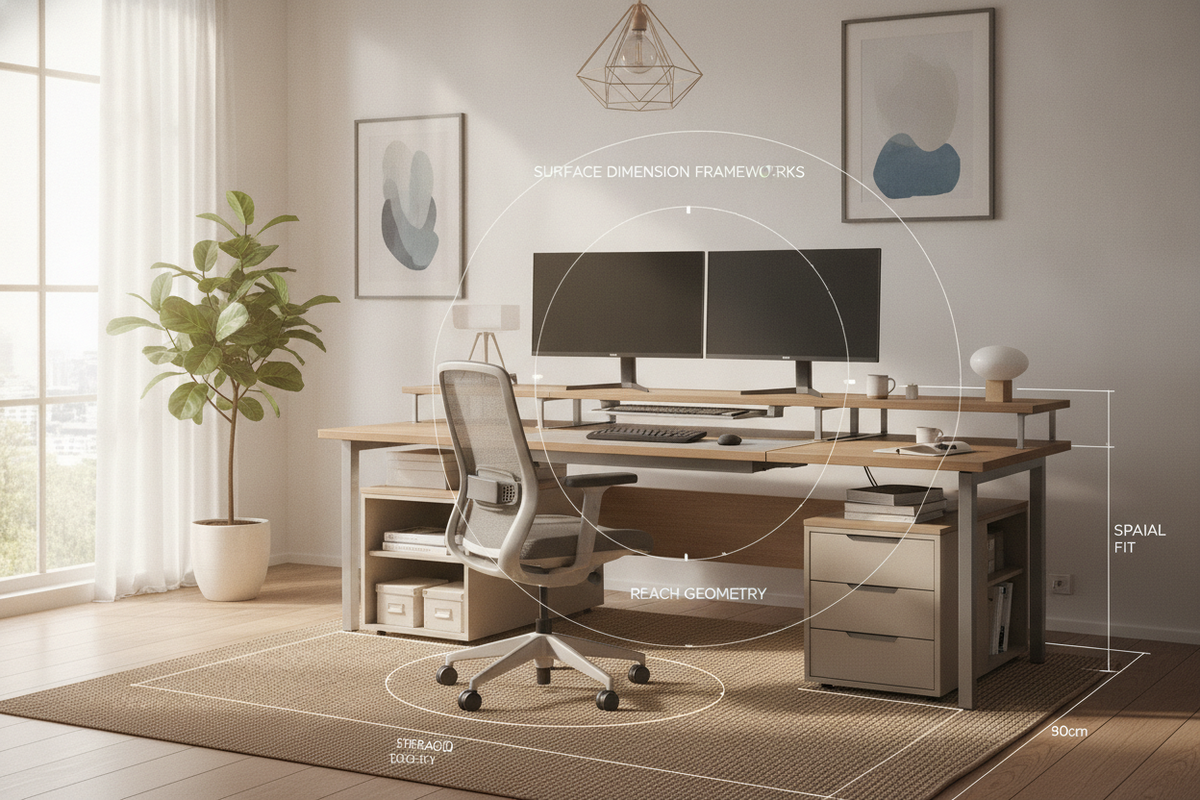
Configuring an effective workstation requires treating your desk as an interconnected architectural system rather than an isolated piece of furniture. Sound work desk ergonomics balances human biomechanics with intentional furniture selection, ensuring your daily work environment supports sustained focus, ease of movement, and effortless organization.
Foundational Principles of Work Desk Ergonomics and Workstation Dynamics
At its core, ergonomic spatial planning creates harmony between user posture, viewing distances, and physical reach. Rather than forcing the body to adapt to rigid furniture boundaries, an intentional setup conforms to natural resting positions. Prioritizing neutral bodily alignment—where shoulders remain relaxed, forearms rest comfortably parallel to the floor, and the spine retains its natural contour—helps minimize muscle tension throughout the day.
A well-balanced ergonomic office workstation accounts for the interplay between your seating posture, desktop plane, and peripheral equipment. When visual sightlines and reach paths flow naturally, daily administrative tasks and computer work feel seamless rather than physically demanding.
Dimensional Decision Frameworks: Desktop Depth, Width, and Vertical Clearances
Choosing the right desk dimensions sets the spatial baseline for proper posture. Desktops must provide adequate surface depth to accommodate contemporary display equipment while preserving comfortable focal distances. A surface that is too shallow forces screens too close to the user, disrupting natural neck posture, while an overly deep surface may push everyday accessories out of comfortable reach.
Width selection dictates your ability to segment the desktop into dedicated workflow zones. A broad surface allows you to separate computer hardware from secondary tasks such as document review or sketching. Beneath the surface, vertical knee-well clearance is equally vital. An open, unobstructed knee cavity allows chairs with adjustable armrests to tuck smoothly beneath the edge, ensuring users do not sit awkwardly twisted or perched at the perimeter.
Desktop Reach Envelopes: Primary, Secondary, and Tertiary Work Zones
Structuring your desktop into concentric reach envelopes is essential for maintaining optimal ergonomics at desk setups:
- Primary Zone: The immediate area swept by your forearms while elbows remain close to your torso. This zone should be reserved exclusively for the most critical input devices, such as the keyboard and mouse.
- Secondary Zone: The semi-circular arc reached by extending your arms without bending at the waist. This tier comfortably houses reference notebooks, task lighting switches, or beverage coasters.
- Tertiary Zone: The outer periphery of the desk surface, accessible by leaning forward. This area should only hold stationary monitors, decorative accents, or occasional reference books.
Kinetic vs. Static Desktops: Aligning Adjustable Mechanics with Daily Movement
While traditional fixed-height desks can offer reliable stability and structural simplicity, dynamic sit-stand desks introduce adaptable height transitions that encourage physical variation throughout the workday. Incorporating an ergonomic home office sit-stand desk with memory presets allows users to easily alternate between sitting and standing elevations while preserving exact height preferences for different tasks.
Room Fit Archetypes: Tailoring an Ergonomic Office Space Across Layouts
Achieving effective working desk ergonomics depends heavily on how the workstation integrates into the surrounding room layout. Different room archetypes require distinct spatial considerations to maintain clear pathways and optimal natural lighting.
- Linear Wall Placement: Aligning a desk along a solid wall provides stable cable management channels and leaves the center of the room open for circulation.
- Corner and L-Shaped Configurations: Utilizing room corners maximizes surface area while keeping distinct tasks within a simple swivel radius of the primary seating position.
- Freestanding Floating Desks: Positioned in the center of executive layouts, floating arrangements offer expansive spatial comfort and commanding room views, provided electrical cords are neatly routed across the floor.
Compact Room Solutions and Micro-Workstation Strategies
When working within tighter footprints, spatial efficiency must not compromise physical alignment. For those planning home office setups in small rooms, selecting streamlined desk frames with open leg architecture maintains visual lightness while preserving necessary lower-body clearance.
Storage Synergy: Freeing Desktop Real Estate with Modular Cabinetry
Desktop clutter directly disrupts reach envelopes and forces unnatural reaching patterns. Integrating auxiliary storage alongside the main desk ensures high-frequency zones remain clear and functional. Credenzas, mobile pedestals, and complementary cabinetry serve as dedicated holding zones for physical files, charging stations, and extra stationery.
Vertical Storage and Under-Desk Organizer Coordination
Implementing targeted cabinet organizer strategies for office setups allows you to keep high-priority documents accessible without encumbering legroom. When placing mobile drawer units under the desk, position them toward the outer corners to ensure the central knee cavity remains wide enough for natural leg positioning and chair rotation.
Material Craft, Surface Tactility, and Aesthetic Cohesion
The tactile experience of a desktop plays a subtle yet significant role in everyday physical comfort. High-pressure laminates and engineered wood with smooth melamine finishes offer durable, easy-to-clean surfaces that resist daily wear. Beveled or softly radiused desktop front edges prevent pressure points along the user's wrists and forearms during prolonged typing sessions. Additionally, selecting matte or textured finishes helps minimize surface glare under overhead and task lighting.
Harmonizing Functional Ergonomics with Workspace Styling
An inspiring workstation blends technical utility with refined visual design. When elevating your office desk decor, opt for functional accents such as ceramic pen trays, ambient task lamps, and desktop planters that sit neatly within tertiary reach zones. Pairing these elements with a sophisticated programmable sit-stand ergonomic workstation results in an executive workspace that is as visually pleasing as it is biomechanically supportive.
Assembly Precision, Stability Verification, and Long-Term Maintenance
The long-term success of an ergonomic office space depends on proper assembly and regular structural maintenance. When installing furniture, ensure adjustable leveling glides are properly calibrated to eliminate wobble on uneven hardwood or carpeted surfaces. Periodically checking frame fasteners and cable management trays ensures your workstation maintains structural rigidity and provides reliable everyday support.

Dejar un comentario
Este sitio está protegido por hCaptcha y se aplican la Política de privacidad de hCaptcha y los Términos del servicio.