










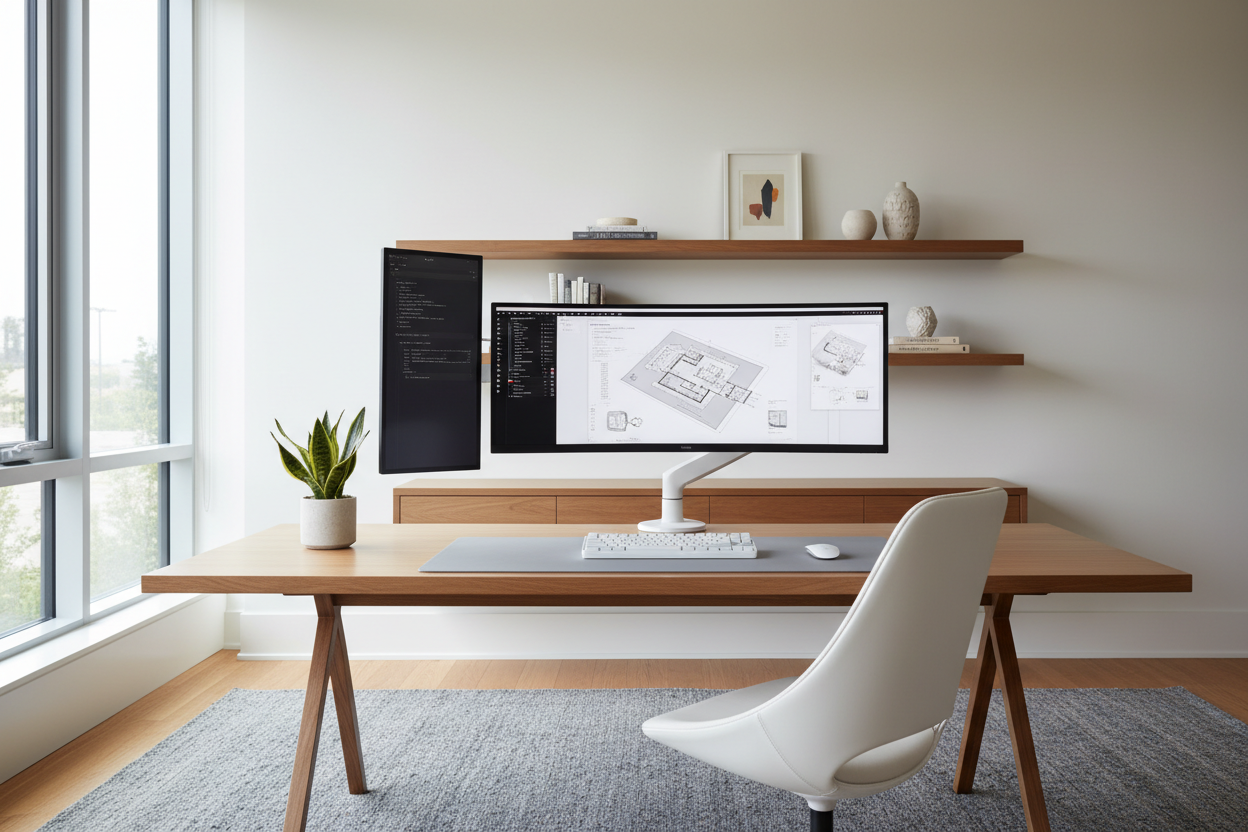
I have seen it happen in countless residential projects. A client invests in a stunning walnut mid-century desk, pairs it with a beautiful leather chair, and then drops a chunky, aggressive black plastic screen right in the middle of the room. The visual weight instantly shifts, and a carefully curated space suddenly feels like a corporate cubicle. Finding the best computer monitor for home office use isn't just about refresh rates and pixel density; it is about finding technology that respects your interior architecture while keeping you productive.
A good computer monitor for work from home should blend seamlessly into your aesthetic without compromising on ergonomics. Today, we are going to walk through how to choose the best computer monitor for work, balancing scale, cable management, and eye comfort so your workspace remains a place you actually want to spend time in.
Quick Decision Guide
- Match screen size to desk depth: A 24-inch deep desk pairs best with a 27-inch screen. For 30-inch deep desks, you can upgrade to a 32-inch screen.
- Prioritize USB-C connectivity: The best home office monitor uses a single USB-C cable to charge your laptop and display the screen, eliminating cord clutter.
- Check the back panel: If your desk floats in the middle of the room, the back of the monitor acts as a focal point. Look for matte white or silver finishes.
- Demand adjustability: The best ergonomic monitor must offer height, tilt, and swivel adjustments to prevent neck strain over long hours.
Sizing Your Screen to Your Space
Scale and proportion are the foundational rules of interior design, and they apply directly to technology. Buying the biggest screen possible is a common mistake that immediately overwhelms a room.
The Sweet Spot: Best 27 Monitor for Office Work
For the vast majority of North American residential setups, a 27-inch display is the ideal choice. It offers enough digital real estate for side-by-side windows without dominating the physical space. If you are looking for the best monitor for small desk setups (like a bedroom alcove or a narrow hallway desk), a sleek 27-inch model with ultra-thin bezels maintains a light visual footprint while still functioning as a highly capable work monitor for home.
Going Big: Best 32-Inch Monitor for Home Office
If you have an executive-sized desk or a dedicated room where the desk sits far from the seating area, you can scale up. The best 32-inch monitor for home office setups works beautifully on desks that are at least 30 inches deep. Any closer, and you will find yourself physically turning your head to see the edges of the screen, which ruins your posture. For those needing the best monitors for finance or extensive spreadsheet work, this larger size is highly practical, provided the room can handle the physical footprint.
Blending Tech with Interior Design
Technology shouldn't look like an afterthought. The best monitor setup for home office environments integrates smoothly with your existing decor.
Cable Management and Visual Weight
Nothing ruins a styled vignette faster than a rat's nest of black cords. When sourcing the best wfh monitor, I strictly look for models with built-in cable routing and USB-C hubs. This allows you to run a single, clean wire down the back of the stand. To reduce visual weight, I also steer clients toward monitors with silver, white, or minimalist metallic stands rather than heavy, gamer-style tripod bases.
The Rise of the Lifestyle Screen
Manufacturers are finally realizing that home office computer monitors live in our personal spaces. The best smart monitor for home office use often features a textured back panel, fabric accents, or a slim profile that mimics a picture frame. If your desk faces out into the room (meaning the back of the monitor is visible from the doorway), these design-forward models are worth the extra investment.
Comfort & Ergonomics for the Long Haul
A monitor can look gorgeous, but if it gives you a headache by 2 PM, it is a failure.
Best Ergonomic Monitor Features
The best monitor for remote work must accommodate your physical needs. Look for IPS panels, which offer wider viewing angles and better color accuracy, reducing eye strain. Furthermore, never settle for a fixed-height stand. The top edge of your screen should sit at or slightly below eye level. If you want a truly clean aesthetic, bypass the factory stand entirely and mount your screen to a pneumatic monitor arm. It frees up negative space on your desktop and allows for infinite adjustments.
Designer's Honest Take
A few years ago, I designed a gorgeous, minimalist workstation for a client. I recommended what I thought was the best workstation monitor based purely on impressive tech specs—a massive 34-inch ultrawide. It arrived, and it was a visual disaster. The aggressive curve and bulky black plastic casing completely swallowed the delicate lines of the writing desk.
I learned the hard way that tech specs do not matter if the piece ruins the room's proportion. We swapped it for a sleek, flat 27-inch display with a brushed aluminum finish, and the entire room breathed a sigh of relief. The honest downside? Sleeker, design-forward monitors often have terrible built-in speakers. If you take a lot of video calls, plan to buy separate desktop audio or rely on a good headset.
Frequently Asked Questions
What size monitor do I need for my home office?
For standard desks (20 to 24 inches deep), a 24-inch or 27-inch monitor is ideal to prevent eye and neck strain. For deeper desks (30+ inches), a 32-inch monitor is a great fit. Always measure your viewing distance before purchasing.
Are curved monitors good for office work?
Curved screens can be excellent for immersive tasks and reducing glare on very wide screens. However, they carry a heavy visual weight and take up more physical depth on a desk. They are generally not the best monitor for wfh setups in small or shared spaces.
How do I hide monitor cables on an open desk?
Invest in a monitor with USB-C power delivery so you only need one cable for both display and laptop charging. Use a monitor arm with integrated cable channels to route that single wire down to the floor, keeping the desktop completely clear.


Leave a comment
This site is protected by hCaptcha and the hCaptcha Privacy Policy and Terms of Service apply.