











Configuring a dedicated workspace requires balancing physical movement, task requirements, and architectural boundaries. For left-dominant professionals, multi-monitor power users, or rooms where door swings and windows dictate traffic on the right, a left hand desk provides a natural solution. Whether choosing a dedicated left hand l shaped desk or an adaptable modular frame, understanding how left-side returns alter reach zones, storage distribution, and room flow ensures a functional, comfortable working environment.
Understanding Left Hand Desk Configurations and Structural Orientation
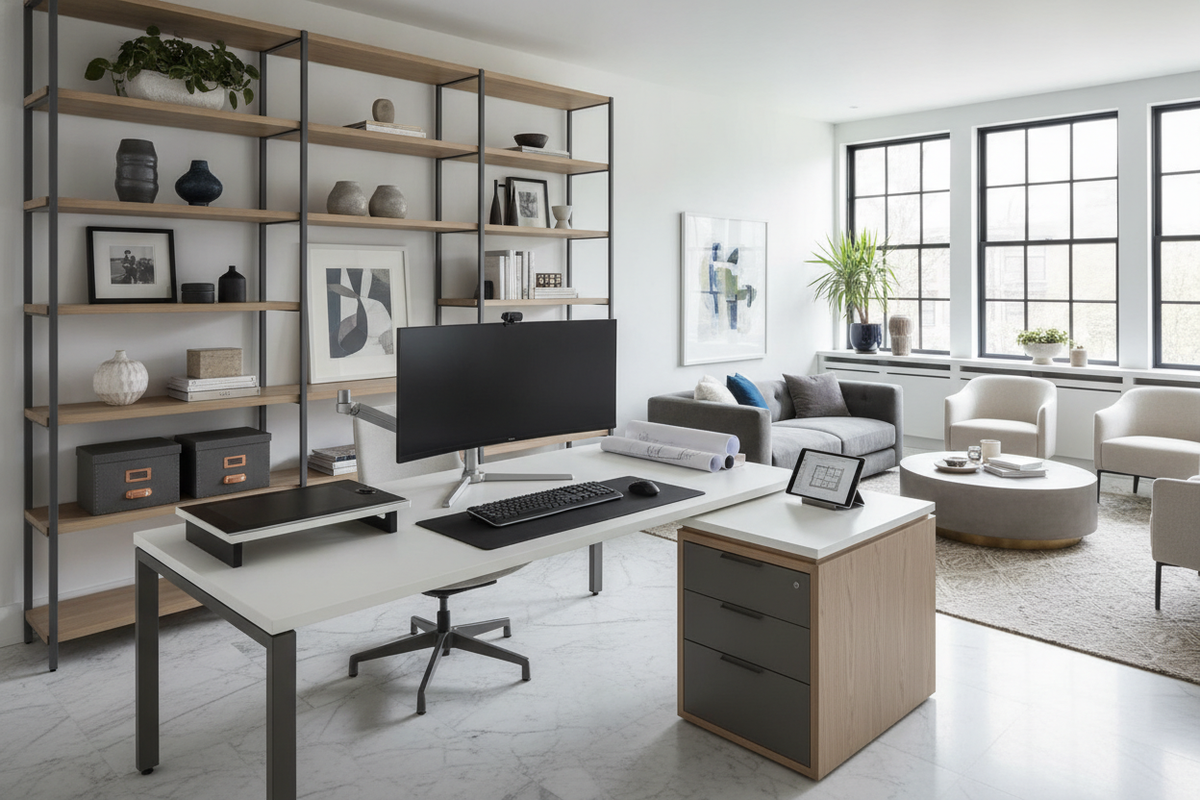
In furniture design, the designation of a left hand desk—frequently termed a left-return workstation—refers to the position of the secondary desktop extension relative to the user when seated in the primary working position. When facing the main desktop, the return surface extends outward to your left side, forming an asymmetrical or symmetrical L-shape.
What Defines a Left-Hand Desk or Left-Return Layout?
A classic desk arrangement divides tasks into primary computing and secondary reference zones. When the secondary surface is positioned on the left, it creates an uninterrupted working perimeter along your left flank. This orientation proves particularly advantageous when navigating architectural room corners where adjacent walls run leftward from the primary seating position, or when room entryways on the right side must remain completely unblocked by furniture wings.
Dedicated Left-Wing Frames vs. Reversible Corner Desks
When selecting a left handed l shaped desk, buyers typically encounter two structural categories:
- Dedicated Left-Return Frames: Engineered with factory-fixed structural joints, pre-drilled brackets, and fixed modesty panels or leg braces built specifically for left-side orientation. These models often feature seamless surface aesthetics and rigid corner leg placements tailored for maximum stability.
- Reversible Modular Systems: Designed with symmetrical leg mounting patterns and universal bracket placements, allowing the user to assemble the return wing on either the left or right side during initial setup. Reversible models provide long-term adaptability if you reconfigure your room or relocate to a new office layout.
Ergonomic Zoning: Tailoring Workflows for Left-Handed Productivity
Proper workspace planning relies on ergonomic reach zones. By organizing tools based on how frequently they are handled, you reduce repetitive stretching, shoulder strain, and unnecessary torso twisting.
Primary vs. Secondary Reach Zones on the Left Wing
The primary reach zone encompasses the sweep of your forearms without extending your elbows. On a left hand desk, this zone can be strategically divided between keyboard entry on the central span and active handwriting, drafting, or document review along the left return. Left-handed individuals gain immediate access to their natural writing arc on the return wing, leaving the central desktop open for monitors, reference stands, and input peripherals.
Peripheral Placement, Mouse Tracking, and Dual Monitors
For left-handed computer navigation, placing input devices on the left side of the keyboard requires dedicated clearance that does not collide with desk legs or monitor bases. A left-return layout offers ample surface area for wide mouse tracking surfaces, macro pads, and digital drawing tablets. When arranging dual or ultrawide monitors, aligning the primary display directly in front of your natural seated centerline and angling the secondary screen toward the left return maintains comfortable viewing angles while preserving open desk space.
Dimensional Categories and Room Fit Planning
Selecting the right desk scale requires evaluating the full perimeter footprint against existing room clearance and door pathways. Integrating proper L-shaped office layout principles ensures your furniture supports natural movement rather than creating spatial bottlenecks.
Measuring Main Desktop Width vs. Left Return Depth
Workstation scales generally fall into three structural categories:
- Compact Nook Formats: Sized for tight bedrooms or secondary study alcoves, offering just enough return space for a laptop dock or writing surface. In ultra-constrained spaces where an L-return cannot fit, a compact writing desk with drawer storage can serve as a streamlined linear alternative.
- Standard Workstation Formats: Designed for dedicated home offices, providing generous main surface depth alongside a functional left wing suitable for secondary displays, printers, or task organizers.
- Expansive Executive Spans: Wide-perimeter workstations designed for open offices, providing deep worktops, integrated multi-drawer storage, and extensive space for multi-device setups.
Corner Placement vs. Floating Room Dividers
An L-shaped desk with a left-side return can be positioned flush into a room corner to maximize floor efficiency, or floated outward into the room. When floated, the left return acts as a subtle partition, defining the boundary between your office zone and adjacent living areas while maintaining an open line of sight toward room entryways.
Doorway, Window, and Walkway Clearances
Before finalizing your layout, verify that the left return does not obstruct closet doors, window sills, heating vents, or primary traffic paths. Maintain adequate clearance behind the main seating area to allow task chairs to roll backward and swivel comfortably without striking walls or adjacent cabinetry.
Storage Architecture: Pedestals, Drawers, and Under-Desk Clearance
Integrating storage into an asymmetrical desk frame requires thoughtful placement to keep essential supplies accessible without encroaching on legroom.
Left-Wing Pedestal Placement vs. Open Legroom
Under-desk storage pedestals are frequently mounted beneath the outer edge of the left return. Placing drawer units at the far left edge keeps filing and office supplies within arm's reach while preserving the inner corner curve for unrestricted leg movement and smooth chair swiveling. For setups demanding extensive organization, selecting an L-shaped corner desk with integrated storage balances utility with an uncluttered footwell.
Balancing Drawer Storage with Swivel Mobility
When transitioning between computer tasks on the main deck and analog paperwork on the left wing, the seated user rotates through the desk’s inner corner. Ensure that under-desk cabinets, drawer pulls, or CPU mounts do not intrude into this central knee cavity. Choosing an L-shaped desk with storage drawers engineered with an offset base preserves seamless legroom during continuous seated transitions.
Cable Management Routes Across Asymmetrical Frames
With electronics often distributed across both the main desktop and the left return wing, managing cords is vital for visual order and safety. Route monitor power cables, peripheral leads, and charging cords along the inner frame rails of the left wing using adhesive clips, under-desk raceways, or integrated grommet holes to keep footwells free of dangling wires.
Material Selection, Surface Finishes, and Frame Durability
The structural materials and finishes of your desk influence its longevity, tactile comfort, and visual harmony with surrounding room furnishings.
Engineered Wood, Laminates, and Solid Tops
Desktop surfaces crafted from high-density engineered wood finished with durable melamine or scratch-resistant laminate provide an even, resilient workspace. These surfaces resist everyday wear from writing instruments, peripheral movement, and warm beverage cups. For light and airy interior palettes, a white L-shaped corner desk offers a clean, contemporary aesthetic that brightens home office environments.
Reinforced Steel Leg Frames and Leveling Glides
Stable L-shaped workstations depend on reinforced support legs and rigid corner joinery. Heavy-gauge steel frames with powder-coated finishes resist scuffs and maintain structural rigidity across wide desk spans. Adjustable leveling glides installed at the base of each leg allow you to compensate for slight irregularities in floor surfaces, preventing desk wobble and ensuring perfectly flush seams where the main surface meets the left return.
Step-by-Step Selection and Assembly Checklist
To ensure a smooth transition from purchasing to daily productivity, follow this practical checklist when selecting and assembling a left-hand desk:
- Measure Your Available Floor Span: Map out the main width, return depth, and necessary clearance for chair rollback and doorways.
- Determine Handedness and Workflow: Confirm whether your active writing or device zone is naturally suited to the left side.
- Verify Assembly Reversibility: Check whether the frame is dedicated or reversible if you anticipate future layout changes.
- Assemble on a Protected Surface: Build the frame on a soft rug or packaging blanket to avoid scratching laminate surfaces.
- Align Desktop Seams Before Final Tightening: Hand-tighten structural bolts during initial frame assembly, square the desktop junction seam, and then tighten all hardware fully to achieve a smooth, level joint.

Leave a comment
This site is protected by hCaptcha and the hCaptcha Privacy Policy and Terms of Service apply.