










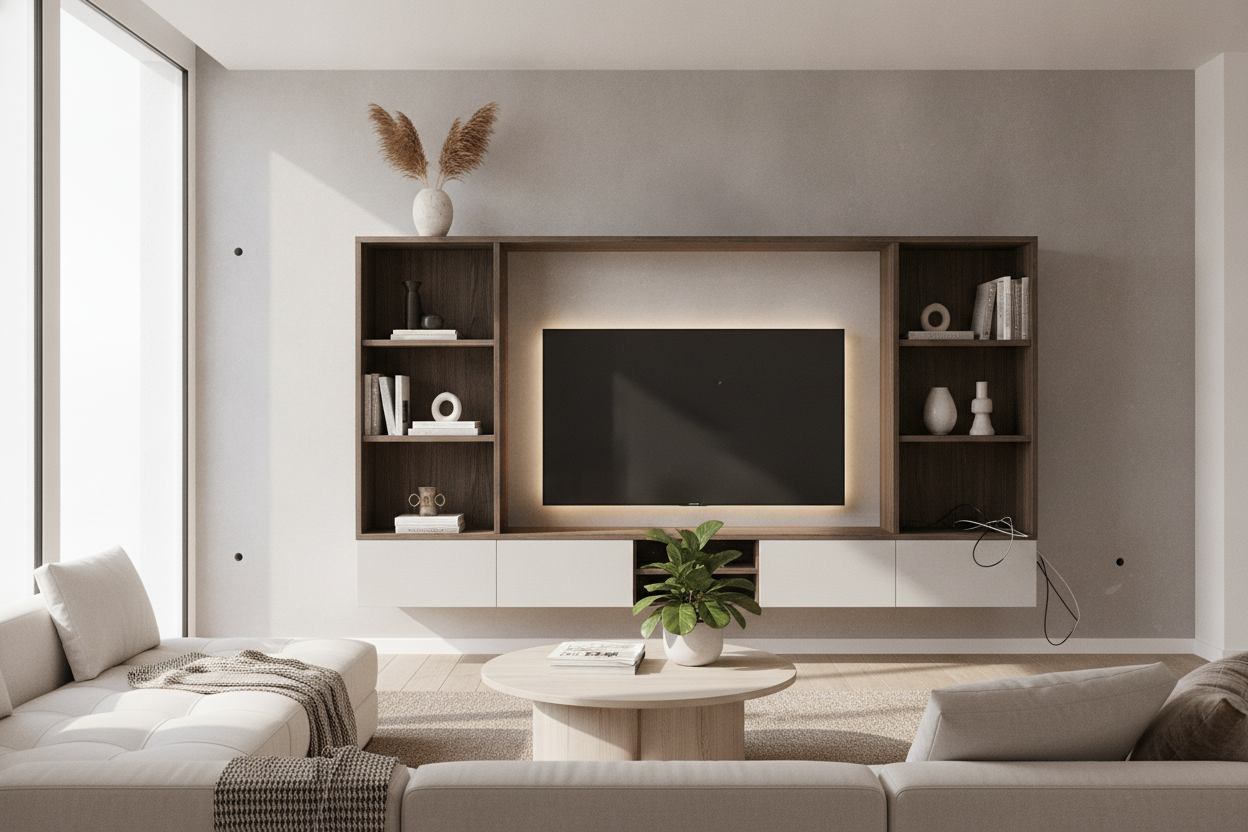
I remember staring at my first wall-mounted console like it was a physics exam I hadn't studied for. It looked sleek in the catalog, but holding a 60-pound box of MDF against a plaster wall at 10 PM is a different vibe entirely. You are making the right aesthetic call by opting for a floating entertainment center installation—it opens up the floor and makes a small living room feel twice as big. I am a huge advocate for ditching legs for a wall-mounted unit, but if you wing the process, your TV is going to end up in a heap of drywall dust.
Quick Takeaways
- Studs are non-negotiable; drywall anchors are a recipe for disaster.
- Mount the console first, then the TV, to ensure the spacing looks intentional.
- In-wall cable kits are the only way to avoid the 'cord waterfall' look.
- Always use a level—your eyes will lie to you.
So You Bought a Wall-Mounted Unit (Now What?)
The appeal is obvious. No vacuuming around chunky wooden legs, no dust bunnies trapped in corners, and a clean, modern silhouette. But the sheer terror of figuring out how to install floating entertainment center units is real. Most people overcomplicate it or, worse, underestimate the weight of their own gear.
I have seen consoles sag, tilt, and straight-up rip out of the wall because someone thought 'heavy-duty' plastic anchors were enough. They aren't. Before you even open the box, you need to accept that your wall is about to become a structural partner in this project. If you aren't ready to drill into your framing, you aren't ready for a floating unit.
Mistake 1: Trusting Drywall Anchors With Your Life (and Your TV)
This is the most common disaster I see. Those little plastic toggles that come in the box? Throw them away. They are fine for a picture frame, but they have no business supporting a 70-inch media console plus a soundbar and your PlayStation. A floating tv unit installation requires you to hit at least two wooden studs, preferably three.
If your studs don't line up with the pre-drilled holes in the unit, you need to drill new holes through the back of the console's mounting cleat. Do not compromise on this. If you live in an old apartment with metal studs or crumbling plaster and you can't get a solid bite, be honest with yourself. You are better off returning the unit and getting a standard freestanding entertainment center. It is better to have legs on your furniture than a hole in your wall and a broken TV.
Mistake 2: Hanging the Console First, Placing the Screen Second
The 'floating' look only works if the proportions are tight. I have walked into too many homes where there is a massive, awkward two-foot gap between the console and the TV. It looks like the two pieces of furniture are having an argument. When you are learning how to mount tv on floating entertainment center units, you have to think of them as one cohesive visual block.
I usually recommend mounting the console so the top sits about 20 to 24 inches off the floor. Then, hang the TV so the bottom edge is only 5 to 8 inches above the console. If you are looking for a wall mounted media console that handles this spacing well, pick one that is at least 10 inches wider than your screen. This creates a balanced 'frame' that feels grounded rather than hovering aimlessly.
Mistake 3: Forgetting the Cords Until It's Too Late
Nothing kills the high-end look of a floating tv unit installation faster than a tangled mess of black power cords dangling underneath. If you can see the cords, you might as well have kept your old floor-standing unit. You need to plan for cable management before the unit ever touches the wall.
I always use an in-wall cable routing kit. It's essentially two plastic grommets that let you run the HDMI and power cords behind the drywall. If you're renting and can't cut holes, buy a paintable cord cover and match it exactly to your wall color. It’s a small detail, but it’s the difference between a professional-looking setup and a DIY project that looks unfinished.
The Foolproof Guide: How to Hang a Floating Entertainment Center Safely
Ready to pull the trigger? Here is my personal checklist for how to mount a floating entertainment center without losing your mind—or your security deposit.
- Buy a real stud finder: Not the $10 one. Get one that detects the edges of the stud so you can hit the center every time.
- Use a laser level: A 6-inch torpedo level isn't enough for a 6-foot console. If you're off by even a fraction of an inch, it will be glaringly obvious once the TV is up.
- Pilot holes are mandatory: Don't just drive a lag bolt into the wall. Drill a pilot hole first to prevent the stud from splitting.
- The Two-Person Rule: Do not try to hold the unit and level it at the same time. One person holds, one person drills.
FAQ
How high should a floating entertainment center be?
The sweet spot is usually 20 to 24 inches from the floor to the top of the unit. This keeps your TV at a comfortable eye level when you're sitting on the sofa.
Can I mount a floating console on a brick wall?
Yes, but you'll need a masonry bit and Sleeve Anchors or Tapcons. Standard wood screws won't do anything but dull your drill bit.
How much weight can these units actually hold?
Most well-built units can handle 50-75 lbs if they are secured to studs. Just don't use them as a bench; they are for electronics, not for sitting.


Leave a comment
This site is protected by hCaptcha and the hCaptcha Privacy Policy and Terms of Service apply.