










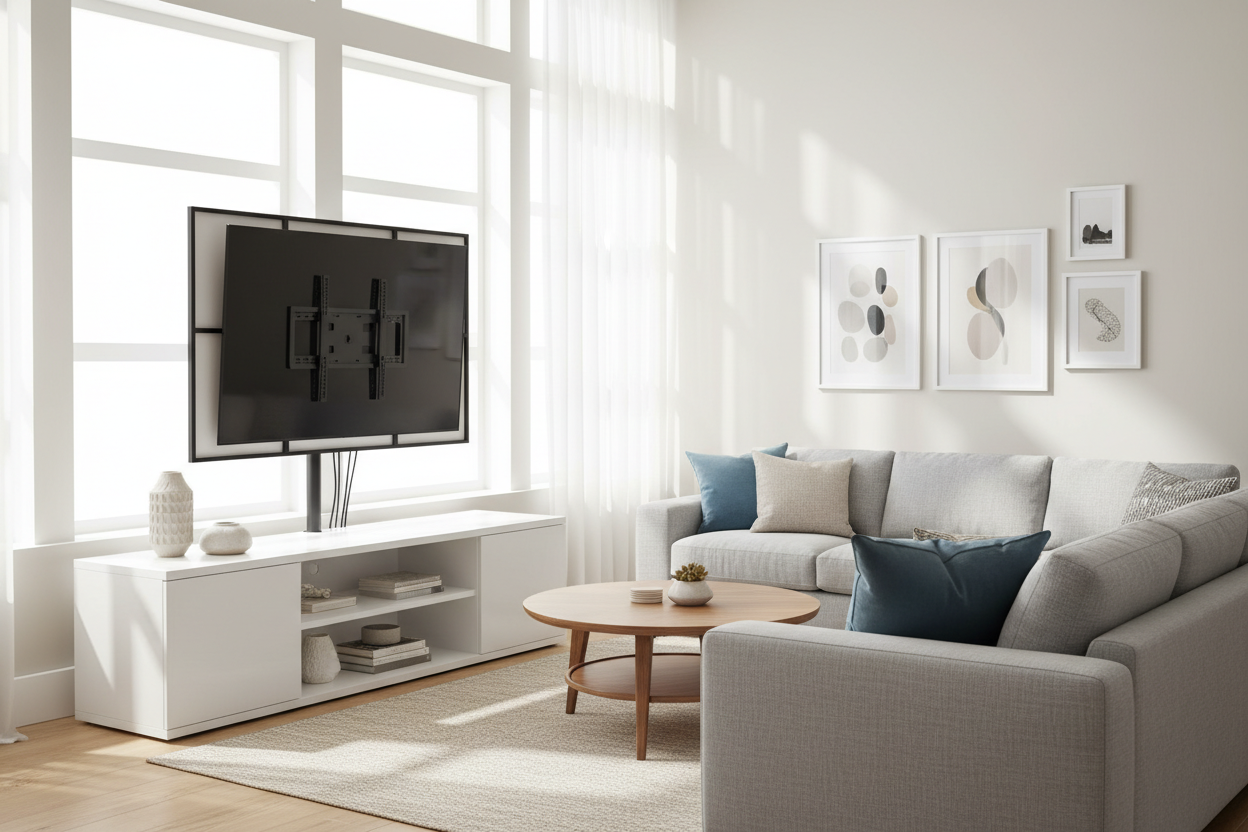
I spent three hours last weekend trying to tuck six black cables behind a leaning floor mirror. It did not work. My living room looked like a server room from 1998, and my 65-inch OLED deserved better. I wanted that sleek, floating-on-the-wall look, but my landlord has a strict policy against drilling into the masonry.
That is when I finally gave in and bought a television stand with mount. I used to think these were strictly for conference rooms or hospital waiting areas, but the new residential versions actually look like high-end furniture. They offer the height of a wall mount with the storage of a credenza, and most importantly, they swallow every single wire.
- Renter-friendly: No holes in the drywall, no security deposit drama.
- Perfect Cable Management: The hollow spine hides HDMI and power cords completely.
- Adjustable Height: You can set the screen at eye level, not just wherever the studs allow.
- Integrated Storage: A place for the PS5 and router that is not the floor.
The Floating Screen Dream (and the Dangling Cord Nightmare)
We all want that Pinterest-perfect living room where the TV looks like a piece of art hovering in mid-air. It looks effortless until you actually buy the screen. Then you realize you have a power cord, a soundbar wire, an Apple TV cable, and maybe a gaming console or two. Suddenly, your 'art' has five thick black tails dangling down to the baseboards.
It is the ultimate design buzzkill. I tried those plastic cord raceways you stick to the wall, but they just look like a different kind of clutter. I even considered a tapestry to hide the mess, but that felt like a college dorm solution. I needed something that felt intentional, like the furniture was designed to handle the tech, not just tolerate it.
Why I Refused to Cut Holes in My Drywall
The standard advice is to 'just fish the wires through the wall.' No thanks. Between the cost of an in-wall cable kit and the fear of hitting a live wire, I was out. Plus, if you have ever tried to use a stud finder on an old house, you know the pain. You drill a pilot hole only to find empty air, or worse, you realize your wall studs are totally off-center from where your sofa actually sits.
A tv furniture mount bypasses the physics of your house entirely. It is a self-contained unit that puts the screen exactly where you want it. You are not at the mercy of the 16-inch spacing behind your plaster. If you decide to move the living room layout six inches to the left next month, the TV moves with the furniture. No patching, no sanding, no repainting required.
The Magic of the Central Column
The secret sauce here is the vertical spine. Most people buy a standard console or media cabinet and just set the TV on its little plastic feet. But then you have the 'cable waterfall' spilling off the back. A tv stand with a mount solves this with a hollow vertical column made of heavy-gauge steel.
My HDMI cables and the power cord all tuck into a 3-inch channel behind the screen. This flat panel tv stand with mount keeps everything tensioned so nothing peeks out from the sides. Unlike those flimsy 'cable clips' that pop off after a week, a dedicated column keeps things organized for the long haul. It is the cleanest my tech setup has ever looked, even with three different consoles plugged in at once.
Does It Actually Look Like It is Floating?
I was worried the metal pole would be an eyesore, but if you choose the right model, it is surprisingly discreet. If you position a soundbar directly under the screen, the illusion is nearly perfect. I actually went a step further and chose a model with a white spine that matches my walls. From across the room, the tv table stand with mount is almost invisible.
The real win is the height. Most media consoles are too low, forcing you to look down at the screen. This setup lets me bolt the TV at the exact ergonomic height for my favorite chair. It feels more like a custom built-in than a piece of flat-pack furniture. I did have one 'oops' moment during assembly where I dropped a VESA screw into my shag rug—pro tip: assemble this over a hard floor if you can.
Stashing the Routers, Consoles, and Apple TVs
The mount handles the screen, but the base of the unit is where the real work happens. You want a tv stand with tv holder that offers enough depth for your hardware. I opted for a unit with slatted doors to hide your messy routers while still letting the air circulate. Electronics get hot, and trapping them in a solid wood box is a recipe for a fried motherboard.
The wires travel down the spine and directly into the back of the cabinet. There is no point where they are visible to the naked eye. My router, my Hue Bridge, and my Switch are all tucked away, but they still respond to the remote because of the slatted design. It is the first time in my adult life that I have looked behind my TV and did not feel a wave of anxiety.
FAQ
Will this hold a heavy 75-inch TV?
Most modern stands are rated for 100+ lbs, but always check the VESA pattern and weight limit on the box. If your TV is a beast from five years ago, it might be heavier than a new OLED.
Is it hard to assemble alone?
The base is easy, but hanging the TV on the bracket is definitely a two-person job. Do not risk your screen trying to be a hero.
Can I swivel the TV?
Yes, most mount-style stands offer 20-30 degrees of swivel. It is great for hitting that one 'sweet spot' on the sectional or avoiding afternoon glare from a window.


Dejar un comentario
Este sitio está protegido por hCaptcha y se aplican la Política de privacidad de hCaptcha y los Términos del servicio.