










Evaluating Retail Sit-Stand Solutions: Footprint and Format Categories
Shopping for height-adjustable workspaces often leads homeowners to explore retail-style workstations, such as a standing desk target shoppers consider for balancing convenience and cost. Modern workspaces demand versatility, making it essential to understand how different furniture formats fit into distinct floor plans and lifestyle routines.
Full-Sized Adjustable Desks vs. Desktop Risers
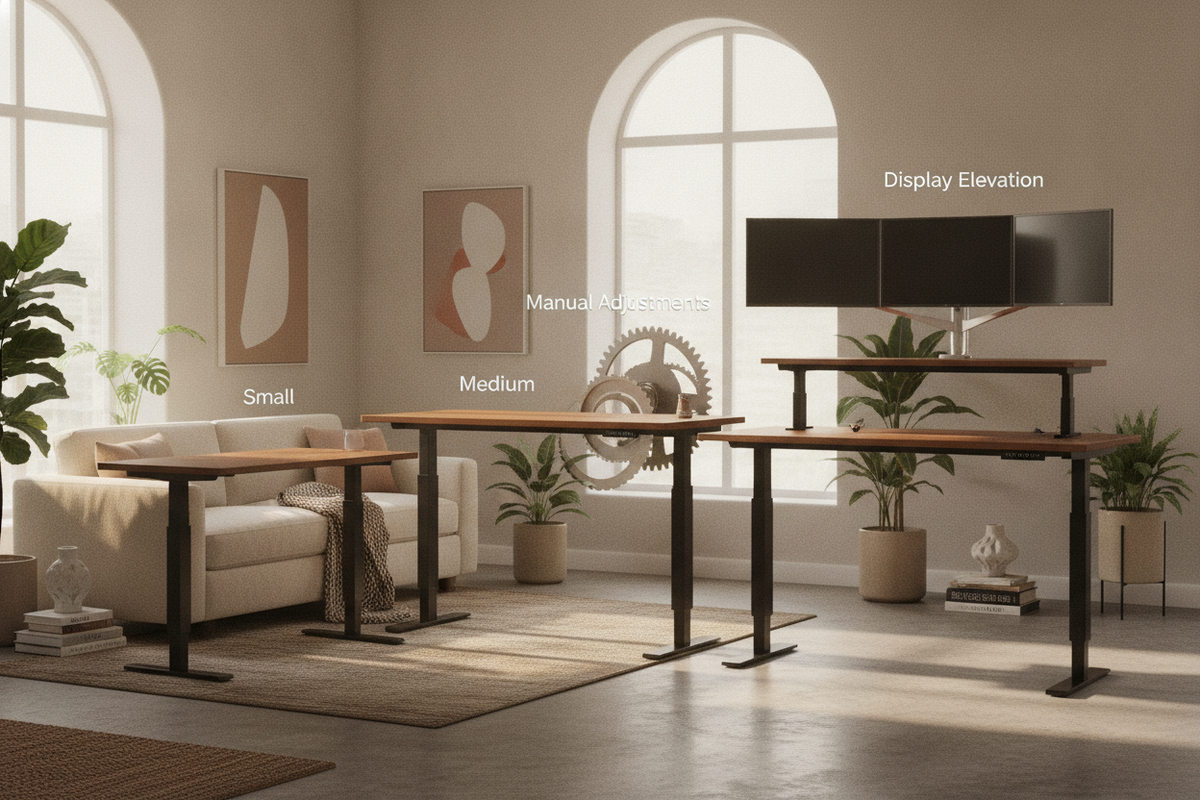
Full-sized height-adjustable desks replace existing tables entirely, providing a continuous work surface that moves as a single unit. In contrast, desktop risers sit on top of an existing table or credenza. Risers offer an accessible entry point if you already own a sturdy writing surface, but they introduce tiered platforms that can divide your desktop area into smaller compartments. Exploring a dedicated standing desk resource can help you evaluate whether replacing your table or adapting your current surface better suits your daily work habits.
Compact Urban Workstations and Small-Space Clearances
In multi-purpose living rooms, studio apartments, or compact bedrooms, spatial efficiency is critical. Smaller sit-stand tables are engineered with shallower depths and narrower crossbars to slip neatly into alcoves or beside window frames. When measuring your room, plan for clearance not only around the desk base but also above and behind the surface, ensuring that moving elements do not scrape against wall moldings, radiator covers, or lower window ledges during vertical adjustments.
Manual Adjustment Mechanisms vs. Powered Lifts
Retail offerings encompass both manual adjustment systems and electric motor lifts. Manual desks frequently utilize pneumatic gas springs, hand cranks, or counterbalance pin-locks. Gas springs allow smooth movement with minimal effort, whereas hand-crank designs require intentional winding, providing reliable mechanical operation without reliance on nearby wall outlets. Powered frames offer pushbutton ease, making them appealing for setups supporting substantial desktop weight or multi-screen equipment.
Surface Architecture and Display Ergonomics
Achieving a supportive posture requires aligning your screen height with your natural sightline, regardless of whether you are seated or standing.
Integrating Monitor Stands, Arms, and Dual Display Mounts
A bare tabletop rarely positions a screen at natural eye level. Supplementing a desk with an elevated shelf or articulating arm helps prevent continuous neck tilting. For compact surfaces, integrating a specialized surface like a computer desk monitor product provides built-in elevation while freeing up the main desktop for notebooks and keyboards. Reviewing a thoughtful desk monitor stand guide offers practical ideas for maintaining balanced visual angles across various screen dimensions.
Surface Depth Requirements for Clamp-On Mounts vs. Freestanding Risers
When selecting monitor accessories, consider how they attach to your tabletop. Clamp-on monitor arms require an open under-desk edge free of structural aprons or crossbars, along with sufficient desktop thickness to distribute pressure evenly. Freestanding risers sit directly on the desktop surface, eliminating clamping restrictions while occupying a portion of the usable surface area. Both approaches effectively raise the screen, allowing you to choose based on your tabletop's structural underside.
Maintaining Usable Work Surface Around Display Peripherals
Elevating displays opens up valuable space beneath the screens. Freestanding monitor risers often accommodate compact keyboards, external hard drives, or charging hubs underneath their platforms. Keeping peripheral cords bundled and pens organized within this recessed space ensures your primary writing zone remains open for everyday productivity.
Storage Strategies for Minimalist Height-Adjustable Frames
Height-adjustable frames prioritize vertical travel and leg clearance, often omitting traditional drawers. Maintaining an orderly workstation requires deliberate planning for secondary storage.
Managing the Absence of Built-In Under-Desk Drawers
Because sit-stand desks lack deep pedestals, desktop surfaces can quickly gather clutter. Incorporating slim under-mount pencil trays, desktop caddies, or shallow felt organizers helps contain small stationery items without encroaching on knee space when seated.
Coordinating Mobile Pedestals and Side Storage Credenzas
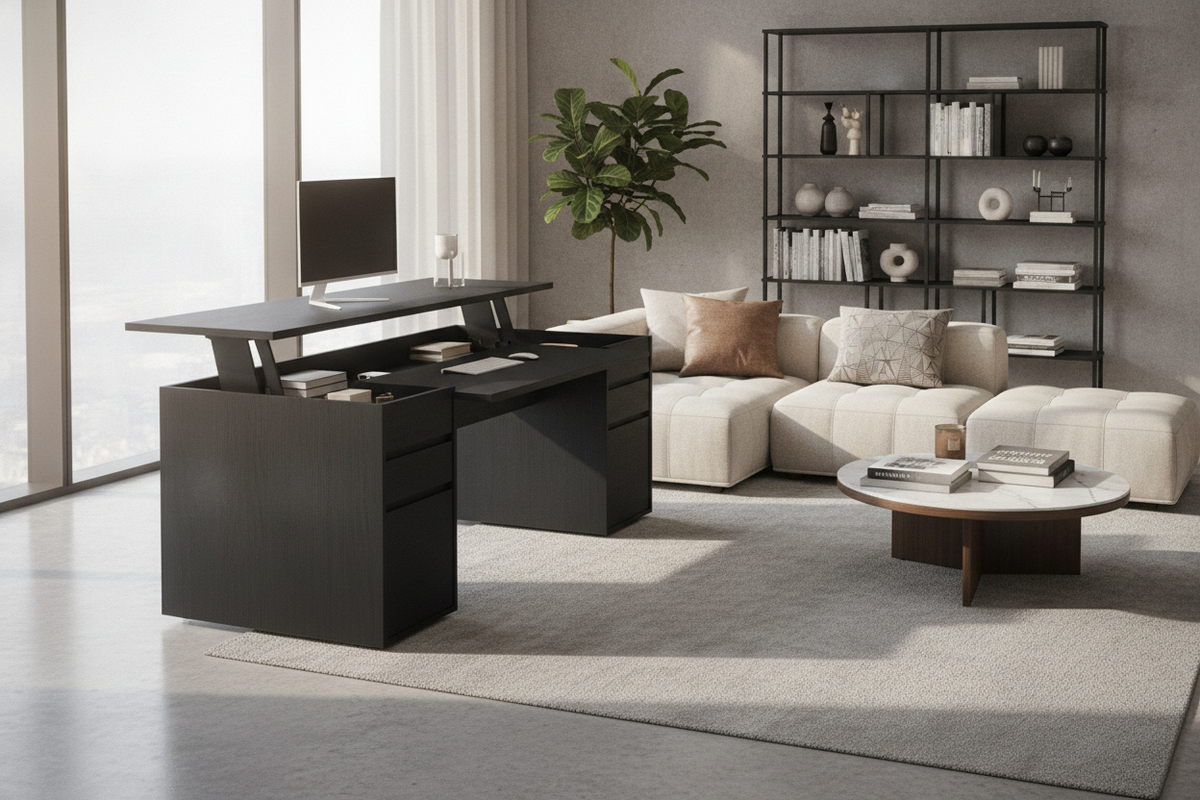
For extensive filing or reference book storage, pairing a mobile rolling pedestal or a matching low credenza alongside your desk works well. Alternatively, an integrated solution such as an adjustable standing desk product combines active height adjustment with fixed storage compartments, keeping essential files accessible regardless of desk elevation.
Cable Clearance and Slack Management Across Height Transitions
As a desk moves up and down, connected cables expand and contract. Securing power strips to the underside of the main tabletop ensures connected monitors and chargers move together as a single unit. Maintain a generous loop of slack in the primary power lead reaching the wall outlet, and use flexible cable sleeves or spine tracks to prevent cords from snagging on base legs or nearby furniture edges during travel.
Material Selection, Frame Stability, and Assembly Factors
The structural integrity of any sit-stand workstation depends on solid materials, rigid connection hardware, and careful assembly.
Laminate Finishes, White Minimalist Frames, and Metal Bases
Retail-oriented desks typically feature powder-coated steel leg columns paired with durable laminate, melamine, or engineered wood tops. Smooth laminate surfaces resist everyday spills and pen impressions while remaining easy to wipe down. Steel frames provide the necessary lower ballast to counterbalance the shifting weight of screens and desktop gear.
Mitigating Lateral Wobble at Extended Heights
Any two-column standing desk can exhibit subtle lateral sway when fully extended. You can minimize this movement by ensuring leveler feet are adjusted flush against the flooring, choosing frames with wide floor-contact feet, and positioning the desk parallel to a supportive wall rather than floating in an open thoroughfare.
Assembly Practicalities and Hardware Verification
During assembly, loosely position all frame bolts before tightening them completely. This prevents cross-threading and ensures crossbeams sit squarely within their alignment channels. Re-checking hardware tightness after the first few weeks of regular use helps keep the entire frame firm and quiet.
Room Layout and Workflow Recommendations
Integrating an adjustable desk into your living space requires thoughtful orientation toward surrounding light sources, pathways, and supplementary displays.
Perimeter Wall Clearances and Window Placement
Position your desk perpendicular to windows to reduce direct glare on your displays throughout changing daylight hours. Leave a modest gap between the rear edge of the tabletop and the wall so monitor brackets, cable tracks, and desk mats do not rub or scuff wall paint during elevation shifts. If floor space remains tight, consulting an architectural desk stand monitor guide can provide layout inspiration for separating screens onto independent stands to preserve maximum walking room.
Hybrid Sitting and Standing Transitions Throughout the Workday
Switching positions smoothly supports day-long physical comfort. Alternating between seated tasks and standing focus periods keeps your posture dynamic without disrupting your concentration. Pairing your setup with an anti-fatigue mat and an adjustable task chair creates a functional, enduring home office built around daily versatility.

Dejar un comentario
Este sitio está protegido por hCaptcha y se aplican la Política de privacidad de hCaptcha y los Términos del servicio.