










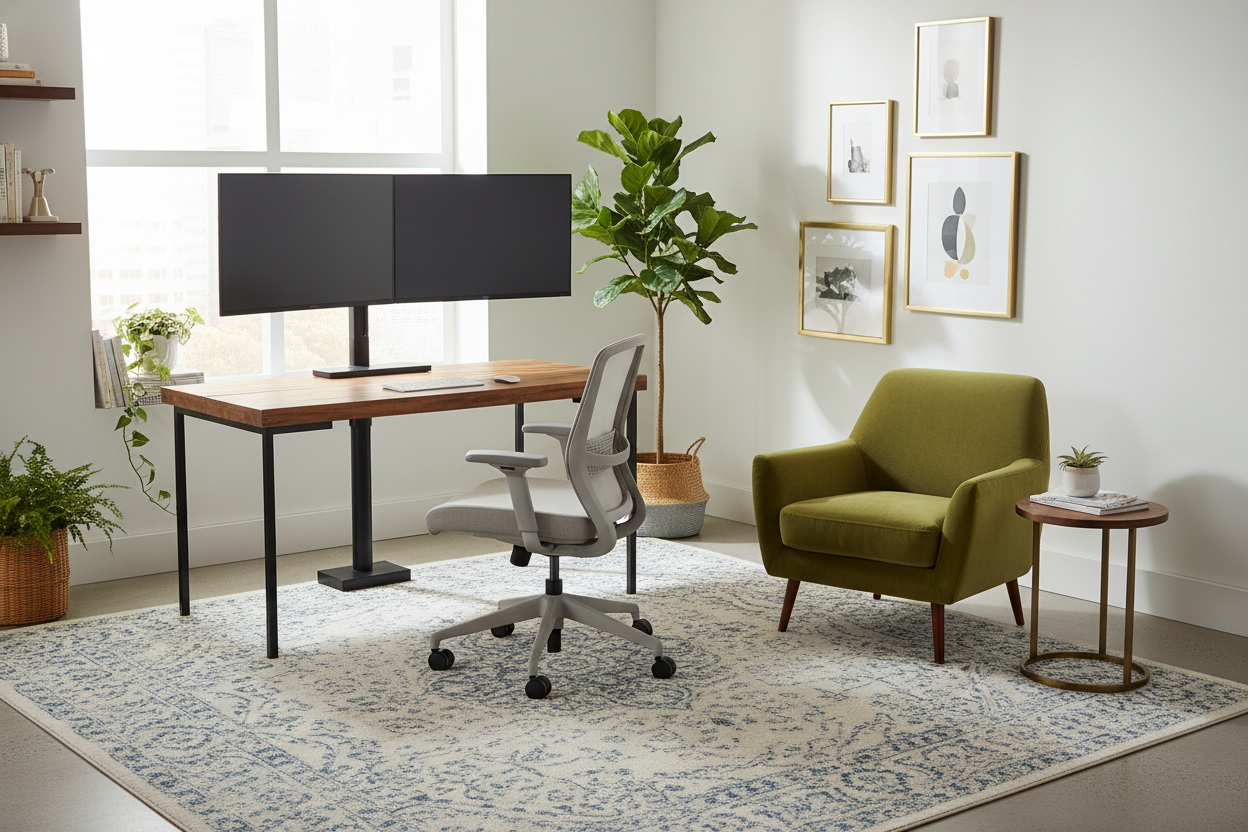
I spent a small fortune on a 43-inch monitor thinking it would turn me into a productivity machine. Instead, it sat eighteen inches from my face on a standard 24-inch deep desk. I was squinting, my neck was locked in a permanent crane position, and I had exactly zero room left for a keyboard and a coffee mug. That is when I realized I needed a floor stand for tv monitor setups to save my spine.
- Depth is the enemy of big screens; you need more space than a desk provides.
- Standard desk mounts often fail under the weight of 40-plus inch screens.
- Decoupling the screen from the desk allows for infinite height and depth adjustments.
- Cable management is the only thing standing between a cool setup and a messy hospital room vibe.
The Day I Realized My 43-Inch Screen Was Ruining My Desk
My desk is a solid 48x24 slab of wood. It is great for a laptop, but it is a total disaster for a massive screen. I originally tried to try a tv monitor on stand that sat right on the desktop, but the base was the size of a dinner plate. It ate my entire workspace. To actually see a 4K screen that size without getting a headache, you need at least 30 to 36 inches of distance. A standard desk simply does not have the depth to make that happen.
I was constantly leaning back in my chair just to see the corners of my spreadsheets. It was ridiculous. Moving the screen off the desk surface was the only way to get my desk back and actually use the screen the way it was intended.
How a Floor Stand for TV Monitor Use Actually Works
A floor stand is essentially a heavy-duty steel pole mounted to a flat, weighted base. You slide that base directly under the back of your desk. The screen hangs over the back edge, floating in the air. Because it is not touching the desk at all, your desk can be as shallow as you want. The screen is technically in the room, not on your furniture.
Most of these stands use a VESA mount, which is the standard four-hole pattern on the back of almost every TV and monitor. You bolt the bracket to the screen, hook it onto the pole, and suddenly you have reclaimed about four square feet of desk real estate. It is the closest thing to wall-mounting without having to drill holes in your drywall and lose your security deposit.
The Ergonomic Magic of a TV Monitor Floor Stand
The real win here is the posture. A tv monitor floor stand allows you to set the height independently of your work surface. Most desk mounts have a frustratingly low height limit. With a floor stand, I can crank that screen up so the top third is at my exact eye level, regardless of how low my keyboard tray is. My chronic tech-neck vanished within three days of making the switch.
But Doesn't It Look Like a Corporate Conference Room?
I get it—most of these stands look like they were stolen from a Marriott meeting room. They can feel cold and industrial if you do not handle them right. I remember my TV was on the floor for weeks because I was terrified of making my home office look like a cubicle farm. The secret is choosing a matte black finish and being obsessive about cable management.
Use black velcro ties to strap your power and HDMI cords strictly to the back of the pole. If you tuck the stand tight against the wall and hide the bottom half behind your desk, the screen just looks like it is hovering. It feels intentional and modern rather than like a piece of medical equipment.
When You Should Stick to Standard Storage Consoles
As much as I love my pole stand, it is a specialized tool. If you are setting up a living room, please do not do this. You need a modern TV stand with cabinets to hide your gaming consoles, routers, and that tangle of extra wires. A floor stand offers zero storage.
For a lounge vibe where you want to display decor and keep the room feeling cozy, you should definitely browse traditional TV stands instead. The floor pole is for the high-utility work zone where performance and ergonomics beat out the need for a place to put your coasters and remote controls.
Personal Experience: The Wiggle Factor
I initially bought the cheapest $40 stand I could find. Huge mistake. The pole was thin, and every time I typed with any vigor, the screen would wobble like a bobblehead. It was nauseating. I eventually upgraded to a stand with a 2.5-inch thick steel pole and a base that weighs nearly thirty pounds. It is rock solid. If you are putting a $500+ screen on a stand, do not cheap out on the metal holding it up.
FAQ
Is a floor stand stable enough for a carpeted floor?
Yes, but you need a base with some serious weight. Look for a stand that has a wide, flat steel base rather than a tripod. The weight of the monitor actually helps pin it down, but a heavy base is non-negotiable for carpet.
Can I still use a sit-stand desk with a floor stand?
It is tricky. Since the monitor height is fixed to the floor, it will not move when you raise your desk. You would have to manually adjust the monitor height every time you stand up, which is a pain. For standing desks, a desk-mounted arm is usually better.
Will it fit under a desk with a crossbar?
You need to measure the height of your desk's support bars. Most floor stand bases are about an inch thick, but the vertical pole starts immediately. If your desk has a low back bar, you might not be able to slide the stand in deep enough.



Dejar un comentario
Este sitio está protegido por hCaptcha y se aplican la Política de privacidad de hCaptcha y los Términos del servicio.