










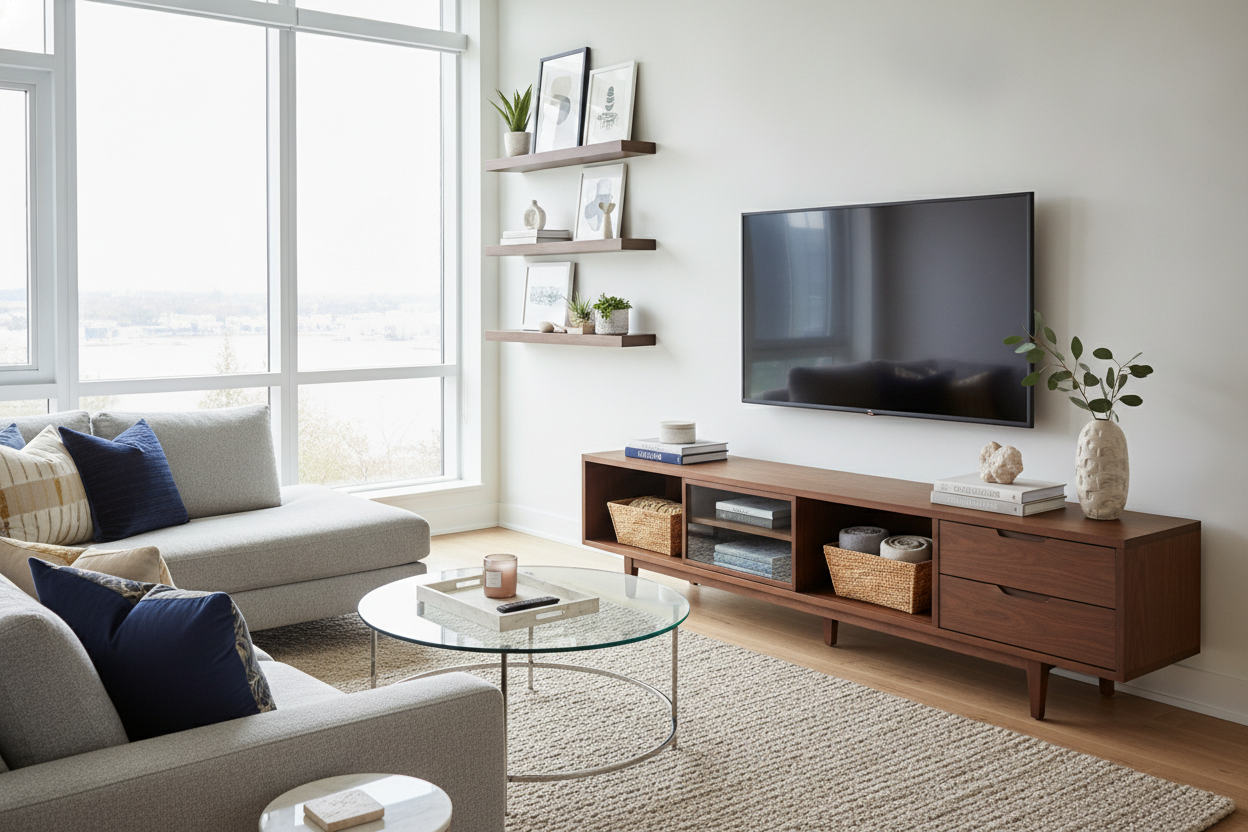
I spent three years staring at a tangle of HDMI cables and a half-eaten bag of chips under my TV before I realized my living room wasn't 'lived-in'—it was just a mess. We spend thousands on the OLED screen and then park it on a piece of furniture that looks like a tech landfill. It is the ultimate design irony.
Your media center should be the anchor of the room, not a distraction. If you are currently using your console as a staging ground for mail and dead AA batteries, it is time for a reset. Staring at 47 browser tabs of tv stands and consoles at 1 AM won't help if you don't have a plan for the clutter.
- Hide every wire using clips, boxes, or ventilated cabinets.
- Style in groups of three with varying heights and textures.
- Ensure your console is at least 12 inches wider than your TV.
- Add a vertical element like a tall vase to soften the screen's edges.
The 'Electronics Graveyard' Problem
It happens to the best of us. You buy one of those tv stands and consoles with high hopes, and three weeks later, it is covered in unread mail and a dusty Nintendo Switch dock. It is the visual equivalent of a junk drawer with a screen on top. When tv stands consoles become a dumping ground, the whole room feels frantic.
The problem is that we treat this surface as 'extra' space. It isn't. It is the focal point of your seating arrangement. Every piece of clutter there is competing with whatever you are trying to watch, creating a layer of subconscious stress while you are trying to relax. If you can't see the wood grain for the clutter, you aren't relaxing; you're just managing a mess.
Hide the Ugly Stuff First (Yes, Even the Router)
Before you even think about buying a decorative bowl, you have to deal with the plastic. Cords are the enemy of good design. I have seen $5,000 rooms ruined by a single white Ethernet cable snaking across a dark wood floor. Use adhesive cord clips to run wires down the back of the legs so they disappear.
If your tech stack is an eyesore, look for furniture that does the heavy lifting for you. Upgrading to Tv Stands with fluted or frosted glass doors is a pro move. It hides the blinking lights of your router and the messy stack of gaming consoles while still allowing your remote signals to pass through effortlessly. It is the easiest way to make a $400 setup look like a $4,000 custom build.
The Rule of Three for Media Styling
Styling a long surface can feel intimidating, but the 'Rule of Three' is your best friend. Instead of lining things up like soldiers, create small clusters. Pick three items of different heights: something tall (a vase), something medium (a stack of books), and something low (a small tray or bowl).
Place one cluster on the left and one on the right. Leave the middle relatively clear so it doesn't block the bottom of the screen. This creates a visual 'frame' for the TV. I like to mix materials here—think a ceramic vase, a wooden bowl, and a brass object. The contrast in textures makes the setup feel curated rather than like you bought a 'decor kit' from a big-box store.
Why Scale Matters More Than You Think
The biggest mistake I see is tiny decor. If you have a 65-inch screen and you put a 4-inch succulent next to it, the plant looks like it is being bullied. Modern TVs have massive visual weight, and your decor needs to be chunky enough to stand its ground. Tiny trinkets just look like more clutter from across the room.
The length of your furniture dictates everything. Standard Consoles Look Silly: Why You Need Long TV Stands With Fireplace because a short unit makes the TV look top-heavy and unstable. You want your console to be significantly wider than the screen to give your eyes a place to land that isn't just the black rectangle. If the TV is 55 inches wide, your console should be at least 70.
Don't Forget the Vertical Space
A TV is a flat, horizontal object. If everything on your console is also short and flat, the whole wall feels bottom-heavy. You need to draw the eye upward to break up that harsh geometry. A tall, architectural lamp or a set of dried branches in a heavy stone vase can work wonders.
If you have a low ceiling, Stop Buying Low Consoles: The Case for Tall Black TV Stands. A taller unit brings the screen to a better eye level and allows you to lean a piece of art behind the TV. This 'layering' effect makes the television feel like part of the gallery rather than an appliance bolted to the wall. It softens the entire room.
Personal Experience
My own living room was a disaster zone for years because I insisted on keeping an old 48-inch mid-century sideboard as my TV stand. My 55-inch TV hung over the edges like a bad haircut. It wasn't until I swapped it for a 72-inch solid mango wood console that the room finally felt 'finished.' I realized then that I wasn't bad at decorating; I was just fighting bad proportions. The extra width gave me space to actually style the ends without the TV looking like it was suffocating.
How much wider should the stand be than the TV?
Aim for at least 6 to 10 inches of breathing room on each side. If the TV is wider than the stand, it looks precarious and shrinks the room visually.
Can I put a plant next to my TV?
Absolutely, but keep it real. Fake plants gather dust and look sad under the heat of electronics. A hardy snake plant or a vase of eucalyptus works best because they don't drop many leaves.
What do I do with all the remotes?
Get a small, heavy decorative box or a leather tray. If they have a designated home on the shelf, they won't end up lost in the sofa cushions or scattered across the console top.

Dejar un comentario
Este sitio está protegido por hCaptcha y se aplican la Política de privacidad de hCaptcha y los Términos del servicio.