










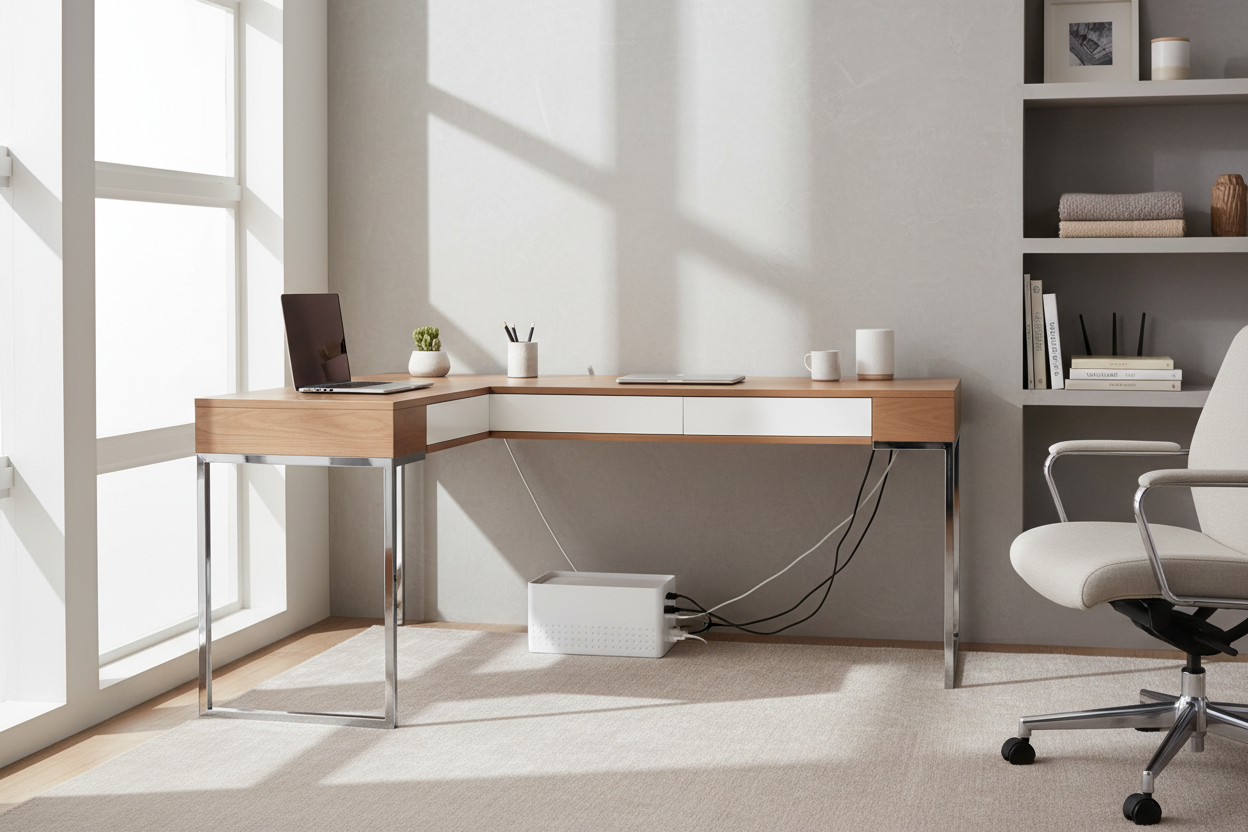
In interior design, we often talk about "visual noise"—the subtle, chaotic elements that disrupt the flow of a room. You can invest in a bespoke walnut desk or a Herman Miller chair, but if a tangle of multicolored wires is visible, the sense of luxury evaporates immediately. This is where the container store cable box transitions from a mere utility item to an essential design element.
As a designer, I treat cable management not as an afterthought, but as part of the room's architecture. It is about reclaiming negative space and ensuring that the eye travels smoothly across your furniture without snagging on a power strip. This guide explores how to select the right enclosure to maintain the integrity of your interior aesthetic.
Key Features to Look For
Before heading to the checkout, consider these critical factors to ensure the unit functions as well as it looks:
- Internal Dimensions: Measure your surge protector length and the height of your tallest power brick. Standard boxes often fail to close over bulky MacBook chargers.
- Ventilation Logic: Look for models with perforated bases or dual-side slits to dissipate heat effectively.
- Material Weight: A heavier box (steel or wood) stays planted when you tug a cord; lightweight plastic often tips over.
- Port Accessibility: Ensure the container store cable organizer has openings wide enough for thick, braided HDMI or power cables.
Materiality and Visual Integration
When selecting a cable box, you are essentially choosing a small piece of furniture. The material must converse with the rest of your decor.
The Minimalist Steel Approach
Many high-end options found at The Container Store, particularly those from brands like Yamazaki, utilize powder-coated steel. From a design perspective, matte steel is superior to glossy plastic because it absorbs light rather than reflecting it. If your home office features industrial elements, glass, or darker woods, a matte black or white steel box disappears into the background, maintaining the room's clean lines.
Warmth Through Wood and Bamboo
For Scandi-inspired or mid-century modern spaces, clinical white plastic can feel jarring. Look for boxes that incorporate wooden lids or bamboo bodies. This introduces organic texture to a tech-heavy zone. When styling a client's desk, I often match the wood tone of the cable box lid to the desk legs or shelving to create a cohesive "suite" of accessories.
Ergonomics and Placement Strategy
The placement of your cable management solution dictates the ergonomics of your workspace. A common error is assuming the box must sit on the floor.
If you have a standing desk, the box should be mounted to the underside of the desktop or placed in a cable tray. If the box sits on the desktop, it becomes a focal point. In this scenario, size matters. A box that is too large will dominate the surface area; one that is too small will look cluttered. Aim for a profile that aligns with the depth of your monitor stand or bookends to create a deliberate silhouette.
Lessons from My Own Projects
I want to share a specific challenge I faced during a project for a client in a high-rise condo. We were working with a "floating" glass desk in the center of the room, meaning there was nowhere to hide. We purchased a standard, lightweight plastic cable box initially.
Here is the unpolished truth I learned that day: Cable tension is real. The client had rigid, braided HDMI cables and a heavy-duty power cord. Because the plastic box was so light, the tension of the thick cables actually lifted the front of the box off the ground, making it hover awkwardly. The lid also wouldn't stay snapped shut because the cables pushed up against it.
I had to swap it for a heavier, rubberized model I found at The Container Store. The added weight kept it grounded against the floor, and the lid had a magnetic closure that resisted the upward pressure of the cables. It’s a small detail—the weight of the empty box—but it is the difference between a polished look and a fidgety annoyance.
Conclusion
Managing cords is the final step in curating a space that feels intentional. By choosing a container store cable box that aligns with your room’s material palette and functional needs, you eliminate visual clutter and allow the true design of your home to breathe. It is a small investment that yields a massive return in visual peace.
Frequently Asked Questions
Do cable boxes cause power strips to overheat?
Quality cable boxes are designed with ventilation in mind. However, as a precaution, avoid tightly coiling excess wire inside the box, as this generates induction heat. Leave some slack and ensure the side ports are unobstructed for airflow.
How do I clean a matte-finish cable box?
Matte finishes, often found on high-end organizers, can show oil from fingerprints. I recommend using a microfiber cloth slightly dampened with water. Avoid harsh chemical cleaners, as they can polish the matte surface, creating uneven shiny spots.
Will a standard box fit a double-wide surge protector?
Most standard boxes are designed for single-row strips. If you are using a double-wide block or a strip with side-facing outlets, you will need to specifically look for "Extra Large" or "Wide" models to ensure the lid sits flush.


Dejar un comentario
Este sitio está protegido por hCaptcha y se aplican la Política de privacidad de hCaptcha y los Términos del servicio.