










We have all experienced the midday slump or the nagging back pain that sets in by Thursday afternoon. As an interior designer, I often hear clients blame their workload, but I usually point to their environment. Significant research on working from home suggests that your physical surroundings—lighting, chair mechanics, and spatial flow—are not just aesthetic choices; they are the foundation of your professional output. This article bridges the gap between academic data and high-end residential design to help you curate a workspace that actually works.
Key Design Takeaways from Research
Before we dive into floor plans and finishes, here is a summary of the critical factors that influence performance in a home office setting:
- Ergonomic Support: Adjustable lumbar support and seat depth are non-negotiable for sustaining focus over long periods.
- Lighting Layers: A mix of ambient (general) and task lighting reduces eye strain and maintains energy levels.
- Spatial Zoning: Visual boundaries between "work" and "living" areas are essential for psychological detachment.
- Acoustic Control: Soft textiles (rugs, drapes) are necessary to dampen echo and improve audio quality during calls.
- Biophilic Elements: Incorporating natural materials and greenery lowers stress markers.
Translating Data into Design: The Ergonomic Foundation
When we look at the impact of work from home on employee productivity, the data consistently points to physical discomfort as a primary distraction. In the showroom, I steer clients away from "occasional chairs" that look sculptural but offer zero support. Instead, we look for performance seating disguised in premium textiles.
You need a chair with a synchronized tilt mechanism—meaning the back and seat move in a specific ratio to open up the hip angle as you recline. Look for breathable mesh or high-grade leather that regulates temperature. If you are selecting a desk, verify the height. The standard 29 to 30 inches is often too high for typing without elevating the shoulders, which is why a sit-stand mechanism hidden within a solid wood case is often the best investment for long-term health.
Zoning: The Psychology of Space
The impact of work from home on productivity research highlights the necessity of "psychological boundary management." In design terms, this means zoning. If you do not have a dedicated room, you must create a visual hierarchy that separates the workspace from the rest of the home.
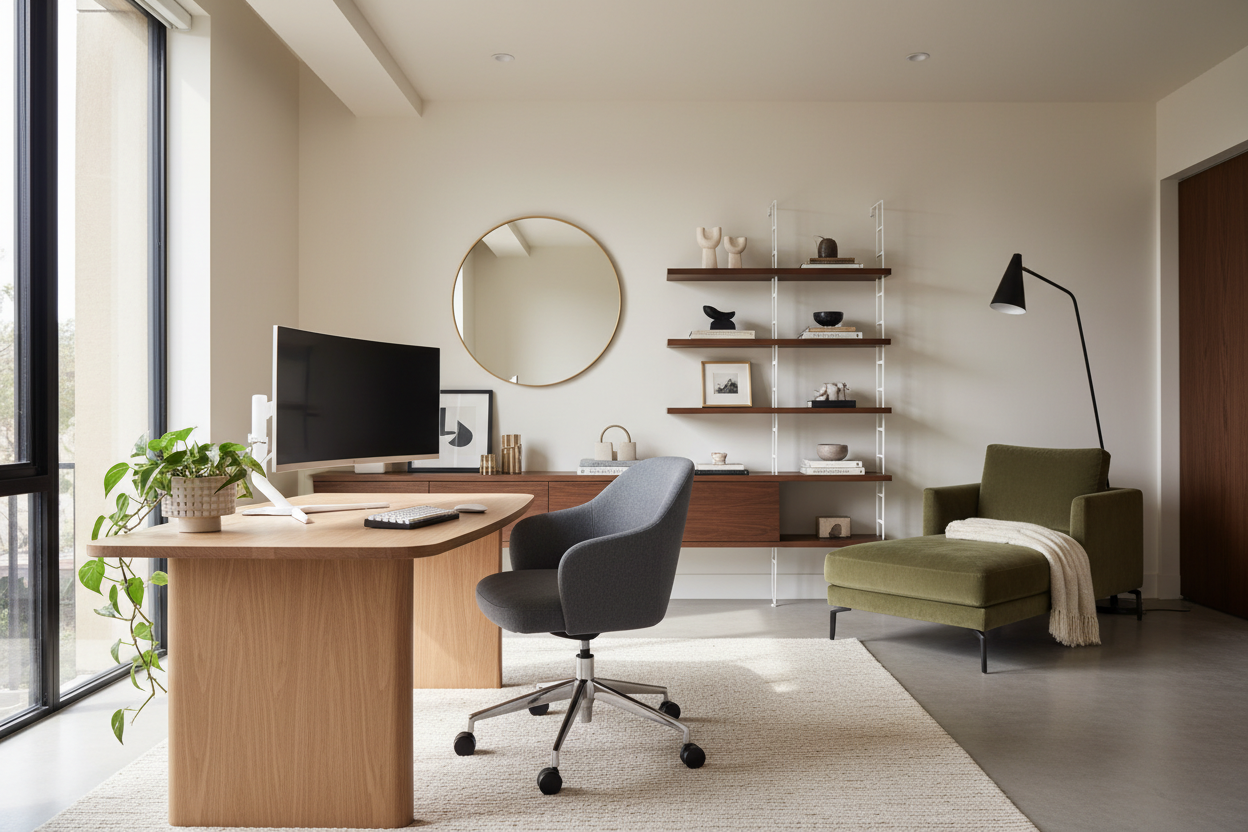
I recommend using open shelving units as room dividers. This adds storage and creates a distinct "office" silhouette without blocking light. Rugs are another powerful tool here; anchoring your desk on a specific rug creates a "zone" that signals to your brain that you have entered a place of work.
Materiality and Acoustics
Hard surfaces like glass and polished concrete are stunning, but they are acoustic nightmares for video conferencing. Research indicates that poor audio quality increases cognitive load. To combat this, introduce soft textures.
Consider heavy linen drapes or a wool-blend area rug. If you prefer a minimalist aesthetic, look for acoustic wall panels that double as art. The goal is to reduce reverberation. Furthermore, choosing tactile materials like walnut or oak for your desk surface can provide a warmth that sterile laminates lack, contributing to a calmer, more grounded atmosphere.
Lighting: Beyond the Bulb
Never rely solely on overhead recessed lighting. It casts shadows on your work surface and creates a flat, uninspiring environment. Proper lighting design involves three layers: ambient, task, and accent. For task lighting, aim for a fixture with a Color Rendering Index (CRI) above 90, which renders colors accurately and reduces eye fatigue. Position your desk perpendicular to windows to avoid glare on your screen while still benefiting from natural light, which is proven to regulate circadian rhythms.
Lessons from My Own Projects: The "Floating" Desk Mistake
I want to share a specific realization from a project I worked on last year. I designed a stunning home office for a client, placing a custom, heavy-grain oak desk right in the center of the room—the classic "power position." It looked incredible in photos.
However, three months later, the client called me. Despite the high-end setup, he felt exposed and distracted. I realized I had ignored the ancestral human need for "refuge and prospect"—we like to see the door, but we also like our backs protected. We moved the desk so his back was against a wall of built-in cabinetry. The difference was immediate. Also, a practical note on that oak desk: I learned the hard way that open-grain wood finishes are beautiful but terrible for writing directly on paper. If you choose a textured wood, you absolutely need a leather desk blotter, or your pen will skip constantly. It is a small detail, but it ruins the workflow if you miss it.
Conclusion
Analyzing the research on working from home allows us to move beyond trends and make design decisions that genuinely support your career. By prioritizing ergonomics, acoustics, and proper lighting, you are not just buying furniture; you are investing in your daily performance and well-being. Ideally, your home office should be the most comfortable room in your house.
Frequently Asked Questions
What is the ideal desk depth for a home office?
For a standard setup with a laptop and monitor, a depth of 24 to 30 inches is ideal. This allows you to maintain a proper viewing distance from your screen (about an arm's length) without crowding your workspace.
How does color temperature affect productivity?
Lighting measured between 3500K and 4000K (cool white) is generally best for focus and alertness. Warmer lights (2700K) are better for relaxation zones, while daylight bulbs (5000K+) can feel too harsh for a residential setting.
Is a standing desk worth the investment?
Yes, provided you actually use the function. Research shows that alternating between sitting and standing reduces fatigue. Look for electric dual-motor frames for stability and smooth transitions, especially if you have heavy monitors.

Leave a comment
This site is protected by hCaptcha and the hCaptcha Privacy Policy and Terms of Service apply.