










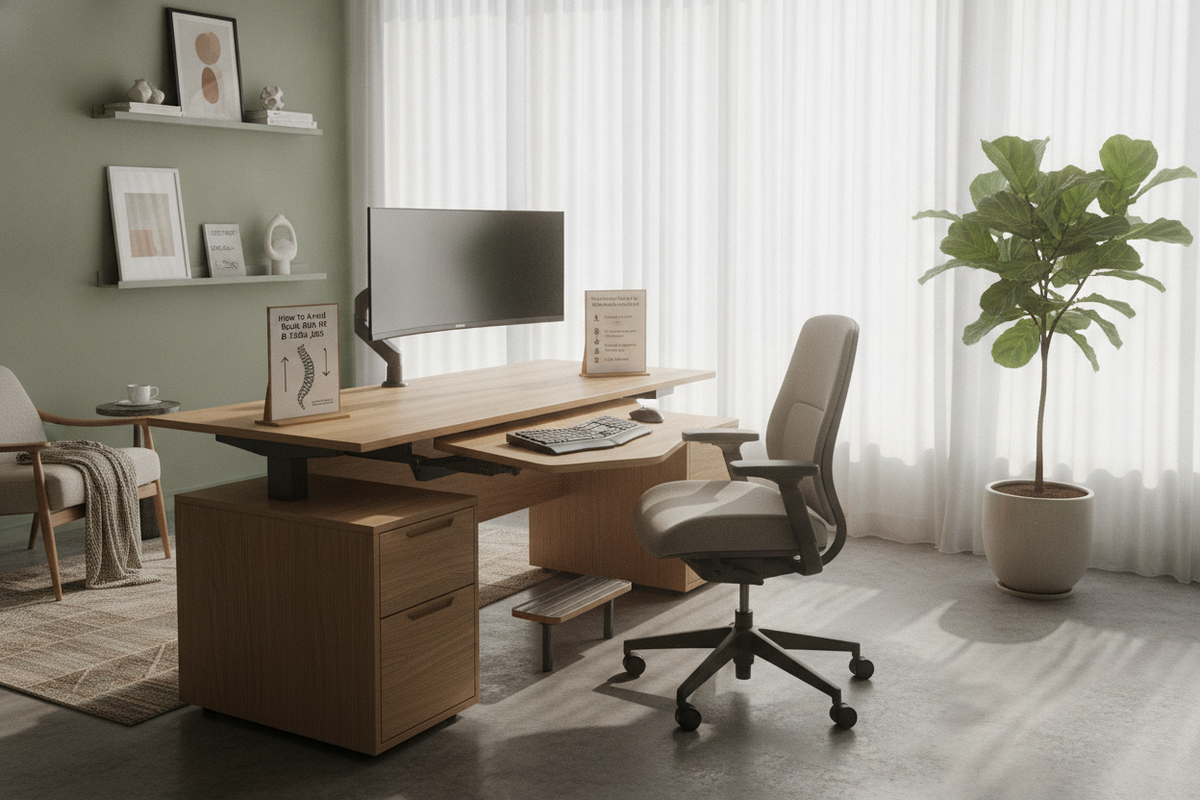
Knowing how to avoid back pain at desk job routines is an essential part of protecting your everyday well-being and productivity. When you spend hours seated in front of screens, subtle strain accumulates in the muscles along your spine, hips, and neck. Learning how to prevent back pain sitting at a desk requires looking closely at your furniture, physical habits, and the arrangement of your daily work area. By learning how to relieve back pain from sitting at desk configurations, you can build an office space that supports your posture all day long.
Understanding Workplace Strain in Long Desk Routines
Modern office roles often require extended stretches of static sitting. When your body stays fixed in one posture for hours, continuous pressure settles across your lower back, pelvic area, and shoulders. Static sitting limits natural blood circulation and tires the stabilizing muscles along your spine. Without intentional support, your posture tends to deteriorate as fatigue sets in toward the middle of the day.
An uncalibrated workspace can make these physical tensions worse. When your screen is positioned too low or set at an awkward distance, your head naturally juts forward. This forward lean creates substantial upper back strain while placing uneven stress on your lumbar spine. Achieving meaningful office back pain relief begins with recognizing these ergonomic triggers and rearranging your surface heights, seating, and everyday accessories so they work together seamlessly.
Adjusting Your Office Chair for Proper Spinal Support
Your chair is the central piece of furniture in your daily working environment. A well-designed ergonomic chair provides the structural support needed to balance body weight and reduce pressure on vulnerable spinal joints. Learning how to properly adjust your seating ensures that your body stays supported without fighting against the frame of the chair.
Start by setting your chair height so that your feet rest firmly on the floor. If your desk surface is fixed and forcing your chair too high for your feet to plant securely, use an under-desk footrest to restore a balanced base. Proper chair height prevents excess pressure under your thighs, stabilizing your hip angle and helping you manage lower back pain during long sessions. For step-by-step seating recommendations, check out our guide on chair adjustments and posture alignment.
Next, check the seat depth of your chair. A good guideline is to leave a small gap between the front edge of the seat cushion and the back of your knees. When a seat pan presses directly against your calves, it restricts leg circulation and prompts you to slide forward, disrupting your spine alignment and pulling your lower back away from the lumbar support.
How to Sit at Your Desk to Avoid Back Pain
To master how to sit at your desk to avoid back pain, position your hips all the way back against the seat so the lumbar contour cradles the natural curve of your lower back. Your sitting posture should keep your pelvis neutral rather than tilted forward or tucked beneath you. This intentional posture alignment stabilizes the spine and reduces the gradual muscular fatigue that often leads to lower back pain during long computer sessions.
Your armrests also play a critical role in upper body comfort. Set your armrest height so that your elbows rest lightly at your sides at roughly a right angle, allowing your forearms to align naturally with your work surface. If the armrests sit too high, they push your shoulders upward, creating upper back strain. If they sit too low, you may find yourself leaning to one side, introducing an asymmetrical twist to your spine. Symmetrical support helps keep your neck and upper torso relaxed while typing.
Choosing High-Back and Supportive Backrest Styles
When selecting seating, the shape and vertical reach of the backrest determine how much relief your upper body receives during extended work periods. A supportive high backrest reinforces upright sitting posture by distributing pressure evenly along your lumbar region and thoracic spine. If you are exploring different seating silhouettes, take a look at our high-back desk chair selection guide to evaluate forms and proportions suited to your workspace.
A well-contoured ergonomic chair cradles the spine without restricting your freedom to move or breathe comfortably. When the backrest provides consistent lumbar support, you do not need to constantly strain your muscles to maintain an upright position. This structural stability keeps your lower back feeling supported from your first morning email to the end of the day.
Aligning Desk Height, Monitor Placement, and Reach Zones
Even the most supportive chair cannot compensate for an unaligned desk setup. To support your back throughout the day, you must coordinate how your work surface, display screens, and typing accessories line up with your body.
Start by establishing primary and secondary reach zones. Place your keyboard and mouse within easy reach directly in front of your body, where you can use them without extending your elbows forward. Overreaching pulls your shoulders forward, causing your chest to sink and your lower spine to curve away from the chair. Keeping everyday tools close at hand minimizes repetitive reaching and twists that stress back muscles.
Next, evaluate your monitor height and screen distance. Position your primary display straight ahead, approximately an arm's length away. The top edge or upper third of the screen should sit level with your natural horizontal gaze. When monitor height is set too low, your head tilts down, pulling on the neck muscles and transferring compensatory strain down the upper back. Getting screen distance and height right makes it easy to keep your head balanced over your shoulders.
How to Avoid Back Pain at Desk Job Workstations with Sit-Stand Movement
You can avoid back pain at desk job workstations by pairing ergonomic alignment with regular transitions between sitting and standing. No single seated position remains comfortable indefinitely because static postures gradually restrict circulation and tire out stabilizing muscles. Alternating between sitting and standing redistributes pressure across your hips and spine throughout the day.
Investing in a flexible sit stand desk lets you shift your working position effortlessly without halting your focus. For an adaptable workstation, consider an ergonomic sit stand desk that lets you save preset heights for both sitting and standing.
When working at a standing desk, apply the same basic rules of workstation ergonomics as when seated. Set the desktop to roughly elbow height so your forearms rest naturally while typing on your keyboard and mouse. Keep your monitor height aligned with your eye level, stand with your weight balanced evenly across both feet, and avoid locking your knees. Switching between an ergonomic chair and a standing position every hour keeps your body active and relieves static pressure on your lower back.
Daily Movement Habits and Workspace Organization
Beyond choosing supportive office furniture, building gentle daily movement habits is essential for maintaining comfort. Taking regular breaks every thirty to sixty minutes helps reset your posture and refresh your muscles. Use these pauses to stand up, walk across the room, stretch your shoulders, and rest your eyes.
Incorporate these simple habits into your daily routine:
- Schedule regular breaks throughout the day to change positions and relieve joint stiffness.
- Ensure clear leg clearance under your desk so you can stretch your legs without bumping drawers or cables.
- Use an adjustable footrest if your chair height needs to stay raised to meet a fixed desk height.
- Keep secondary items like notebooks and water bottles within comfortable reach zones to avoid awkward torso twists.
- Check your monitor height and screen distance after adjusting your chair or switching to a standing desk.
By pairing a well-adjusted desk setup with an ergonomic chair, clear leg clearance, and regular standing breaks, you can transform your everyday workspace. Thoughtful workstation ergonomics and intentional posture alignment allow you to stay productive and comfortable throughout your entire workday.

Leave a comment
This site is protected by hCaptcha and the hCaptcha Privacy Policy and Terms of Service apply.