










I was staring at my perfectly curated living room when the 'black box of doom' arrived. My partner brought home a receiver so massive it looked like it belonged in a NASA control room, not on my vintage credenza. This was the moment I realized my hunt for home theater cabinets was about to become a full-time job.
Standard furniture just isn't built for the weight and heat of serious A/V equipment. I spent weeks measuring depths and checking weight capacities, only to find that most 'media units' are just glorified bookshelves that can barely hold a soundbar, let alone a full surround sound system.
Quick Takeaways
- Standard consoles are usually too shallow; you need at least 18-20 inches of depth for high-end receivers.
- Ventilation isn't optional—without airflow, your expensive gear will overheat and fail prematurely.
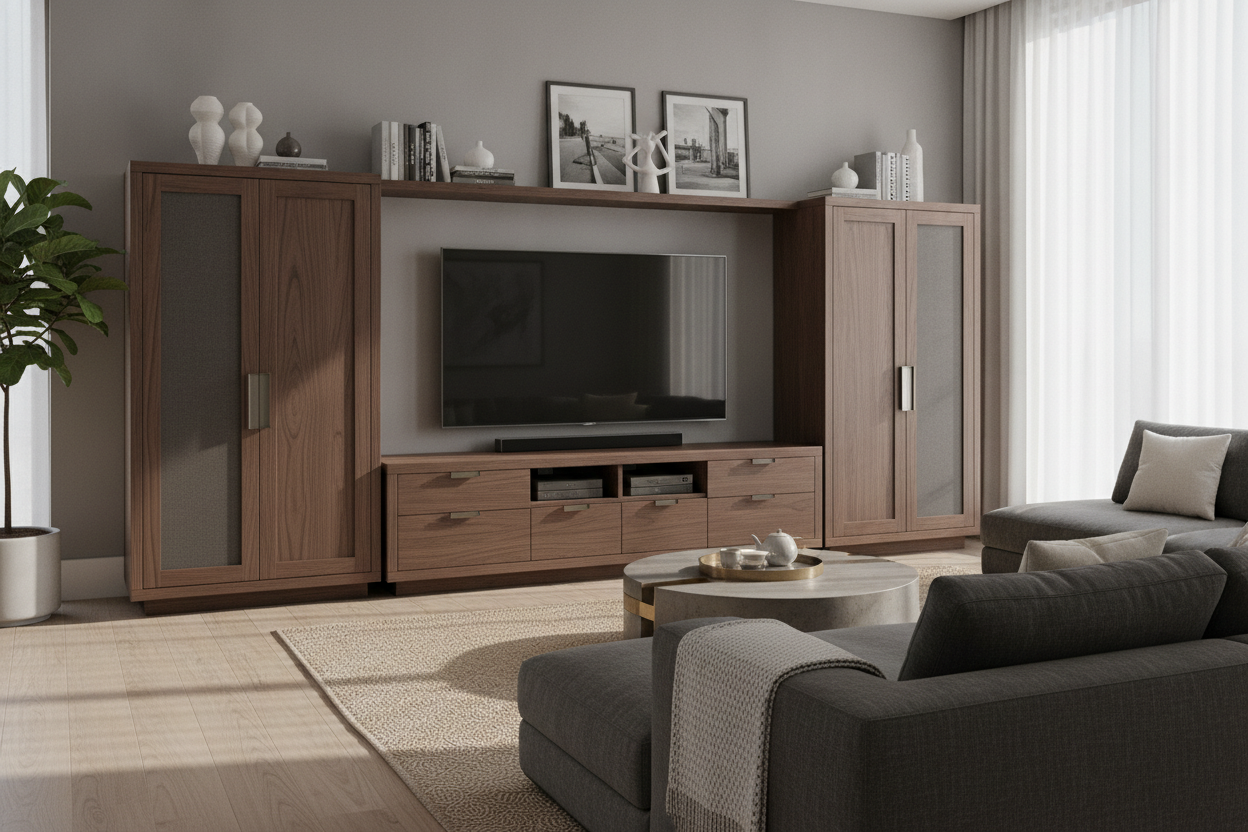
- Slatted or mesh doors allow remote signals (IR) to pass through while keeping the 'black box' look hidden.
- Integrated cable management is the difference between a clean room and a wire-infested nightmare.
The Day the Giant A/V Receiver Arrived
The receiver in question was a Denon beast, nearly 17 inches deep and weighing a solid 45 pounds. I tried to shove it into my mid-century modern credenza, but it looked ridiculous. The front legs were perched on the edge, and the thick HDMI cables sticking out the back meant the unit hung off the front by three inches. It was a 1950s aesthetic being held hostage by 21st-century technology.
I quickly learned that a standard home cinema tv stand is designed for a thin OLED and maybe a Nintendo Switch. These units are often made of thin MDF that bows under the weight of a heavy amplifier. I watched my beautiful wood shelf start to sag in real-time. It was clear I needed a dedicated home theater tv stand that actually understood the physics of modern home audio.
My living room started looking like a Best Buy clearance aisle. Wires were snaking across the floor because the back of my cabinet didn't have enough cutouts for the sheer volume of cables required for a 7.1 setup. I was frustrated, my partner was annoyed that I was 'ruining the vibe,' and the receiver was running so hot I could have fried an egg on the casing.
Why Standard Consoles Actually Break Your Gear
Here is the truth: most furniture designers hate tech. They design for the 'look,' not the heat. If you put a high-powered receiver inside a standard cabinet with a closed back, the internal temperature can spike to over 120 degrees in an hour. That heat kills capacitors. Using a generic tv and home theater stand without active or passive ventilation is basically putting your expensive electronics in a slow-cooker.
Then there is the depth issue. Once you plug in those chunky HDMI cables and heavy-gauge speaker wire, you need an extra 2 to 3 inches of clearance behind the device. Most living room consoles are 16 inches deep. A proper tv stand for home theater needs to be 20 to 22 inches deep to accommodate the 'cable bend radius.' If you force it, you'll snap the ports right off your motherboard.
Weight capacity is the final nail in the coffin. A home theater stand needs to support a 75-inch TV, a center channel speaker, and a heavy receiver. We are talking 150+ pounds. Your average flat-pack furniture will literally collapse under that load over time. I've seen it happen—it's a slow-motion disaster of cracking cam-locks and splintering particle board.
The Hunt for Specialized Storage That Doesn't Look Like 1999
I almost gave up and bought a metal rack from a server supply company, but then I discovered the world of high-end home theater consoles. These aren't the bulky, oak-veneered home theater entertainment centers your parents had in the 90s. Modern versions use slatted wood or perforated metal doors that look like high-end cabinetry but allow for total airflow and IR signal pass-through.
I finally settled on a unit with 'hidden' wheels. This sounds like a small detail, but being able to roll a 200-pound theater entertainment center away from the wall to plug in a new cable is a life-saver. No more crawling on the floor with a headlamp. I also looked for a home theatre media cabinet that featured removable back panels, which makes the initial cable routing so much less painful.
The best part? These specialized home theater entertainment unit designs actually hide the glowing blue lights and digital displays that drive me crazy during a movie. You get the performance of a pro-grade rack with the soul of a designer piece. It's the only way to keep a living room looking like a home instead of a laboratory.
Wait, Can I Stash My Work Gear in Here Too?
Once I realized how much space and airflow these cabinets had, I started wondering if I could hide my entire home office inside one. It turns out, a deep stand for home theater is the perfect place for a bulky laser printer and a mesh router. The same ventilation that keeps my receiver cool also prevents my router from throttled speeds due to overheating.
Instead of buying a separate, ugly metal cabinet, I used the extra-wide shelves of my media console to tuck away my laptop dock and external hard drives. If you are tight on space, choosing a heavy-duty piece like this beats a flimsy file cabinet TV stand any day of the week. You get the industrial-strength build quality but with a finish that matches your sofa.
It transformed my 'clutter corner' into a streamlined zone. At 5 PM, I just close the slatted doors, and the work day effectively disappears. No more glowing power bricks or tangled USB cables staring me in the face while I'm trying to relax and watch a movie.
3 Things to Check Before You Buy
Before you pull the trigger on a new media cabinet for home theater use, you have to check the specs like a nerd. First, verify the internal shelf depth. Don't just look at the overall dimensions; look at the 'usable' depth once the doors are closed. You want at least 19 inches for a standard receiver.
Second, check for IR compatibility. If the doors are solid wood, your remote won't work unless you buy an expensive IR repeater kit. Look for slats, mesh, or grey-tinted glass. Third, ensure the center shelf is wide enough for a center-channel speaker. Many media console for home theater units have a vertical support right in the middle, which is the exact spot your speaker needs to sit.
Unlike standard home office furniture, which is built for paper and laptops, these cabinets are built for vibration and heat. Investing in a purpose-built piece might cost more upfront, but it saves you from replacing a fried $1,000 receiver three years down the road. Trust me, your gear (and your partner) will thank you.
FAQ
Do I really need fans in my media cabinet?
If you have a high-end receiver and the cabinet is mostly enclosed, yes. You don't necessarily need loud electric fans; passive ventilation (large cutouts and slatted doors) is often enough, but active fans are a cheap insurance policy for expensive gear.
Will my remote work through wooden doors?
Only if they are slatted or have a mesh insert. If the doors are solid wood, the infrared signal from your remote can't get through. You'll either have to leave the doors open while watching TV or install an IR repeater system.
How do I hide the mess of cables behind the stand?
Look for a cabinet with built-in cable management channels and 'velcro' tie-down points. The best cabinets have a 'raceway' that lets you run wires between compartments without them ever being visible from the front or sides.

Leave a comment
This site is protected by hCaptcha and the hCaptcha Privacy Policy and Terms of Service apply.