










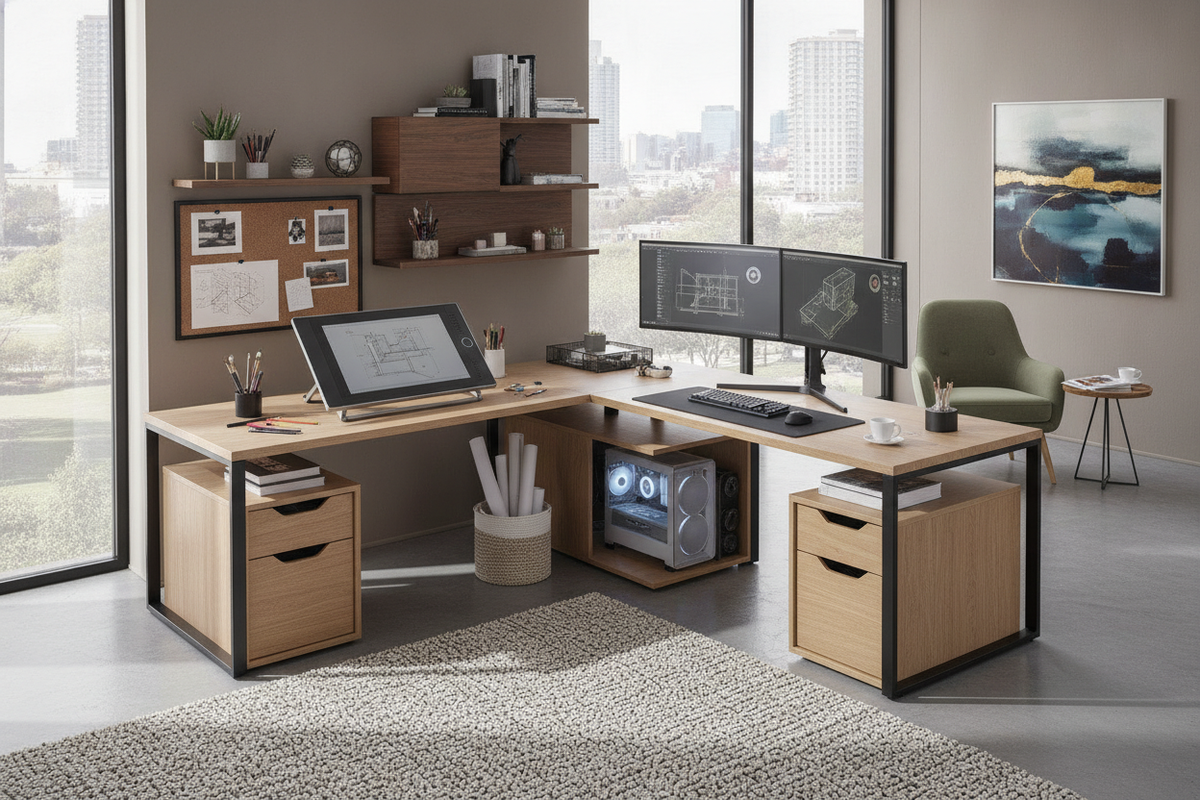
Dual-Zone Creative Architecture: Why Choose an L-Shaped Drawing Desk?
Modern creative workflows rarely exist in a single medium. Illustrators, architects, and designers frequently shift between tactile media—such as graphite, ink, markers, and drafting paper—and digital production suites requiring multi-monitor setups, graphic tablets, and dedicated towers. An l shaped drawing desk provides an expansive footprint specifically arranged to address these bifurcated tasks.
Separating Analog Drafting and Digital Workstations
The primary advantage of a corner format is the clear spatial division between dry or wet traditional art media and sensitive electronic equipment. By dedicating one wing to paper pads, sketchboards, lightboxes, and pigment tools, creators eliminate the risk of accidental spills or graphite dust settling into keyboards and computer peripherals. When planning dual-task zones between analog sketching and computer monitors, consult our comprehensive shaped desk guide for room flow recommendations.
Corner Surface Geometry and Sightline Flow
Rather than working across a single elongated flat desk that forces continuous sliding or shifting of chairs, a 90-degree corner desk configuration keeps both creative stations within a simple swivel radius. You can keep reference sheets, color swatches, or open art books directly in your peripheral line of sight on one side while executing vector rendering or 3D modeling on the other. This seamless visual transition maintains creative momentum throughout complex projects.
Surface Geometry and Drafting Wing Configurations
Selecting the right desk shape requires evaluating how you produce artwork on daily basis. Surface depth, continuous table space, and edge comfort all impact prolonged creative sessions.
Dedicated Drafting Boards vs. Continuous Flat Tabletops
Some creators prefer an adjustable drafting board insert that tilts upward for ergonomic sketching posture, while others benefit from a continuous flat tabletop capable of supporting wide-format paper rolls, trace tables, or oversized cutting mats. Flat surfaces provide total freedom to rearrange peripherals as project scopes evolve, whereas tilting mechanisms provide dedicated neck and wrist relief for traditional illustration.
Wing Sizing Profiles for Pad Placement and Lightboxes
Ensure that both wings provide adequate depth to accommodate oversized media alongside drawing lamps and arm rests. If you require versatile surface wings alongside integrated tier storage for creative materials, consider a dedicated shaped desk product. A primary working wing should easily house your largest active sketchpad without crowding the inner corner return.
Integrating Computing Hardware: The Role of the Dedicated PC Holder
High-end digital illustration, rendering, and video editing require robust desktop towers. Balancing this hardware against traditional craft space requires intentional placement strategies.
Floor-Mounted Carts vs. Suspended PC Brackets
Using an l shaped desk with pc holder or dedicated computer shelf removes the heavy tower from the main desktop, reclaiming square footage for trace paper and stylus movement. Choosing an l-shaped desk with pc holder platform helps keep the computer elevated above floor level. Elevating the chassis prevents excessive dust, fiber, and eraser shavings from being drawn into the power supply and cooling fans.
Airflow, Dust Management, and Cable Routing in Art Studios
Art studios produce unique airborne particulates, from charcoal dust to pastel powders and eraser crumbs. Maintaining open airflow around your PC tower carriage keeps ventilation pathways clear. Pairing this arrangement with structured cable clips beneath the return wing prevents cords from tangling around your feet or catching on your drafting stool when pivoting between stations.
Art Supply Organization and Integrated Storage Frameworks
Organizing a versatile workspace requires balancing immediate desktop access with structured off-desk containment.
Under-Desk Drawers for Sketching Tools and Portfolios
Deep drawers and shallow pencil trays keep precision rulers, technical pens, blending stumps, and replacement nibs neatly categorized. Having immediate under-desk compartments prevents creative surfaces from becoming cluttered with loose tools, ensuring a clean slate whenever a fresh sheet of paper is laid down.
Open Shelving and Vertical Cabinet Pairing
For larger art prints and bulky sketchbooks that exceed desktop capacity, review our drawing guide to optimize wall-mounted cabinetry. Combining under-desk open shelving for immediate-grab supplies with perimeter cabinetry for archived work keeps the central drawing zone open and uncluttered.
A minimalist white finish helps reflect ambient light across your drafting workspace, making this shaped desk product an ideal choice for light-filled studios. For compact secondary creative nooks or companion sketching stations, an auxiliary desk shaped product provides dedicated drawer storage.
Room Planning, Clearance Zones, and Spatial Layouts
Proper studio ergonomics depend on the relationship between your desk, room boundaries, and natural light sources.
Corner Nesting vs. Open Studio Room Partitioning
Placing an L-shaped desk into an interior room corner maximizes open central floor area, creating an intimate, focused workstation. Alternatively, floating the corner unit outward so that one wing functions as a room divider allows you to partition a dedicated creative zone within a larger shared living space or open-plan studio.
Swivel Clearance and Lighting Orientation
Allow generous clearance behind the inner apex of the desk to ensure your task chair or drafting stool can swivel 360 degrees without colliding with surrounding walls or storage units. Position the desk relative to windows so that direct sunlight illuminates your drawing surface without casting harsh hand shadows across your paper or causing direct glare on your digital monitors.
Material Selection and Maintenance for Creative Workspaces
Creative surfaces experience rigorous daily wear from sharp tools, pigments, and constant cleaning.
Engineered Wood, Laminate, and Steel Frame Durability
High-density engineered wood tops treated with durable laminate coatings offer solid resistance against ink stains, moisture rings, and light abrasions. Supporting these tabletops with reinforced steel leg structures ensures total structural rigidity, eliminating desk wobble during firm pencil shading or high-speed digital pen strokes.
Surface Protection and Ink-Resistant Maintenance
To preserve your desk surface over time, consider these maintenance practices:
- Use self-healing cutting mats when trimming paper or working with craft knives.
- Wipe down laminate finishes regularly with a mild microfiber cloth to lift graphite residue.
- Apply desk pads beneath heavy desktop accessories to prevent localized friction wear.
- Keep solvent-based markers and fixatives capped when not actively in use to safeguard surfaces.

Leave a comment
This site is protected by hCaptcha and the hCaptcha Privacy Policy and Terms of Service apply.