










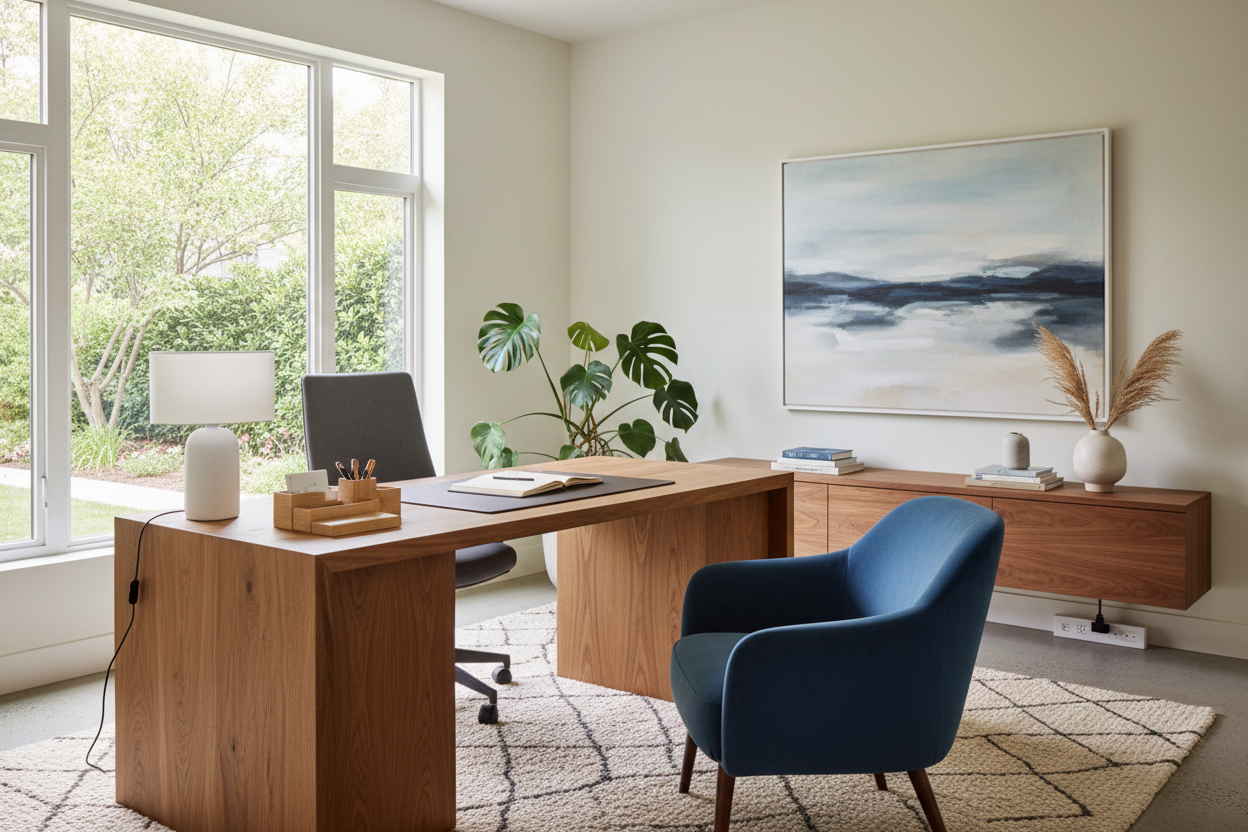
I have walked into countless homes where the 'workspace' is just a laptop balanced on a dining table, or a spare bedroom overflowing with laundry and filing cabinets. When your environment feels chaotic, your brain follows suit. A strategic office makeover isn't just about picking a trendy paint color or a stylish rug; it is about engineering a room that actively supports your focus, posture, and daily workflow.
By the end of this guide, you will know exactly how to plan a workspace that looks professional on camera and feels incredibly comfortable during a ten-hour workday, avoiding the common pitfalls that plague residential office designs.
Quick Decision Guide
- Position for power: Never face a blank wall if you can avoid it; float your desk facing the entrance to reduce visual fatigue and command the room.
- Prioritize ergonomics over aesthetics: A beautiful vintage dining chair will wreck your back. Invest in a highly adjustable, supportive task chair.
- Layer your lighting: Relying solely on overhead flush mounts causes eye strain. Mix ambient room lighting with directional task lighting and natural window light.
- Hide the visual clutter: Cable management and closed storage are non-negotiable for a calm, distraction-free zone.
Space Planning & Layout
One of the biggest mistakes I see in a typical home office makeover is shoving the desk against the darkest wall in the room. This layout instantly makes the space feel cramped and punishing, turning your workday into a timeout.
The Command Position
In design, we often borrow the 'command position' concept from feng shui. Whenever square footage allows, float your desk in the center of the room facing the door, with a solid wall behind you. This arrangement gives you a broad view of the space, creates a polished backdrop for video calls, and utilizes the negative space in the center of the room. If a full office room makeover requires the desk to be against a wall due to tight dimensions, place it perpendicular to a window so you get natural light without the harsh glare bouncing off your monitor.
Comfort & Ergonomics
You can execute the most visually stunning work office makeover, but if your wrists ache after an hour of typing, the design has failed. True luxury in a workspace is rooted in physical support and proper alignment.
The Chair-to-Desk Ratio
Standard desks sit at about 29 to 30 inches high, which is actually too tall for many people unless they use a keyboard tray or raise their chair and add a footrest. When selecting furniture, pay strict attention to the clearance between the top of your thighs and the bottom of the desk drawer. I always recommend an adjustable standing desk paired with an ergonomic chair that offers lumbar support, adjustable armrests, and a seat pan that leaves about two inches of space behind your knees.
Style & Coordination
Bringing personality into a workspace prevents it from feeling like a sterile corporate cubicle. The goal is to layer textures, materials, and colors that promote calm focus while complementing the rest of your home's architecture.
Balancing Visual Weight
When brainstorming office makeover ideas, consider the visual weight of your pieces. A heavy, solid oak executive desk needs to be balanced by lighter elements, like a glass-front bookcase, a soft linen roman shade, or a low-pile vintage rug. Use closed cabinetry for printers, routers, and messy paperwork, reserving open shelving strictly for curated books and decorative objects. This keeps the visual noise to an absolute minimum.
Lessons from My Own Projects
Early in my career, I designed what I thought was the ultimate minimalist workspace for my own home. I bought a stunning, tempered glass desk with sleek polished chrome legs. It looked incredible in photos and gave the room a light, airy feel.
The reality of living with it was a nightmare. Within a week, I realized a glass desk hides absolutely nothing. Every single black power cord, monitor cable, and hard drive wire was fully visible, creating a tangled mess right at my feet. Worse, the glass was cold to the touch in the winter, and every fingerprint or coffee cup ring required immediate buffing. I learned the hard way that high-gloss and transparent materials are the enemies of a functional workspace. I swapped it out for a solid walnut desk with built-in cable routing channels a year later, and I have never specified a glass work desk for a client since.
Frequently Asked Questions
Where should I start with an office makeover?
Always start with a floor plan and an audit of your technology. Measure your room, note where the electrical outlets are, and figure out how many monitors and devices you need to plug in. This dictates your desk placement and storage needs before you even look at paint colors.
How can I make a small office feel bigger?
Maximize vertical space. Install floating shelves or tall, narrow bookcases that draw the eye upward. Use a monochromatic color palette for the walls and large furniture pieces to reduce visual fragmentation, and ensure your lighting is bright and evenly distributed.
How do I hide cables and cords effectively?
Cable management is crucial for a clean look. Mount a wire management tray to the underside of your desk to hold power strips and excess cord length. Use zip ties or velcro sleeves to bundle cables together, and route them down the back of a desk leg so they remain entirely out of sight.


Leave a comment
This site is protected by hCaptcha and the hCaptcha Privacy Policy and Terms of Service apply.