










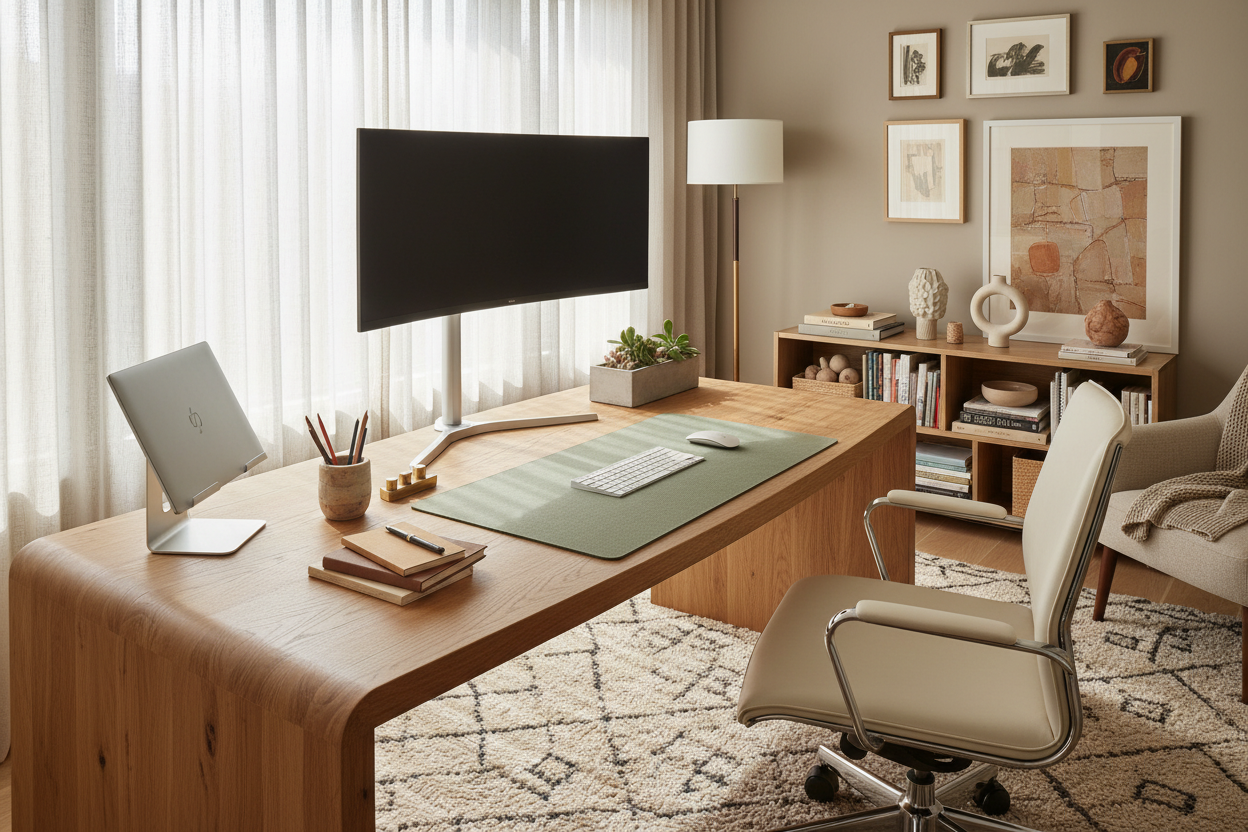
We have all fallen into the trap. You spend hours scrolling, saving image after image of pristine, cable-free workspaces, convinced that if you just buy that specific walnut riser or that exact mechanical keyboard, your productivity will skyrocket. The reality? Most of those photos are staged for a split-second capture, not for an eight-hour workday. The disconnect between a viral image and a livable workspace is often massive. As a designer, my goal isn't just to help you replicate a pinterest desk setup, but to help you deconstruct why it looks good and translate that into a workspace that actually functions for your physiology and workflow.
Quick Decision Guide: The Essentials
Before you purchase a single accessory, review these core elements. These are the foundational pillars that separate a cluttered desk from a curated workspace.
- Visual Weight & Scale: Ensure your desk size balances with the room; a heavy executive desk suffocates a small nook, while a spindly writing desk gets lost in a large study.
- Material Warmth: Prioritize tactile materials like solid wood, felt, or leather over cold glass or cheap laminates to reduce fatigue.
- Lighting Layers: You need three sources: ambient (room), task (lamp/monitor bar), and accent (bias lighting behind screens).
- Cable Architecture: Plan your power route before placing the desk. The "clean" look relies entirely on hidden cable management channels.
- Ergonomic Triangle: The relationship between your eyes, elbows, and lumbar support must take precedence over aesthetic trends.
Analyzing the "Desk Setup Pinterest" Aesthetic
When you search for desk setup pinterest inspiration, you are usually drawn to three things: texture, symmetry, and lighting. Understanding these allows you to build your own look without blindly buying trending items.
Choosing the Right Surface Material
The desk surface is your primary touchpoint. In high-end design, we look for materials that age well. Solid walnut or oak offers a "self-healing" quality where minor scratches add character. Veneers can look identical in photos but often peel at the edges within a year of heavy mouse usage. If you love the industrial look, avoid raw metal edges where your wrists rest; instead, opt for a metal frame with a timber or linoleum top for thermal comfort.
The Art of "Invisible" Storage
The reason those online setups look so serene is the absence of visual noise. To achieve this, you need "active" and "passive" storage. Active storage includes desktop trays or a monitor riser with a drawer—places for things you use hourly. Passive storage refers to nearby shelving or drawers for items used daily. Avoid open wire baskets on the desktop; they create visual clutter. Opt for opaque containers with matte finishes to absorb light rather than reflect it.
Lighting: The Mood Setter
Lighting is the most underrated element of a luxury setup. A common mistake is relying solely on a ceiling downlight, which casts harsh shadows on your work surface. To mimic the cozy, focused atmosphere seen online, use a monitor light bar to illuminate your keyboard without glare. Supplement this with a warm-temperature desk lamp (2700K-3000K) to soften the contrast between your bright screen and the dark room, reducing eye strain.
My Personal Take on Pinterest Desk Setup Trends
I need to be honest about a mistake I made early in my career, influenced entirely by aesthetic photos. I designed a home office for a client—and myself—featuring a stunning, tempered glass desk. It looked incredible in the portfolio shots: sleek, modern, and airy. It was the ultimate minimalist statement.
However, living with it was a nightmare. I hadn't accounted for the thermal reality; the glass was perpetually cold, sucking the heat right out of my forearms during early morning emails. Furthermore, the acoustic reflection was terrible; every time I set a coffee mug down, it made a sharp clack that broke my concentration. And the fingerprints? I was wiping that surface three times a day. It taught me that a pinterest desk setup must be tactile first and visual second. Now, I always insist on natural materials or quality desk mats for that crucial soft-touch layer.
Conclusion
Creating a workspace that rivals the images you save requires looking past the styling and understanding the structure. It is about balancing the warmth of natural textures with the rigors of technology. Don't aim for a showroom; aim for a sanctuary that invites you to sit down and create.
Frequently Asked Questions
How do I hide cables if my desk is in the middle of the room?
This is a common challenge. Use a cable spine (a vertebrae-like tube) that runs from the desk underside to the floor to bundle cords neatly. Additionally, mount a power strip directly to the underside of the desk so only one main power cord needs to run to the wall outlet.
What is the ideal desk depth for a dual monitor setup?
For dual monitors, aim for a desk depth of at least 30 inches (approx. 75cm). This allows you to push the screens back far enough to maintain a proper focal distance (about an arm's length away), preventing eye strain and neck cramping.
Is a monitor riser actually necessary?
From an ergonomic standpoint, yes, unless your monitor has a very tall adjustable stand. A riser lifts the screen to eye level so you aren't looking down and hunching your shoulders. Aesthetically, it also provides a dedicated "garage" to hide your keyboard and mouse when not in use.


Leave a comment
This site is protected by hCaptcha and the hCaptcha Privacy Policy and Terms of Service apply.