










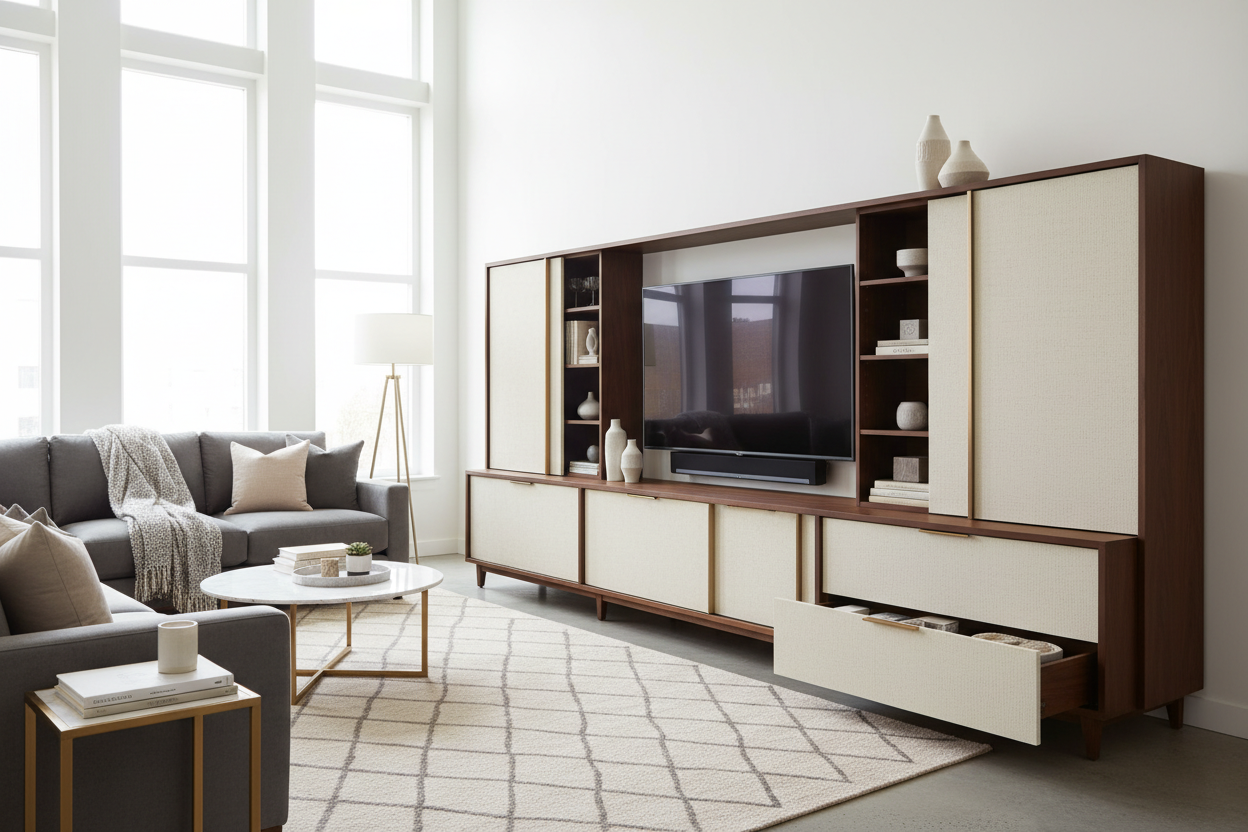
We have all been in that living room. The sofa is beautiful, the rug ties the room together, but the area right under the television is a chaotic nest of tangled black cords, blinking routers, and stray gaming controllers. This is the fastest way to make a carefully designed space feel cluttered and unfinished.
The solution is not just another pretty table, but a dedicated storage tv console. When selected correctly, this piece acts as the anchor of your living room, quietly hiding the technology we need while displaying the decor we love. In this guide, I will walk you through exactly what to look for so you buy the right piece the first time.
Quick Decision Guide
- Width matters: Your console should be at least 4 to 6 inches wider than your television screen to maintain visual balance.
- Prioritize closed storage: Drawers and solid doors hide unsightly tech, while open shelving should be reserved for books and decorative objects.
- Check the back panel: Always confirm the piece has pre-drilled cable management holes before purchasing.
- Account for heat: Electronics run hot. Look for designs with slatted doors or built-in ventilation if you plan to store gaming consoles.
Space Planning & Layout
The Golden Rule of Proportions
One of the most common layout mistakes I see in North American homes is a massive 75-inch television hovering over a tiny, undersized base. To get the proportions right, your tv stand media center needs to ground the wall. A good rule of thumb is to ensure your furniture is 25 percent wider than the TV itself. This prevents the setup from looking top-heavy and leaves breathing room on either end for a table lamp or a structural vase.
Depth is equally important. If you are working with a narrow townhouse or apartment, look for a slim media storage tv stand that sits around 15 to 18 inches deep. Anything deeper will encroach on your walking paths. Remember to leave at least 36 inches of clearance between the front of the console and your coffee table.
Style & Coordination
Balancing Visual Weight
Because televisions are essentially large black rectangles, they carry a massive amount of visual weight. To counter this, your tv stand with media storage needs substantial presence. If your room features light, leggy furniture like a mid-century modern sofa, a solid-to-the-floor base can help anchor the space. Conversely, if your seating is heavy and skirted, a console raised on metal or wooden legs will introduce necessary negative space.
When sourcing tv and media storage furniture, pay attention to door details. Fluted wood, cane fronts, or slatted panels are incredibly popular right now. Not only do they add rich texture to an otherwise flat wall, but slatted designs also allow infrared remote signals to pass through, meaning you can keep the doors closed while watching a movie.
Material & Build Quality
Ventilation and Durability
The materials you choose dictate both longevity and function. Solid wood is durable and ages beautifully, but it is heavy and expensive. High-quality wood veneers over MDF offer an excellent middle ground, resisting the warping that can sometimes plague solid wood in humid climates.
Beyond the surface, consider the internal construction of tv media cabinets with storage. Routers, cable boxes, and gaming systems generate significant heat. If you place them inside a sealed MDF box, their lifespans will drop drastically. Look for tv media storage furniture with vented back panels or adjustable shelving that allows air to circulate freely around your electronics.
Lessons from My Own Projects
A few years ago, I sourced a stunning, custom-built solid walnut tv console storage cabinet for a client in a sleek Chicago loft. It was visually flawless. However, I learned a very frustrating lesson on installation day. The manufacturer had only drilled standard one-inch holes in the back panel.
We could not fit the client's heavy-duty surge protector plugs or the oversized power brick for their gaming system through the tiny openings. I ended up having to use a hole saw to manually drill out three-inch gaps in the back of a $3,000 piece of furniture while the client watched. It was stressful, to say the least. Now, I never specify a media unit without physically measuring the cable cutouts first. Furthermore, while solid wood is gorgeous, I have found that softwoods like pine will show every single scratch from heavy receivers being slid in and out. Always opt for hardwoods or high-pressure laminates if you swap out tech frequently.
Frequently Asked Questions
How wide should my storage TV console be?
Your console should be at least 4 to 6 inches wider than your TV on both sides. For example, a 65-inch TV is roughly 57 inches wide, so your console should be at least 65 to 70 inches wide to look balanced.
Does a media storage TV stand need ventilation?
Yes. If you plan to store active electronics like gaming consoles, amplifiers, or routers behind closed doors, ventilation is mandatory. Without it, heat buildup can cause your equipment to overheat and fail prematurely.
How do I hide cords if my console has an open back?
If you have an open-backed design, use zip ties or velcro straps to bundle cables tightly against the metal or wood legs. You can also mount a surge protector directly to the underside of the top shelf to keep cords completely off the floor.

Leave a comment
This site is protected by hCaptcha and the hCaptcha Privacy Policy and Terms of Service apply.