










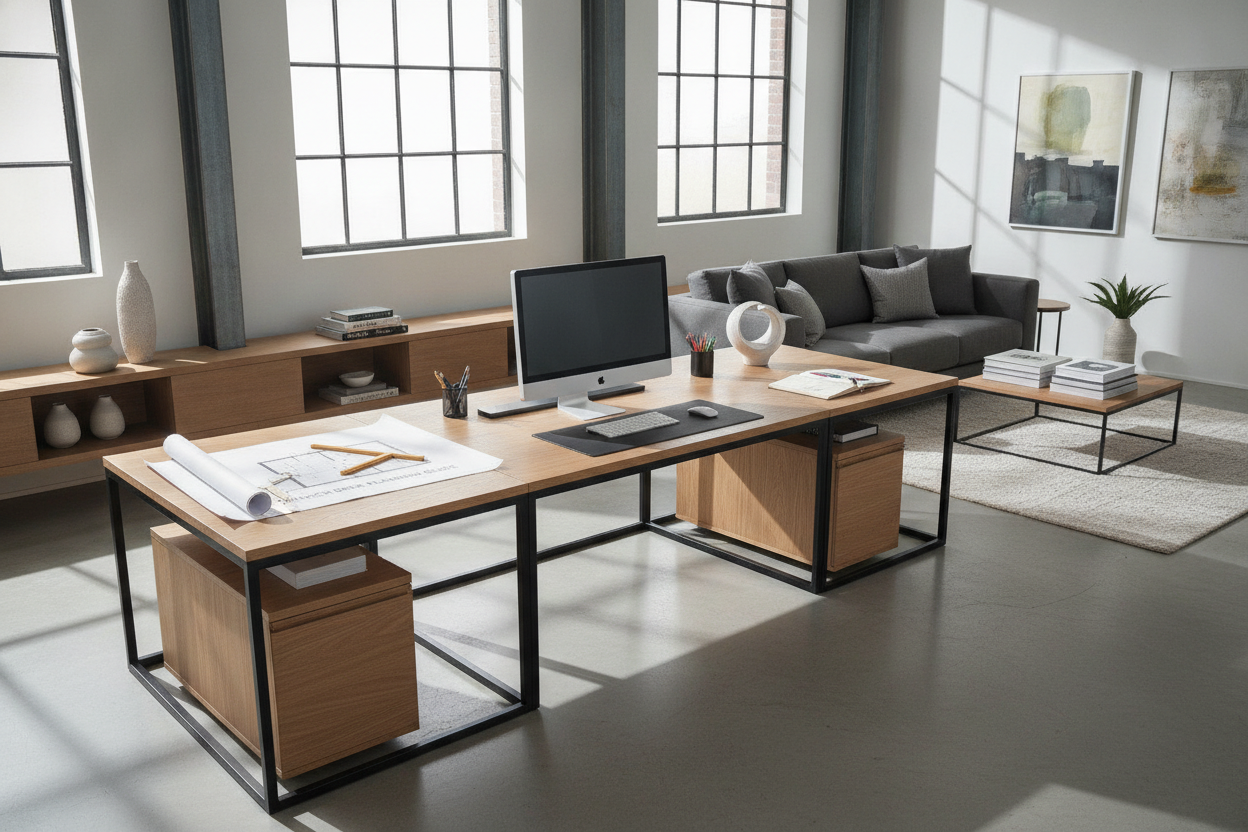
An expansive modular workstation, such as a 78 inch desk ikea configuration built from wide modular tabletop systems, provides an extraordinary amount of horizontal real estate. Stretching roughly six and a half feet across, a long tabletop gives remote professionals, creative duos, and multi-display power users the freedom to combine computing, sketching, and physical reference materials into a unified command center. However, planning a workstation of this scale requires careful attention to room ergonomics, weight distribution, and cable routing.
Understanding the 78-Inch Footprint: Dimensions, Clearance, and Room Flow
Before installing a desktop that spans 78 inches, measuring both the primary wall run and adjacent circulation paths is critical. A surface of this length dominates a room's visual and physical space, demanding thoughtful spatial planning to keep the room feeling open and accessible.
Wall Run Dimensions and Chair Travel Clearances
A straight desktop measuring over six feet requires ample uninterrupted perimeter wall space. When calculating your layout, account for baseboards, heating vents, and window trim that might push the desk outward or interfere with corner placement. Furthermore, office chairs need dedicated depth behind the desk edge to roll back smoothly and turn without bumping into doors, sideboards, or guest seating.
If you are planning an office within tighter architectural boundaries, comparing wide modular runs against dedicated 36-inch desk layout guidelines or exploring compact 32-inch desk planning can help you decide whether a continuous long desk or a zoned compact table better preserves your room flow.
Long Linear Spans vs. Corner Layouts
While a long straight desk creates a clean, architectural line along a single wall, it may not suit rooms with square or restricted footprints. In tighter rooms, wrapping functional surface area into a corner via a 55-inch L-shaped corner desk with storage can provide comparable utility while leaving central floor space open for walking lanes.
Structural Dynamics of Long Desktops: Preventing Deflection and Sag
The primary engineering challenge of any long tabletop—including popular builds based on the ikea linnmon desk 78 design—is structural deflection. When a wide span is supported only at its outer edges, gravitational force and the localized weight of desktop hardware naturally concentrate in the center, leading to noticeable bowing over time.
Center Support Mechanisms: Fifth Legs and Stiffener Rails
To preserve a level, rigid surface, structural reinforcement along the central midline is essential:
- Center Support Legs: Installing an adjustable fifth leg slightly recessed behind the midpoint of the desk distributes the downward load directly to the floor while preserving knee clearance.
- Under-Mount Steel Stiffeners: Attaching longitudinal steel angle irons or structural support channels to the desk underside provides longitudinal stiffness without creating leg obstruction underneath.
- Wall-Mounted Cleats: Fastening a sturdy wooden or metal ledger strip directly to wall studs along the back edge provides continuous perimeter support, eliminating center sagging entirely.
Drawer Pedestals vs. Peripheral Leg Posts
Many builders stabilize a wide ikea 78 desk by anchoring either end atop modular drawer units rather than slender corner legs. Drawer pedestals broaden the base of support at each flank, dampening lateral sway and providing structured weight grounding similar to a tailored built-in desk and shelves setup.
Surface Zoning Strategies: Optimizing 6.5 Feet of Desktop Space
With roughly 78 inches of surface width available, dividing the desktop into dedicated functional zones prevents clutter and improves workflow ergonomics.
The Power-User Multi-Monitor Command Hub
For a single user managing extensive digital workflows, the desktop can be divided into three clear operational sectors:
- Primary Active Zone (Center): Houses the primary monitor, mechanical keyboard, and precision pointing device aligned with ergonomic seated eye levels.
- Secondary Peripheral Zone (Left or Right): Accommodates auxiliary vertical screens, a docked laptop, or audio mixing interfaces.
- Analog Focus Zone (Opposite Wing): Leaves an open, unencumbered surface for notebook journaling, tablet illustration, physical paperwork review, or morning coffee.
The Dual-User Shared Workstation Blueprint
A 78-inch span is also an exceptional candidate for a two-person side-by-side desk. By mirroring equipment on the left and right flanks, each user enjoys a dedicated computing station while sharing a central utility buffer for shared stationery, desktop task lighting, or shared external drives.
Cable Management and Power Distribution Across Wide Desktops
Managing cords along a continuous 78-inch span requires deliberate routing to avoid tangled, trailing wires beneath the workspace:
- Horizontal Under-Desk Wire Trays: Mount wide steel wire baskets or fabric cable channels along the rear underside to carry power strips, heavy power bricks, and excess cords off the floor.
- Surface Grommets and Edge Drops: Utilize desktop grommet holes or rear perimeter gaps to drop monitor and peripheral cables directly into under-desk raceways.
- Central Power Distribution: Mount a multi-outlet surge protector directly beneath the center of the desk to minimize the run distance for peripherals on both wings.
Storage Coordination and Expanded Workstations
Because expansive tabletops can easily accumulate stray paperwork and office supplies, pairing the desk with coordinated vertical cabinetry keeps the work area organized. When a horizontal surface needs to support extensive filing, media production gear, or reference libraries, upgrading to larger modular assemblies like a 90.6-inch wide computer desk with glass cabinets offers integrated overhead storage without sacrificing working depth.
Material Considerations: Honeycomb Core vs. Solid and Engineered Woods
The construction material of your 78-inch top dictates its long-term durability and hardware mounting compatibility:
- Honeycomb Paperboard Tops: Lightweight and cost-effective, these tops feature an internal honeycomb paper core between fiberboard sheets. Because the interior is largely hollow, heavy clamp-on monitor arms can crush the surface unless reinforced with broad metal load-distribution plates.
- Dense Particleboard and MDF: Engineered composite boards offer uniform density, providing balanced screw-holding power and moderate resistance to bowing when paired with proper center supports.
- Solid Wood and Butcher Block: Solid hardwood spans provide maximum structural integrity, withstand heavy multi-arm clamp mounts with ease, and can be sanded or refinished over years of continuous use.
Decision Matrix: Is a 78-Inch Modular Desk Right for Your Office?
Selecting a 78-inch modular desk is ideal if your room offers sufficient perimeter wall clearance, if you need a true multi-monitor command center or dual-person workspace, and if you plan for proper central reinforcement. By securing structural stability, zoning your layout, and organizing cable pathways, a long desktop delivers an organized and highly functional foundation for productive daily work.



Leave a comment
This site is protected by hCaptcha and the hCaptcha Privacy Policy and Terms of Service apply.