










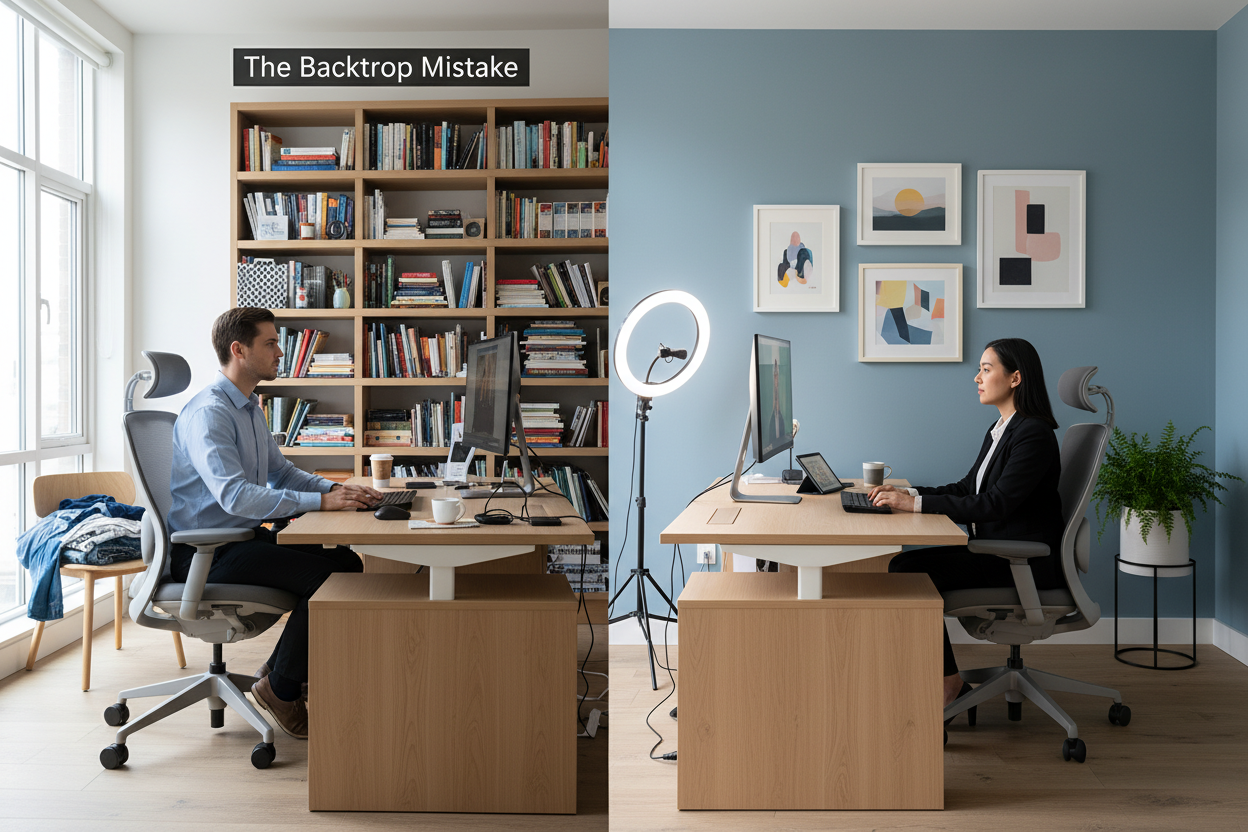
We have all been in that video meeting: the participant who looks like a silhouette in a witness protection program, or the one whose background is so cluttered it becomes the main topic of conversation. In the design world, we call this poor spatial blocking. When you are trying to figure out how to appear online while working from home, the answer isn't just about your Wi-Fi connection or software status—it is about curating a physical environment that conveys professionalism, authority, and intentionality through a camera lens.
Quick Decision Guide: The Video-Ready Setup
If you are rushing to upgrade your home office for an upcoming presentation, prioritize these four design elements to instantly elevate your on-screen presence:
- Lighting Temperature: Aim for 3000K to 4000K bulbs (soft white to cool white) to avoid looking washed out or overly orange.
- Depth of Field: Position your desk at least four feet away from the wall behind you to create visual separation and prevent a "mugshot" aesthetic.
- Acoustic Softening: Incorporate plush rugs or upholstered furniture to dampen echo and improve audio clarity.
- Chair Silhouette: Choose a chair with a structured back that frames your shoulders without dominating the screen.
Mastering the Lighting Ecosystem
Lighting is the single most critical factor in how you translate on screen. In showroom design, we use lighting to direct the eye; in a home office, the focal point is your face. Relying solely on a ceiling fixture casts unflattering shadows under the eyes (the "raccoon effect").
The Three-Point Setup
Ideally, you want a diffused light source in front of you (behind the monitor) to illuminate your face evenly. If natural light is available, face the window—never sit with your back to it, or the camera's exposure will darken you into a silhouette. Supplement this with an ambient table lamp to the side to add warmth and dimension to the scene.
Curating the Background: Visual Noise vs. Personality
Your background is essentially your digital attire. The goal is to strike a balance between a sterile white wall and a chaotic bookshelf. We want to reduce "visual noise"—distracting details that pull the viewer's eye away from you.
The Bookshelf Strategy
If you have a bookshelf visible, style it with intention. Use the "rule of thirds": one-third books, one-third decor objects (sculptural pieces, plants), and one-third negative space. This breathing room prevents the background from feeling heavy. Avoid glass-fronted cabinets directly behind you, as they often reflect the glare of your monitor, creating a distracting light show for other attendees.
Furniture Selection: The Ergonomic Aesthetic
The furniture you choose impacts your posture, which directly influences how engaged you appear. A sofa or lounge chair might feel comfortable, but they often encourage slouching, which reads as low energy on camera.
Investing in the Right Chair
Look for an ergonomic task chair with a mid-to-high back. Material matters here. Leather and high-quality faux leather convey executive authority, while textured fabrics like tweed or velvet offer a softer, more approachable vibe. Be wary of loose-weave fabrics if you have a cat, but also consider breathability if your office runs warm. The chair should support an upright posture, keeping your eye line level with the camera.
Lessons from My Own Projects: The "Green Wall" Incident
I learned a hard lesson about camera optics while designing a home office for a client in finance. We selected a stunning, moody sage green for his back wall—Sherwin Williams' Retreat. In person, it was sophisticated and calming. However, once he hopped on his first Zoom call, the webcam's auto-white balance overcorrected for the green dominance, turning his skin tone a sickly magenta.
We had to scramble to install warm-toned sconces and add a large, neutral piece of canvas art directly behind his head to break up the color block. It taught me that what looks good to the human eye doesn't always translate to the digital lens. Now, I always test paint swatches through a laptop camera before committing to a wall color. Also, a quick tip: matte finishes are your friend. I once used a satin finish on a client's desktop, and the reflection of their hands moving looked like frantic ghost movement on camera.
Conclusion
Appearing "online" is about more than a green status dot; it is about crafting an environment that reflects your professional identity. By manipulating light, curating your backdrop, and selecting furniture that supports proper posture, you turn your home office into a powerful asset. Treat your background as part of your wardrobe, and style it with the same care.
Frequently Asked Questions
What is the best wall color for video calls?
Neutral tones like soft grays, warm beiges, or muted blues work best. Avoid bright whites (which can cause camera exposure issues) or highly saturated reds and greens, which can cast unnatural tints onto your skin.
How do I hide a messy room if I don't have a dedicated office?
Invest in a folding room divider or a shoji screen. These are fantastic portable solutions that provide an instant, textured backdrop while physically blocking off the clutter behind you. They add depth without requiring permanent construction.
Does the material of my desk affect how I look online?
Surprisingly, yes. High-gloss desk surfaces reflect light onto your face, sometimes causing glare or under-chin lighting. A matte wood or laminate finish absorbs light better, ensuring the focus remains on you rather than the reflection of your monitor.

Leave a comment
This site is protected by hCaptcha and the hCaptcha Privacy Policy and Terms of Service apply.