










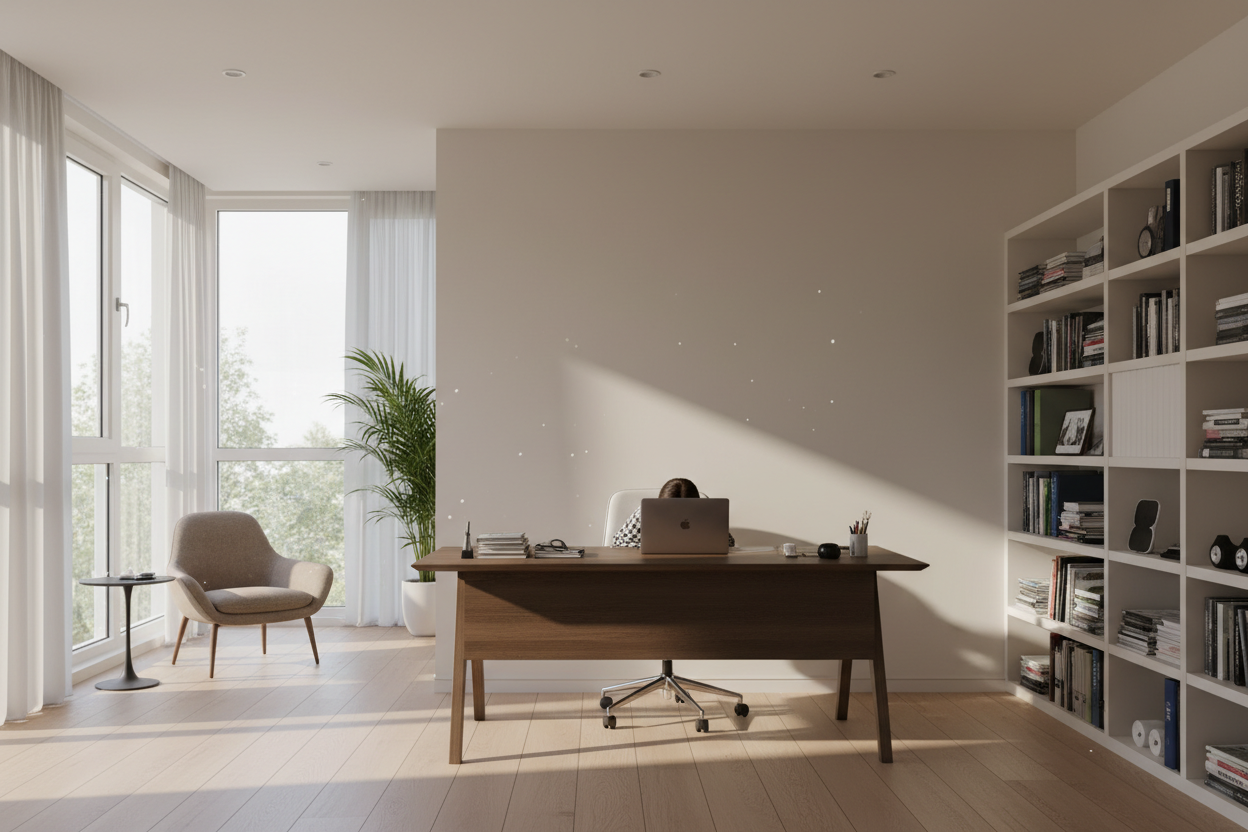
There is a distinct difference between a room that contains a desk and a professionally designed workspace. Often, clients come to me frustrated, believing they need a more expensive chair or a larger monitor, when the real culprit is spatial planning. A poor home office layout creates friction—whether it is glare on your screen, a lack of circulation space, or simply the psychological unease of having your back to the door.
Creating a productive environment requires more than just pushing furniture against the walls. It involves understanding traffic flow, harnessing natural light without the heat, and establishing zones that separate 'deep work' from administrative tasks. This guide will walk you through the architectural principles we use to structure high-performance workspaces.
Key Features of a Functional Layout
- Command Position: Placing the desk so you face the room's entrance, maximizing psychological security and authority.
- Light Control: Positioning screens perpendicular to windows to eliminate glare while retaining ambient light.
- Traffic Flow: Ensuring a minimum of 30-36 inches of clearance behind the desk for chair movement.
- Zoning: Separating the primary workstation from reference areas or reading nooks.
- Ergonomics: Arranging furniture to keep frequently used items within the 'primary reach zone' (approx. 15-20 inches).
Strategic Desk Placement and Orientation
The desk is the anchor of your home office floor plan. The most common error I see is the 'cubicle effect'—facing a wall. While this saves space, it is visually fatiguing. Instead, we aim for the 'Command Position'. This arrangement places the desk in the center of the room or facing out from a wall, allowing you to see the door without being directly in line with it.
Handling Window Placement
A home office layout with window views is desirable, but tricky. Never place your monitor directly in front of a window (backlighting causes eye strain) or directly opposite one (causing screen glare). The ideal home office furniture arrangement positions the desk perpendicular to the window. This allows for soft, side-lighting that illuminates your face for video calls without washing out your screen.
Zoning and Furniture Arrangement
When planning a home office layout, think in zones. In a private office home office floor plan, you have the luxury of creating distinct areas.
The Active Zone
This includes your desk and immediate storage. Home office furniture placement here should prioritize reach. A credenza or low bookshelf placed behind the desk creates a professional backdrop for video calls and provides storage that doesn't clutter the desktop surface.
The Reference or Break Zone
If space permits, incorporate a secondary seating area. A lounge chair in the corner creates a home office room setup that invites a change of posture. This is crucial for reviewing physical documents or taking phone calls away from the glowing screen.
Scale and Materiality in Furniture Design
A perfect home office layout relies heavily on the scale of the furniture. A heavy, solid wood executive desk can dominate a small room, making it feel claustrophobic. For smaller home office plans layouts, look for desks with 'leggy' silhouettes or glass tops; these have less visual weight and make the room appear larger.
Regarding materials, consider the tactile experience. Solid wood offers durability and warmth but requires humidity control. High-pressure laminates are practical for heavy use but can feel cold. When deciding how to arrange furniture in a home office, ensure that filing cabinets and heavy storage units are placed along the perimeter to keep the central floor space open.
My Personal Take on Home Office Layout
I learned a hard lesson about home office furniture layout ideas during a renovation of my own study. I was obsessed with floating my desk in the center of the room to achieve that 'executive' look. It looked stunning in photos.
However, I completely neglected the cabling reality. Without floor outlets, I had to run a rubber cable protector across the hardwood floor. Not only did it ruin the aesthetic, but I also tripped over it constantly. Furthermore, the acoustic echo in the center of the room was terrible for client calls. I eventually added a large area rug and moved the desk closer to a wall with an outlet, creating a 'peninsula' layout instead. It taught me that a personal office layout must prioritize infrastructure—power and data—before aesthetics. If you can't plug it in cleanly, the design fails.
Conclusion
Refining your home office design and layout is an investment in your mental clarity. By respecting the principles of light, flow, and scale, you transform a spare room into a powerhouse of productivity. Look at your current setup today—shifting your desk just ninety degrees might be the change you need.
Frequently Asked Questions
How do I layout a home office in a small space?
For a small home office room layout, utilize vertical space. Use wall-mounted shelving above the desk to clear floor space. Avoid floating the desk; instead, place it against a wall but use a mirror above it to reflect the room behind you, reducing the feeling of being boxed in.
What is the best lighting setup for a home office?
The ideal home office layout layers lighting. You need ambient light (overhead), task light (a focused desk lamp), and accent light. Ensure your task light is on the opposite side of your dominant hand to prevent writing shadows.
How much space do I need behind my desk?
In any home office floor plan ideas, allow at least 36 to 48 inches between the edge of your desk and the wall or furniture behind you. This allows you to slide your chair back comfortably and stand up without hitting obstacles.

Leave a comment
This site is protected by hCaptcha and the hCaptcha Privacy Policy and Terms of Service apply.