










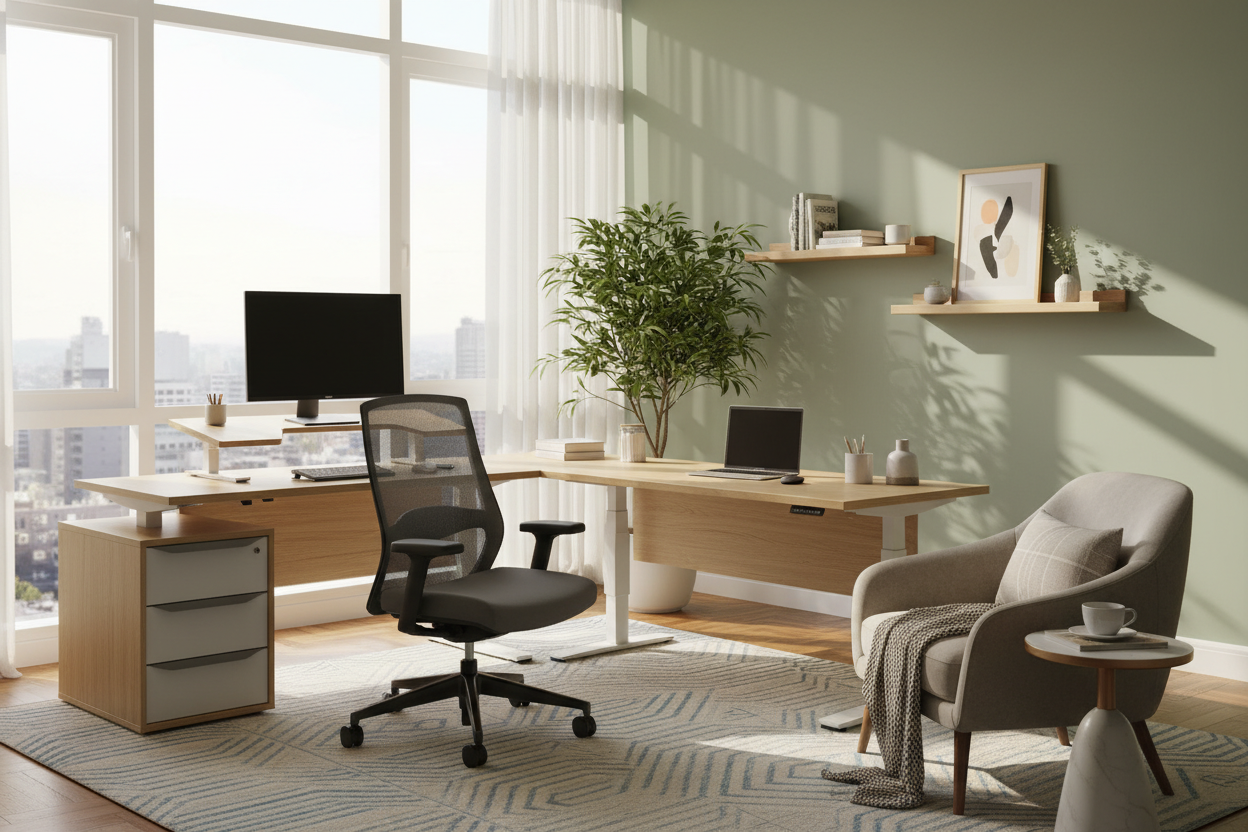
We have all felt the slow creep of the office taking over the sanctuary of the living room. The laptop on the dining table becomes a permanent fixture; the ergonomic struggle becomes real. As an interior designer, I see clients struggling to find balance not because they lack discipline, but because their environment works against them. The best tip for working from home isn't about time management software—it is about strictly defining your spatial boundaries through intentional design.
Key Design Elements for Productivity
- Spatial Zoning: Using area rugs and lighting to create psychological boundaries between 'work' and 'rest' modes.
- Ergonomic Anchors: Prioritizing a chair with lumbar support and adjustable tension over purely aesthetic accent chairs.
- Lighting Layers: combining ambient overhead light with focused, adjustable task lighting (4000K temperature) to reduce eye strain.
- Material Tactility: Choosing matte finishes over high-gloss surfaces to minimize distracting reflections and fingerprints.
Mastering Spatial Zoning
When clients ask me how to deal with work from home fatigue, the answer usually lies in the floor plan. If you do not have a dedicated room, you must create a 'room within a room.' This is where the concept of zoning becomes critical. Do not just float a desk against a wall.
The Rug as an Anchor
Use a high-quality, low-pile rug to define the office footprint. Visually, this tells your brain that when you step onto the rug, you are at work. When you step off, you are home. For rolling chairs, ensure the pile is dense enough to prevent casters from getting stuck, or layer a transparent polycarbonate mat that doesn't ruin the aesthetic flow.
The Chair: Silhouette Meets Science
The centerpiece of your setup dictates your physical health. While a velvet tub chair looks stunning in an Instagram shot, it offers zero support for an eight-hour shift.
Material Selection: Mesh vs. Leather
For long durations, breathability is paramount. High-end mesh offers suspension that distributes weight evenly and prevents heat buildup. However, if you prefer the gravitas of leather, look for top-grain hides which age beautifully. Avoid bonded leather; it peels within a year and lacks the breathability required for all-day use. Look for a synchro-tilt mechanism—this ensures the seat pan moves in ratio with the backrest, keeping your feet flat on the floor while you recline.
Lighting and Visual Balance
Learning how to cope with working from home often comes down to managing sensory input. Bad lighting causes lethargy. Your home likely uses 'warm white' (2700K-3000K) bulbs, which promote relaxation. For your workspace, you need a task lamp equipped with 'cool white' (4000K) light to mimic daylight and stimulate focus.
Biophilic Design Integration
Soften the harsh lines of technology with organic textures. A solid walnut desk introduces warmth and grain patterns that are visually soothing. Position your desk to face a view if possible, or introduce a large-leaf plant (like a Ficus Lyrata) to create a 'soft screen' that dampens sound and reduces visual stress.
My Personal Take on the Best Tip for Working From Home
Early in my career, I designed a custom home office for myself featuring a stunning, high-gloss lacquered parson's desk in jet black. It looked incredible in photos. However, after three days of actual use, I realized I had made a massive functional error.
The glossy finish acted like a mirror for my overhead lighting and my dual monitors. The glare was relentless, causing migraines by 2:00 PM every day. Furthermore, the 'piano finish' showed every single smudge, dust mote, and coffee ring, turning my workspace into a constant cleaning chore rather than a place of focus. I ended up having to cover that beautiful surface with a giant matte leather desk pad just to make it usable. Now, I always steer clients toward matte, satin, or wire-brushed wood finishes. They hide the chaos of the workday and absorb light rather than reflecting it back at you.
Conclusion
Transforming your workspace requires looking past the aesthetics of a catalog and understanding the functionality of your furniture. By investing in the right materials and respecting the layout, you create a space that invites focus rather than forcing it.
Frequently Asked Questions
How deep should a home office desk be?
Ideally, aim for a depth of at least 24 to 30 inches. This allows enough distance between your eyes and the monitor to prevent strain, while leaving room for a keyboard and documents.
Is a standing desk worth the investment for home interiors?
Yes, provided it doesn't disrupt the room's visual flow. Look for models with enclosed motors and cable management trays to avoid the 'industrial clutter' look that ruins residential aesthetics.
How do I maintain a velvet office chair?
Velvet is durable but attracts dust. Vacuum it weekly with an upholstery attachment. If you spill coffee, blot—never rub—immediately. However, for daily 8-hour use, performance fabrics or mesh remain superior choices for longevity.


Leave a comment
This site is protected by hCaptcha and the hCaptcha Privacy Policy and Terms of Service apply.